To configure crowdstrike SIEM integration with Avanan:
-
Access the Avanan
Administrator Portal.
-
From the left navigation panel, go to Security Settings > Security Engines.
-
Scrolldown to the SIEM Integration and click Configure.
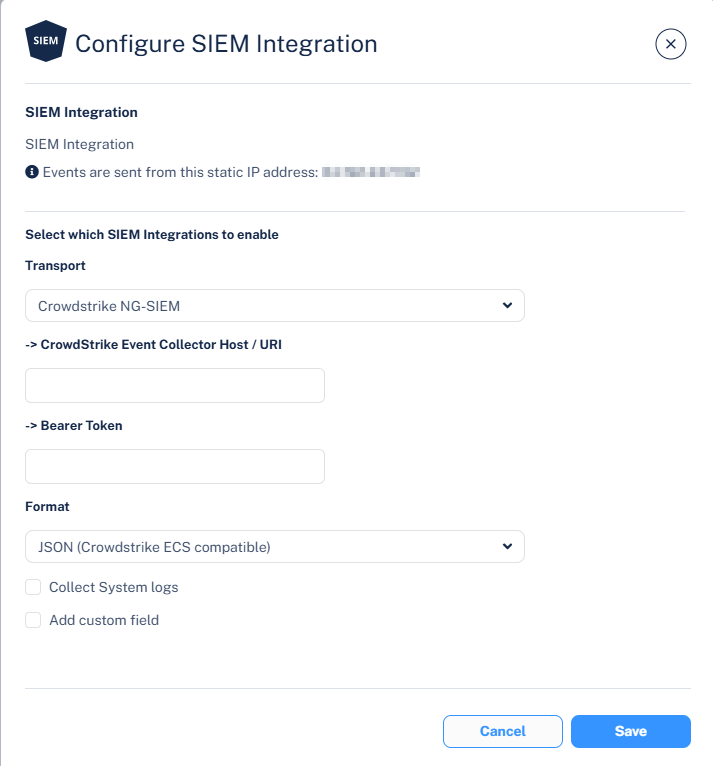
The Configure SIEM Integration pop-up appears.
-
From the Transport dropdown, select Crowdstrike NG-SIEM.
-
In the CrowdStrike Event Collector Host / URL field, enter the API URL copied in Step 1.
-
In the Bearer Token field, enter the API Key copied in Step 1.
-
From the Format dropdown, select JSON (Crowdstrike ECS compatible).
-
To allow SIEM to collect your system logs, select the Collect System logs checkbox.
-
(Optional) If you want to add custom fields to every event forwarded from CrowdStrike to your SIEM platform:
-
Select the Add custom field checkbox.
-
In the Custom field name field, enter the required name.
-
In the Custom field value field, enter the required value.
Note:
You can add only up to five custom fields.
-
Click Save.
After you configured the CrowdStrike SIEM integration, Avanan sends logs to CrowdStrike.
