|
|
|
Security Switch Modules |
Item |
Description |
|---|---|---|
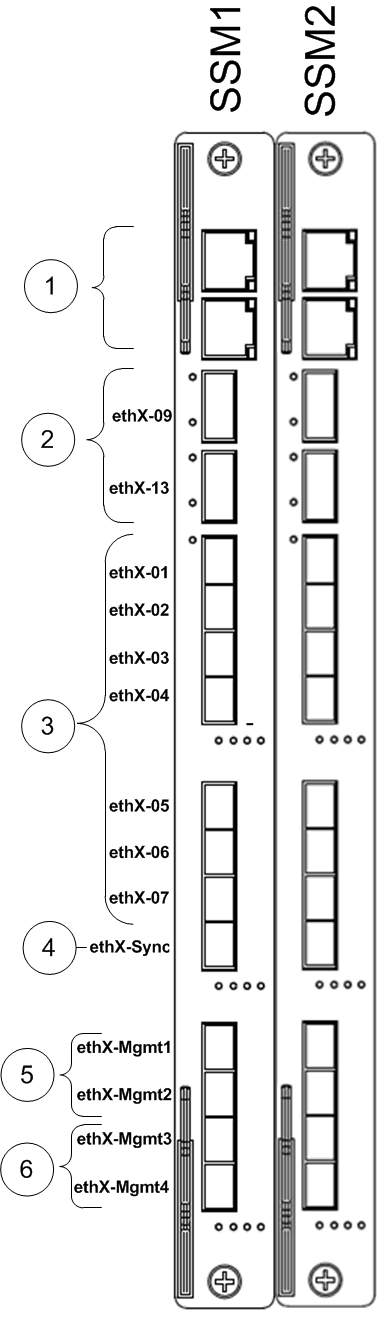
Shows the interface names in the initial setup program. Replace X with the SSM number.
|
(1) |
1 port for direct access through LAN 1 port for direct access through console (serial) |
(2) |
2 x 40GbE QSFP data ports. Use a QSFP splitter to split each of the two QSFP ports to 4 x 10GbE.
|
|
(3) |
7 x 10GbE SFP+ data ports Can use 1GbE or 10GbE transceivers In SmartDashboard, define used interfaces as internal or external. |
|
(4) |
1 x 10 GbE SFP+ synchronization port Use for connecting to and synchronizing with another 61000 Security System that functions as a high availability peer. |
|
(5) |
2x 10GbE SFP+ management and logging ports. Connect these ports to the management/logging network. Security Management Server or dedicated logging servers should be accessible from these interfaces. |
|
(6) |
2 x 1GbE SFP management and logging ports. Connect these ports to the management/logging network. Security Management Server or dedicated logging servers should be accessible from these interfaces. |