


|
|
|
These SSM deployments are available:
SSM Port Density
|
2 SSMs |
4 SSMs |
Configuration |
|---|---|---|---|
Max 10GbE ports without splitter |
14 |
28 |
10GbE ports act as 10GbE |
Max 40GbE ports |
4 |
8 |
40GbE ports act as 40GbE |
Max 10GbE ports if using splitter |
30 |
60 |
40GbE ports act as 4x10GbE |
Max 1GbE ports |
14 |
28 |
10GbE ports act as 1GbE |
SGM Port Numbering in a 2-SSM Deployment
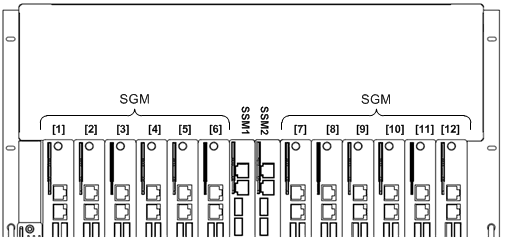
In a 2-SSM deployment, SGM slots are numbered 1 to 12, left to right. Slot 7 for example, (labeled [7] in the diagram) is the slot that is immediately to the right of the two Security Switch Module slots.
SGM Port Numbering in a 4-SSM Deployment
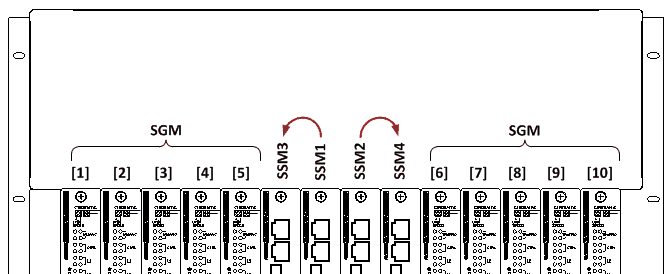
In a 4-SSM Deployment, SGM slots are numbered 1 to 10, left to right. Slot 6 for example, (labeled [6] in the diagram) is the slot that is immediately to the right of the four SSM slots.
SSM Management in a 4-SSM Deployment
In a 4-SSM deployment, the SSMs work independently. However, the Chassis management sees the SSMs as two pairs. An SSM pair has a Primary SSM and a Secondary SSM. The pairs are:
If a Primary SSM fails or is removed from the Chassis: The Chassis management sees the two SSMs as being Down, even though the Secondary SSM continues working.
If a Secondary SSM is removed or stops working: The management correctly sees the status of the two SSMs.

