Print Download PDF Send Feedback

Previous

Next

Defining a Security Gateway

Note - There can be some variations in the Creation Wizard steps due to release updates. In these cases, do the instructions on the screen.

To configure a Security Gateway:

  1. Open SmartDashboard.
  2. When prompted, enter your credentials to connect for the Security Management Server.
  3. Create a Security Gateway object.

    In the Network Objects tree, right click Check Point and then select New > Check Point > Security Gateway/Management

    The Check Point Security Gateway Creation wizard opens.

  4. Select Wizard Mode or Classic Mode.

    This procedure uses the Wizard mode. If you choose Classic Mode, make sure you set all the necessary configuration parameters.

  5. In the General Properties screen, configure:
    • Gateway name
    • Gateway platform - Select 61000 Appliance.
    • Gateway IP address
  6. Click Next.
  7. In the Secure Internal Communication Initialization screen, enter the One-time password. This is the same as the Activation Key you entered during the initial setup procedure.
  8. Click Next.
  9. View the Configuration Summary.
  10. Select Edit Gateway properties for further configuration.
  11. Click Finish.

    The General Properties page of the 61000 Security System object opens.

  12. In the General Properties page, make sure the Version is correct.
  13. Enable the Firewall Software Blade. Enable other supported Software Blades as necessary.
  14. In the navigation tree, select Topology.
  15. Configure:
    • Interfaces as Internal or External
    • Anti-Spoofing.

      Note: Only data and management interfaces show in the list.

  16. Click OK.

    The Security Gateway object closes.

  17. Install the Policy.

Related Topics

Confirming the Security Gateway Software Configuration

Confirming the Security Gateway Software Configuration

To make sure that the policy was successfully installed:

  1. Connect to the appliance with SSH or a serial console.
  2. Run:

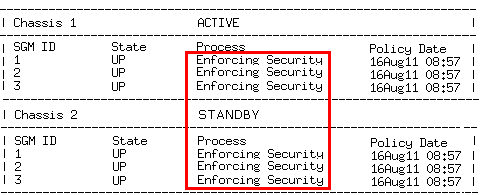
    # asg monitor

  3. Make sure that the SGM status is Enforcing Security on the ACTIVE and STANDBY Chassis.

  4. Make sure the Policy Date matches the date and time the policy was installed.

To verify the configuration:

After configuring the Security Gateway and installing the policy, validate the configuration using the asg diag command. Use the command to collect and show diagnostic information about the system.

If there is a problem, fix it before using the system.