Step 2 - Configuring Infinity Services

Make sure that you performed Step 1 - Enabling Check Point Identity and Trust Integration.

You must configure Infinity Services on the Security Management Server to establish a trusted connection between SmartConsole and the Check Point Portal.

  1. Log in to the Check Point SmartConsole.
  2. Go to Infinity Services.
  3. Click Get Started.

    An Instructions window appears.
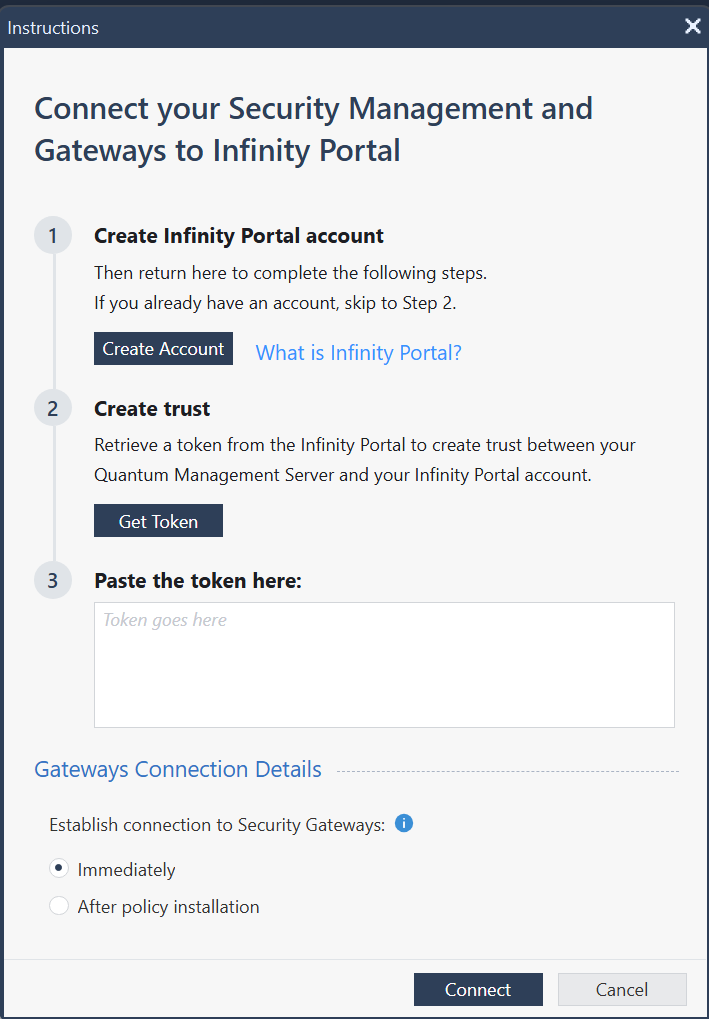
  4. Click Get Token.
    The Check Point Portal opens.
  5. Generate a token and select the relevant Security Gateways.
  6. Copy the token.
  7. Return to SmartConsole and paste the token.
  8. Click Connect.
Continue with Step 3 - Configuring Identity Sharing on the Security Gateway.