
Members
Members are either administrators that manage the SASE Administrator Portal or end-users that you want to provide safe private and internet access.
The Members page allows you to:
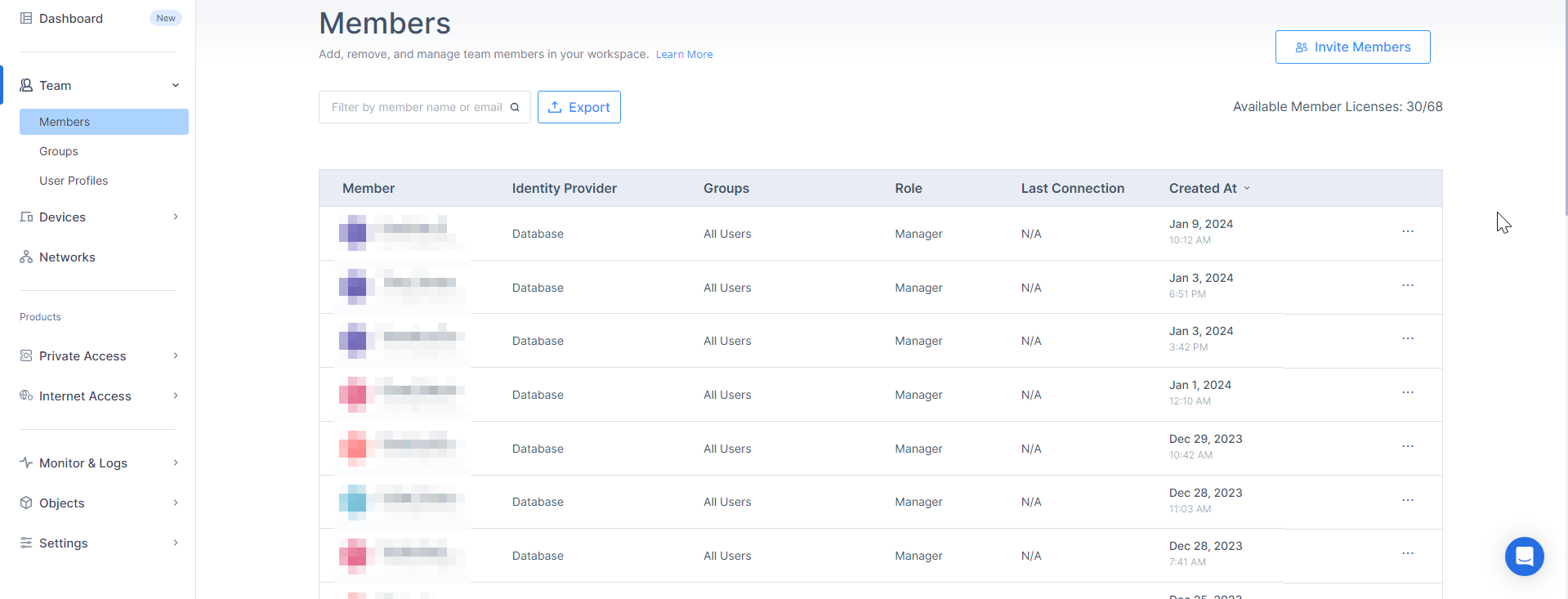
To view the Members page, access Check Point SASE Administrator Portal and click Team > Members.
|
Column |
Description |
||
|---|---|---|---|
| Member | Full name and email address of the member. | ||
| Identity Provider |
Configured Identity Providers (IdP) for the member. Database means that the member is invited from the SASE Administrator Portal. See Invite Members. |
||
| Role |
Role of the member:
For permissions associated with each role, see Member Roles and Permissions. |
||
| Groups | Group(s) to which the member is assigned. | ||
| Last Agent Login | Date and time of the last connected session. | ||
| Created At | Date and time when the member was created. |

To view more details about the member, click the member row.
The Edit Member window appears

|
Legends |
Description |
|---|---|
| 1 |
Indication if the user is currently connected through the agent or application:
|
| 2 | Role of the member. |
| 3 | Date and time of the last Agent login. |
| 4 | Date and time of the last application login, and the name of the application when you hover over  . . |
| 5 | Group(s) to which the member is assigned. |
| 6 | User configuration profile assigned to a user based on their group membership and the priority among configuration profiles. |