Sending Reports
-
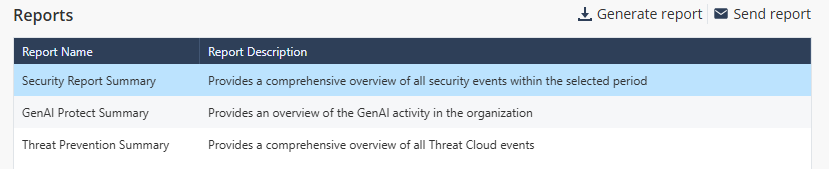
Go to Reports and select the report template in the Reports section.
-
Click Send report.
The Send Report window appears.
-
From the Period list, select the time frame to generate the report.
- Last Day - The system generates the report for the previous day.
- Last Week - The system generates the report for the last seven days.
- Last Month - The system generates the report for the last 30 days.
-
From the Accounts list:
-
To send the report to recipients of specific child accounts:
- Select Specific child accounts.
-
From the Accounts list, click + and select the child accounts you want to include.

Each report will contain information specific to the individual child account.
-
-
From the Recipients per account list, click + and select the user roles of recipients in the account that receive the report.
- Primary Admins - Users with Primary Administrator role in Global Roles in the selected account.
- Tenant Admins - Users with Admin role in Global Roles or in Specific Service Roles in the selected account.
-
Read-Only - Users with Read-Only role in Global Roles or in Specific Service Roles in the selected account.
Note:If the account does not have any users with the selected role, the system will not send the report.
-
To send the report to specific recipients, click Add specific recipients and select the recipients.
-
To send the report only to recipients of MSP account:
- Select This account only.
- In the Recipients field, click + and select the user roles of recipients in the account that receive the report.
- Primary Admins - Users with Primary Administrator role in Global Roles in the selected account.
- Tenant Admins - Users with Admin role in Global Roles or in Specific Service Roles in the selected account.
-
Read-Only - Users with Read-Only role in Global Roles or in Specific Service Roles in the selected account. Note:
If the account does not have any users with the selected role, the system will not send the report.
-
-
To send the report to specific recipients, click
Add specific recipients and select the recipients.
The report will include consolidated security events from both MSP account and all its child accounts.
- Click Send.