Enabling MFA by a User

After the administrator enforces MFA, the user must enable the MFA.
  1. Access the Avanan Administrator Portal.
  2. In the Overview page, open the menu under your user name in the top right corner and select MFA Setup.
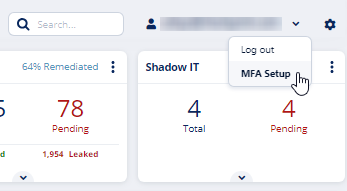
    The MFA Setup screen appears that shows the QR code.

  3. Open the Google Authenticator app on your device and scan the QR code.

    The Avanan portal is added to the Google Authenticator app and shows the authentication code.

  4. In the Enter the Auth Code field, enter the authentication code.
  5. Click Enable MFA.
  6. Click OK.

    The screen shows the authentication status.

To disable MFA for a user, contact Avanan Support.