File Cleaning (Threat Extraction) for Office 365 OneDrive and Office 365 SharePoint
File cleaning (Threat Extraction) uses a Content Disarm and Reconstruction (CDR) engine as an additional layer of security alongside the Anti-Malware engine to prevent malware attacks and their spread among internal users.
The system scans every file uploaded to or edited in Office 365 OneDrive or SharePoint.
-
If malware is detected, Avanan applies the malware workflow.
-
If no malware is found, it sanitizes the file by removing active components that may conceal undetected threats.
If required, administrators can restore the original file to ensure business continuity.
For more information about file cleaning, see Attachment Cleaning (Threat Extraction).
Configuring File Cleaning (Threat Extraction) for Office 365 OneDrive or Office 365 SharePoint
-
Access the Avanan Administrator Portal.
-
From the left navigation panel, click Policy.
-
Open the existing malware policy for the required SaaS application (Office 365 OneDrive or Office 365 SharePoint).
-
Select the policy protection mode as Detect and Remediate.
-
Scroll-down to the Alerts section, and select the Clean Files (Threat Extraction) checkbox.
 Note:
Note:If the Clean files (Threat Extraction) checkbox is not available in your Avanan account (tenant), contact Avanan Support.
-
Click Save and Apply.
Restoring the Original File
Administrators can restore the original file through the Avanan Administrator Portal. To do that:
-
Go to User Interaction > Quarantined Items.
-
From the drop-down list next to the Quarantined Items, select Office 365 OneDrive or Office 365 SharePoint.
-
Open the relevant File Info page, and click the Restore Original File option to restore the original file.
 Note:
Note:If an end user needs access to the original file (without cleaning), they must contact an administrator, as there is no option available for them to restore it on their own.
If multiple versions of the same file exist, only the first (original) version can be restored. See Restoring Files that are Cleaned Multiple Times.
Restoring Files that are Cleaned Multiple Times
When you restore a file, Avanan always restores the first version it scanned, regardless of how many times the file was edited or cleaned later.
Since the file is cleaned every time it's modified, the version restored may be older than the one the end user last saw.
For example, if you restore a file, the system will restore the original version of the file-potentially older than the version they last accessed. The file is cleaned each time it is modified, ensuring security at every stage.
Viewing Cleaned Files for Office 365 OneDrive and Office 365 SharePoint
-
Go to Analytics > Custom Queries.
-
Click Create New Query at the top right corner.
-
In the Select Template for New Query page that appears, select Office 365 OneDrive or Office 365 SharePoint, then click All Files.
-
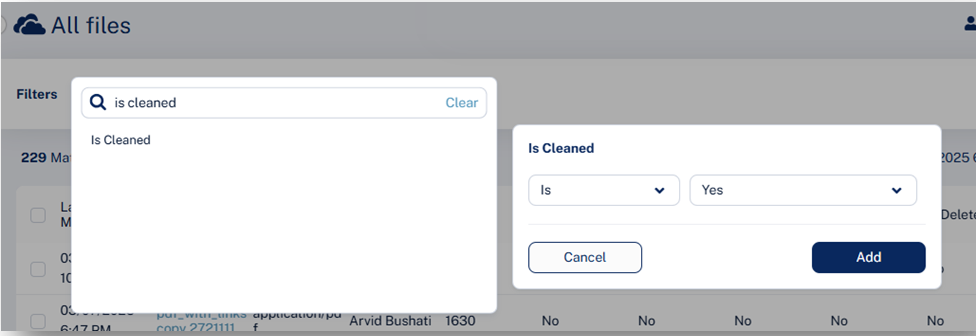
In the All Files page that appears, click Add Filters in the left top corner.
-
Select Is Cleaned is Yes, and click Add.