
Reviewing the DMARC Status of your Domains
The Overview page shows a list of all the organization's protected domains and subdomains.
To view the Overview page, click DMARC > Overview.
To export the details to a CSV, click Export to CSV in the top-right corner above the table.
You can export up to 50k entries at a time.
| Column | Description |
|---|---|
Status |
Monitoring status of the domain.
|
Domain |
Domain name. |
|
DMARC % Success |
The percentage of emails that pass DMARC (DKIM and SPF) out of the total number of reported emails sent by the domain. |
SPF Monitoring |
Monitoring status of the domain.
|
DMARC Policy |
The recommended enforcement on emails that failed DMARC sent on behalf of the sub domain. It is a description of the value defined in the policy (p) tag in the subdomain DMARC record.
|
Reported Emails |
The total number of reported emails for the domain. |
DMARC Failed Emails |
The total number of failed DMARC emails for the domain. |
Tags |
Custom annotation tags added to the domain. |
 - DMARC policy is in place and the reports are being received properly.
 - DMARC policy is in place but no reports were received in the last 72 hours.
 - DMARC policy is in place, trying to receive the first report.
 - No DMARC policy is in place and cannot monitor the domain.
Changing View to Top Level Domains
By default, the Overview page shows the status of different subdomains. To change the DMARC status view to aggregate the results based on top level domains, click Group Domains.
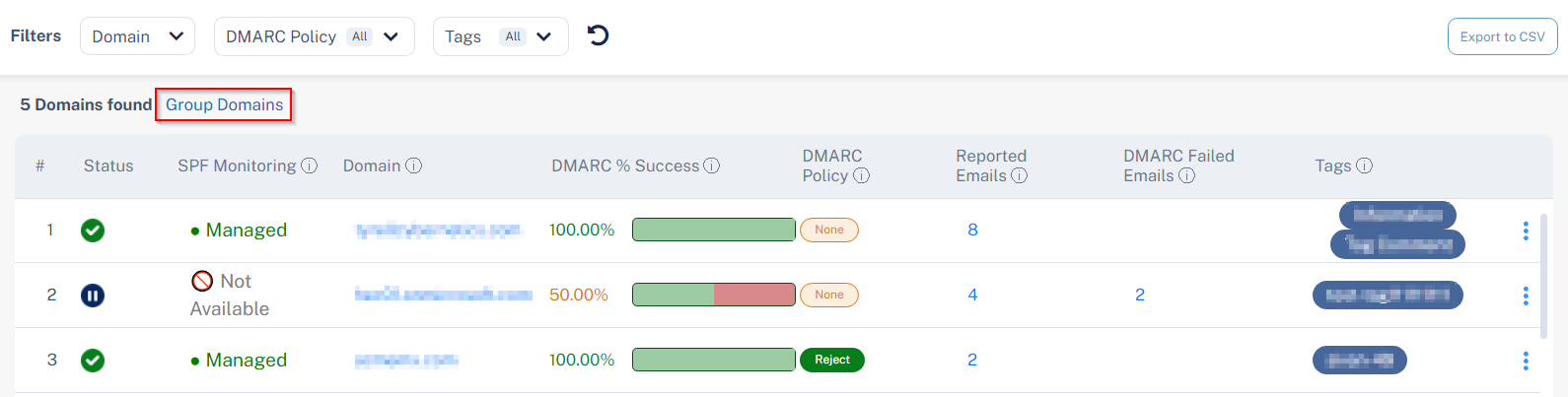
While viewing the aggregated results based on top level domains, to clear the aggregated results and view the status of different sub domains, click Ungroup Domains.