
Configuring DLP Engine Settings
To configure DLP Engine settings:
-
Click Security Settings > Security Engines.
-
Click Configure for SmartDLP.
-
Configure the different configuration options and click Save.
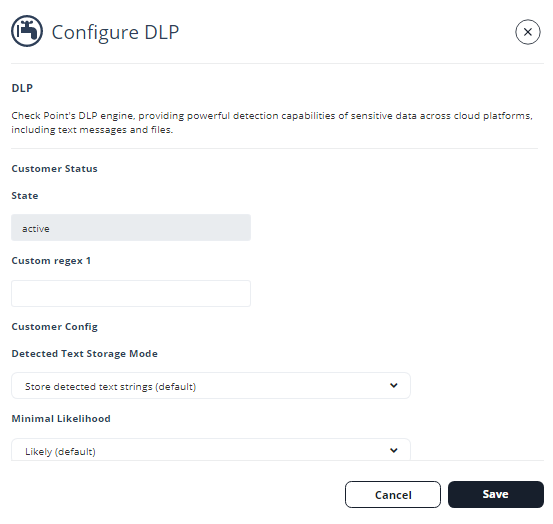
The DLP engine settings are updated and applied to your tenant.
Storage of Detected Strings
When the DLP engine matches strings to a DLP Data Type, Avanan stores these strings and displays them for administrators with sufficient permissions when they investigate the security events.
Since these strings are considered sensitive and private end-user data, you can select how they are stored and presented in the system called Detected Text Storage Mode.
To update Detected Text Storage Mode:
-
Click Security Settings > Security Engines.
-
Click Configure for SmartDLP.
-
Scroll down to Detected Text Storage Mode and select one of these options.
-
Store detected text strings (default): This is the default option, and the detected data is saved and displayed on the security events for the forensic process.
-
Obfuscate detected text prior to storage: Detected data is saved and displayed on the security events obfuscated. The original data is discarded and cannot be accessed.
-
Do not store detected text: No detected data is stored or displayed on the security events.
-
-
Click Save.
The selected Detected Text Storage Mode is applied, and the DLP engine stores and displays detected text according to your selection.
Minimal Likelihood
Whenever the DLP engine detects a possible data leak, it assigns the detection a Likelihood level. Likelihood levels are mostly affected by context around the detected strings.
For example, when a Social Security Number (SSN) is discovered, the DLP engine also checks for the presence of relevant strings close to the discovered pattern, i.e., "SSN" or "Social Security."
Likelihood scale:
-
Very Unlikely
-
Unlikely
-
Possible
-
Likely
-
Very Likely