Jump to main content
Avanan Administration Guide
Index
Avanan Administration Guide
Check Point Support
  1. Home
  2. Getting Started
  3. Activating SaaS Applications
  4. Activating Google Workspace (Gmail and Google Drive)
  5. Google Workspace Footprint
  6. Inbound Check Point Firewall
  • Important Information
  • Introduction to Avanan
  • Getting Started
    • Accessing the Avanan Administrator Portal
    • Licensing the Avanan Product
    • Managing Users, Roles, and their Permissions
    • Activating SaaS Applications
      • Minimum License Requirements to Activate SaaS Applications
      • Activating Office 365 Mail
      • Activating Microsoft Teams
      • Activating Office 365 OneDrive
      • Activating Office 365 SharePoint
      • Activating Google Workspace (Gmail and Google Drive)
        • Activating Gmail
        • Activating Google Drive
        • Google Workspace Footprint
          • Super Admin
          • Changing the Google Application Role
          • Performing Actions on Behalf of Users
          • User Groups
          • Host
          • Inbound Check Point Firewall
          • SMTP Relay Service
          • Content Compliance Rules
          • Google Drive Permissions Changes
      • Activating Slack
    • Onboarding Next Steps
  • Migrating from an Avanan Portal to a Check Point Portal
  • Configuring Security Engines
  • Email Protection
  • Messaging Apps Protection
  • File Storage Protection
  • Compromised Account (Anomaly) Detection
  • Partner Risk Assessment (Compromised Partners)
  • Cloud SMTP Relay
  • Managing Security Exceptions
  • Managing Security Events
  • Managing Quarantine
  • Customization
  • SmartConfig Recommendations
  • Incident Response as a Service (IRaaS)
  • DMARC Management
  • Leaked Credentials
  • Security Awareness Training
  • User Management
  • Configuration SAML
  • Multi-Factor Authentication using Google Authenticator
  • Video Tutorials
  • Appendix

Inbound Check Point Firewall

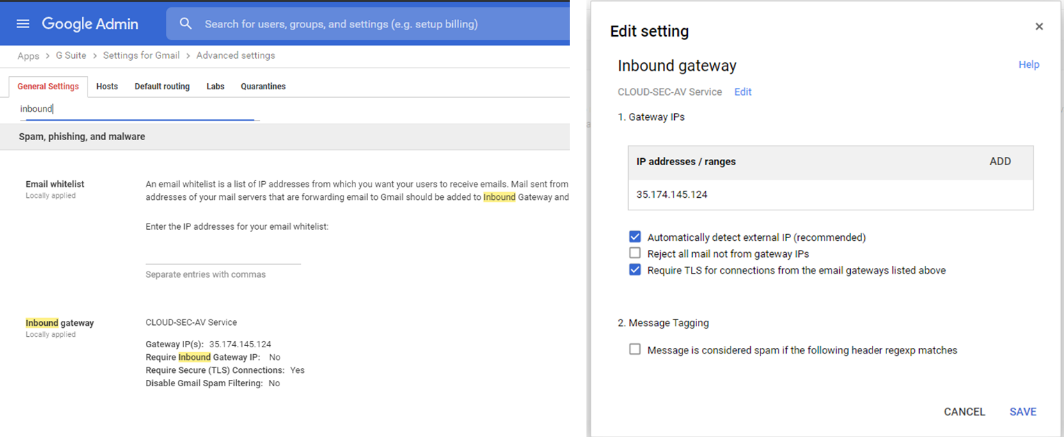
Avanan automatically creates an Inbound Check Point Firewall. You can see the inbound Check Point Firewall from the Google Admin Console in Apps > G Suite > Settings for Gmail > Advanced Settings.
Related information
  • Super Admin
  • Changing the Google Application Role
  • Performing Actions on Behalf of Users
  • User Groups
  • Host
  • SMTP Relay Service
  • Content Compliance Rules
  • Google Drive Permissions Changes
Generated by <oXygen/> XML WebHelp
14 August 2026
© 2024 - 2026 Check Point Software Technologies Ltd.