
Introduction
This document describes the installation and functionality of Check Point AI Factory Firewall (AIFF).
See sk184795 for these:
-
List of support features.
-
Software downloads.
-
Limitations.
Overview of the AIFF Product
Check Point AI Factory Firewall (AIFF) is a software Check Point Next Generation Firewall designed to protect the traffic of applications running on data center servers, typically AI models, but not limited to them.
The system enables Data Center Providers to support tenants in securing AI workloads within their infrastructure.
The system includes integrated security capabilities that protect each workload using a DPU-based SmartNIC located on the same server.
The security services primarily include the AIFF Security Gateway and can include additional components, such as Argus for application protection.
The Data Center Provider handles the orchestration of these services, while each tenant manages their own security policies within the system.
Each protected server has an NVIDIA© BlueField-3© (BF-3) Data Processing Unit (DPU) installed, on which the Check Point AIFF container is installed to protect the workloads' traffic going in and out of the server through that DPU.
By default, BlueField-3 acts just like a network interface card (NIC):
-
When traffic arrives at the DPU's interfaces from the network, the corresponding OVS bridge forwards this traffic immediately to the Host Server.
-
When traffic arrives at the DPU's interfaces from the Host Server, the corresponding OVS bridge forwards this traffic immediately to the network.
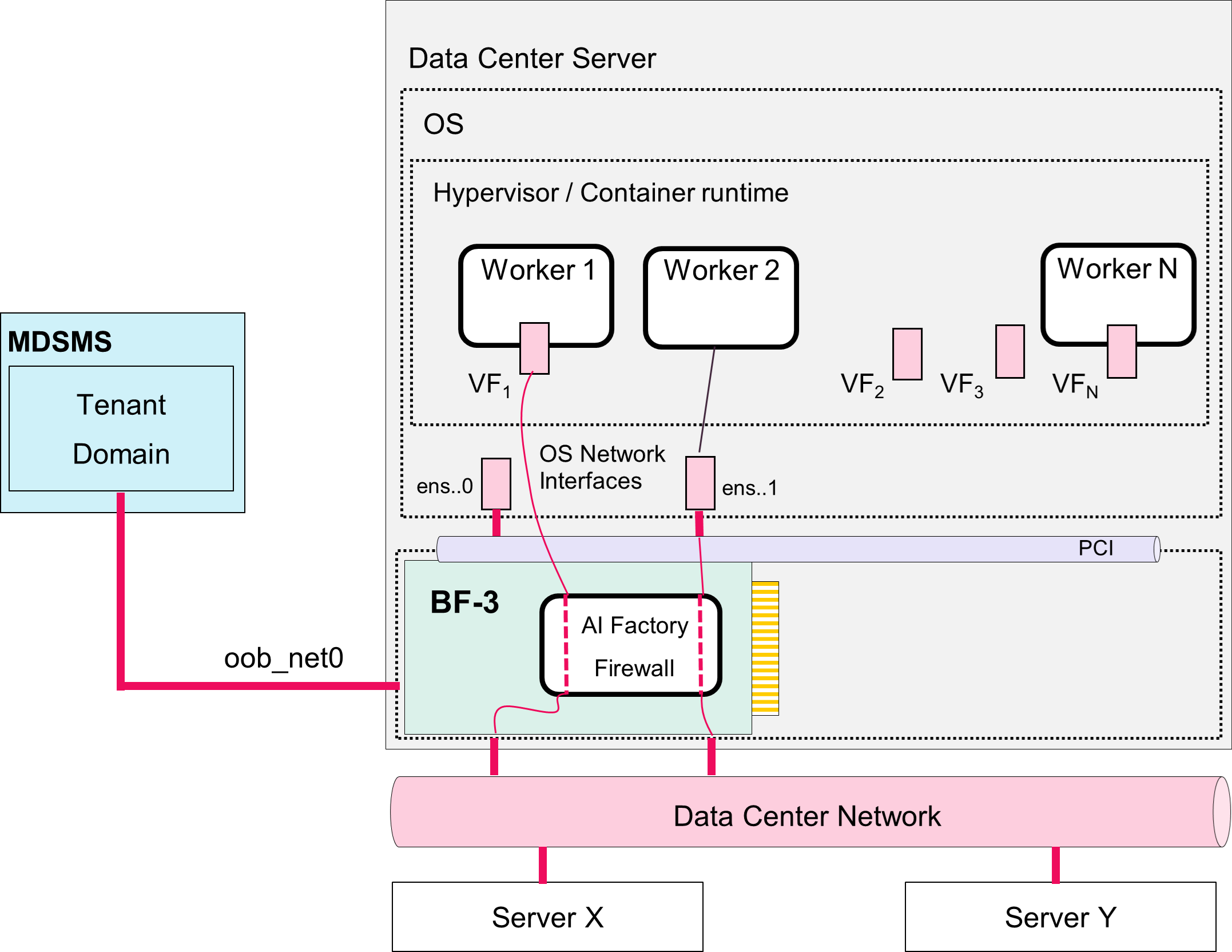
The AIFF is installed as "bump-in-the-wire", enforcing the user-defined policy on server workloads incoming / outgoing through BlueField-3.
Simplified diagram for BlueField-3 in a Host Server

Example diagram for AI Factory Firewall
Overview of the Check Point AIFF Deployment
Two roles are involved in deploying and using the AI Factory Firewall:
-
The Data Center Provider.
See Instructions for a Data Center Provider.
The Data Center Provider owns the infrastructure.
-
They install and configure the Check Point Management Server (Security Management Server or Multi-Domain Security Management Server).
-
For each new tenant they run a script that creates an isolated management domain and connects it to a dedicated Group Policy Controller (GPC).
-
They hand the tenant a configuration file (
zero_touch_parameters.json) containing the credentials and parameters the tenant needs to proceed.
-
-
The End-Customer.
See Instructions for an End-Customer.
The End-Customer owns the AI workloads.
-
They install the AIFF security container onto the BlueField-3 DPU in their Host Server.
-
They connect the AIFF to their management domain.
-
They configure the security policy that governs their workloads' traffic.
-
Overview of the Check Point AIFF Environment
Simplified block-diagram for the AIFF environment:
This diagram shows a high-level multi-tenant cloud architecture from a Data Center Provider's perspective.
This diagram shows how multi-tenant workloads (End-Customers' workloads) are isolated and managed within a shared infrastructure.
The system includes shared infrastructure component - a Management Server (Security Management Server or Multi-Domain Security Management Server) that serves tenant Domains.
The architecture below is a container-orchestrated environment with policy-driven management and distributed gateway services, designed to scale across multiple tenants while maintaining security boundaries:
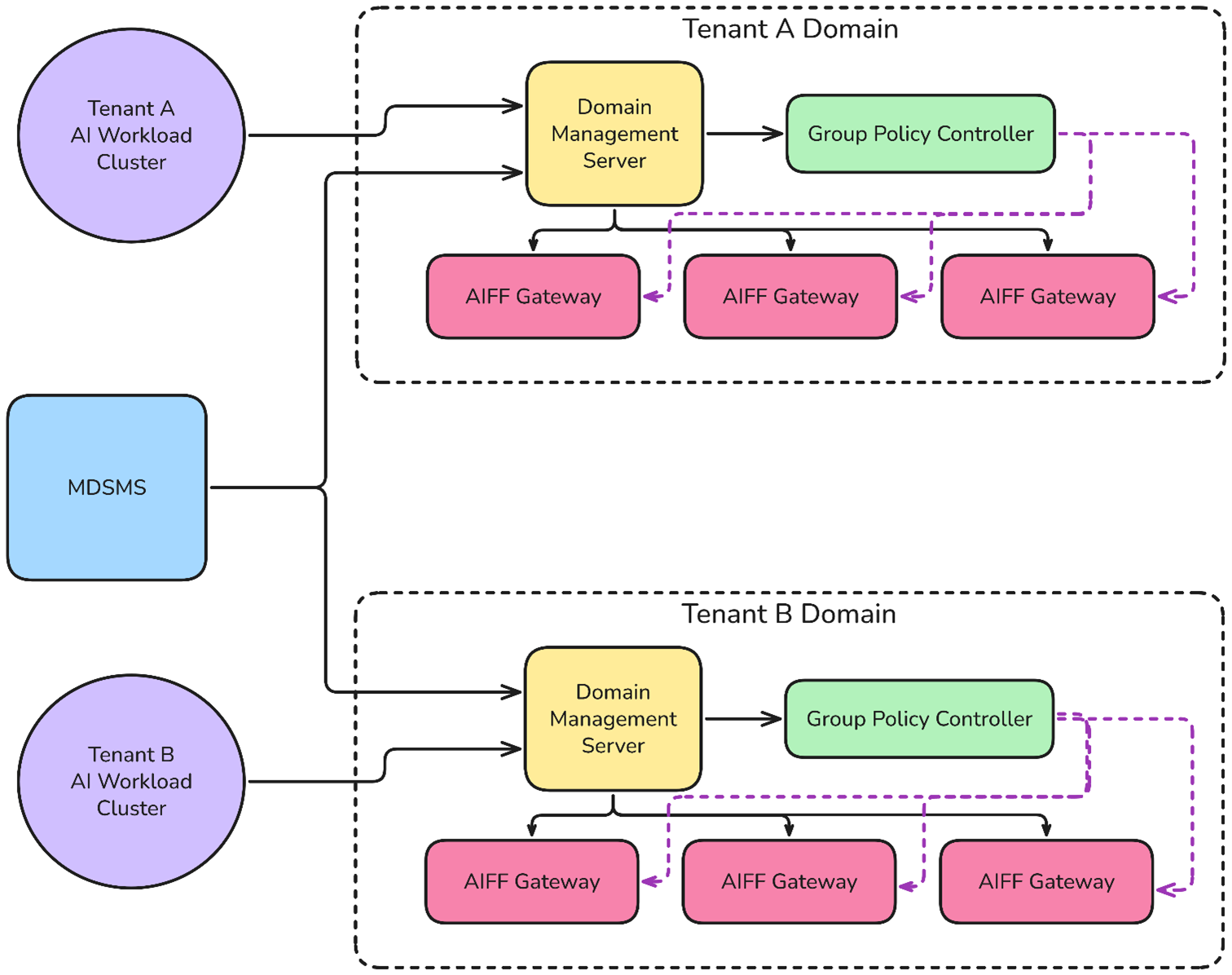
The workloads of each tenant are protected by AIFF containers that are installed using the Data Center Provider Kubernetes on the DPU of the relevant Host Servers. The Data Center Provider deploys dedicated management components per tenant (management Domain, Group Policy Controller) that enable the tenant to define and manage the security policy of its AIFF Security Gateways.
The policy can be object-based - the tenant workloads are deployed as containers on its Host Servers, and you can define policy rules based on the containers' names and labels.
The management system of the tenant connects to the tenant Kubernetes workload to discover the workload IP addresses that are in turn used by the AIFF Security Gateways to enforce the policy.
Detailed block-diagram for the AIFF environment:
This diagram describes the detailed deployment and configuration workflow for the multi-tenant system.
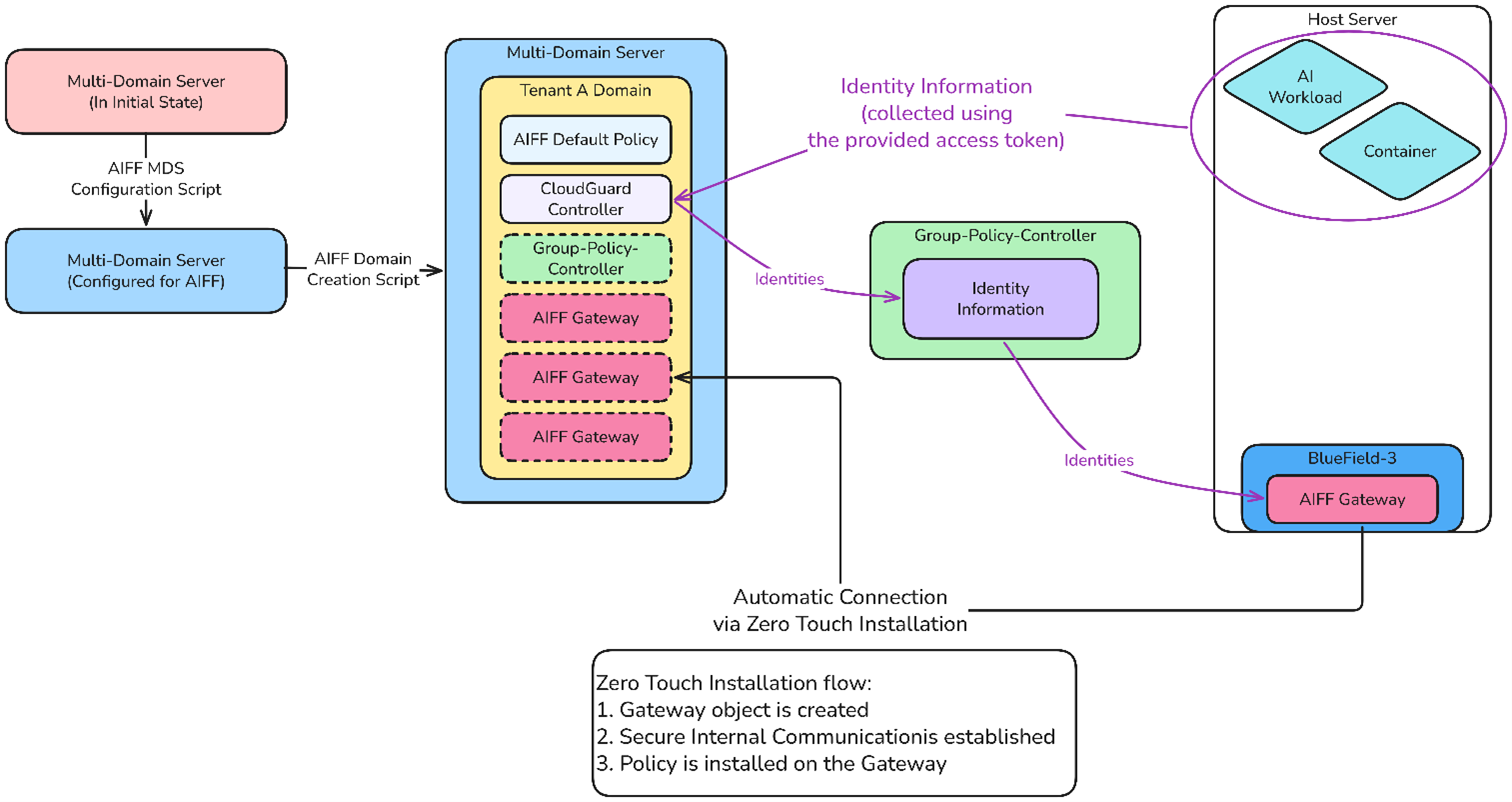
The workflow:
-
Install the Multi-Domain Security Management Server (MDSMS).
-
Run the one-time configuration script on the MDSMS.
-
Run the "Create Domain" script to create a new tenant Domain (in the diagram, "
Tenant_A_Domain") and to configure several key components:-
AIFF Default Policy for baseline policy.
-
Group Policy Controller (GPC) for sharing container identities with AIFF Security Gateways.
-
Identity Awareness (IDA) Client that the CloudGuard Controller uses to communicate with the Group Policy Controller (GPC).
-
If the Zero Touch flow was enabled during the installation, then after deploying the new AIFF Security Gateway:
-
The AIFF Security Gateway automatically connects to the tenant Domain using the internal Zero Touch script.
-
The AIFF Security Gateway automatically installs the policy configured in the Zero Touch policy name parameter.
This architecture demonstrates a policy-driven, automated deployment system where the Data Center Provider can efficiently provision and manage multiple tenant domains.
Overview of the AIFF Security Gateway Management
The management traffic for an AIFF Security Gateway can be one of these:
-
In-Band Management:
In this scenario, we recommend configuring a dedicated underlay network for communication between the AIFF Security Gateways and the Security Management Server (both).
-
Out-of-Band (OOB) Management:
Uses the interface "
oob_net0" on the DPU card.
Overview of the AIFF Security Gateway Installation
The AIFF Security Gateway is installed over these:
-
Two pairs of Scalable Functions (SFs) for the traffic workloads it protects.
-
One SF for the management traffic.
When installing the AIFF Security Gateway, the administrator defines the internal network of BlueField-3, such that the requested workloads traffic will pass through the AIFF Security Gateway, while the rest of the traffic (if any) will skip it.
Such traffic scenarios can include the entire traffic from one network port to the Host Server on a specific channel (for example, between "p0" and "pf0hpf"), or specifically the traffic that goes to a specific worker in the Host Server through a Host Server Virtual Function (VF) representor (for example, "pf0vf0").
This is achieved with the OVS bridges, which connect the SFs with the actual interfaces of the DPU.
In the case of OOB management, there is a kernel bridge implementing the required connection.
The installation package of the AIFF provides a sample script, which configures the internal network of the Data Processing Unit card according to the required workloads and takes care of the management connection.