
strongSwan Client Support
Remote Access client with IKEv2 has the ability to use the strongSwan Client.
strongSwan Client Installation
For strongSwan client installation, follow the instructions in the strongSwan documentation.
strongSwan Client Configuration
The configuration contains these sections:
| Section | Description |
|---|---|
|
Certificate |
This section describes:
|
|
Username and Password |
This section describes:
|
|
Features Configuration |
This section describes:
|
|
Special Configuration |
This section describes:
|
 Certificate
-
ipsec.conf file
File:
/etc/strongswan/ipsec.confDescription:
In this file, you configure how the strongSwan client communicates with Check Point Security Gateway
Dedicated Check Point server that runs Check Point software to inspect traffic and enforce Security Policies for connected network resources. through certificate authentication.The contact of the file:
-
config setup-
charondebug="ike 4, knl 4, cfg 3, chd 4"
-
-
conn CONNECTION_NAME-
type=tunnelBy default, this is a tunnel.
-
leftfirewall=yes -
authby=pubkey -
keyexchange=ikev2 -
left=<CLIENT_EXTERNAL_IP_ADDRESS>By default, this is
%any.The value
%anyfor the local endpoint signifies an address that fills (by automatic keying) during negotiation.If the local peer initiates the connection setup, routing table queries determine the correct local IP address.
-
leftsourceip=%configMakes the peer ask for virtual IP (Office Mode IP), DNS, and other settings.
-
right=<GW_EXTERNAL_IP_ADDRESS> -
rightid=<GW_EXTERNAL_IP_ADDRESS> -
leftcert=<CLIENT_CERTIFICATE_FILE>Example:
StrongSwanPublicCert.cer -
rightsubnet=ENCRYPTION_DOMAIN_WE_WANT_TO_CONNECTIf you want to connect to the entire encryption domain, use
0.0.0.0/0. -
ike=<IKE_METHODS_AS_CONFIGURED_ON_THE_GW>Example:
aes256-sha1-modp1024You must configure the Security Gateway to support those methods.
-
esp=<IPSEC_METHODS_AS_CONFIGURED_ON_THE_GW>Example:
3des-sha1You must edit the Gateway to support those methods.
-
ikelifetime=<TIME_WHICH_AFTER_THE_IKE_SA_IS_NOT_VALID>Example:
24hAbsolute time after which an IKE SA expires.
It can be hours (
h), minutes (m), and seconds (s). -
lifetime=<TIME_WHICH_AFTER_THE_IPSEC_SA_IS_NOT_VALID>Example:
1hAbsolute time after which an IPsec SA expires.
It can be hours (
h), minutes (m), and seconds (s). -
reauth=yes -
rekey=yes -
margintime=<TIME_TO_START_REKEY_OR_REAUTH_BEFORE_EXPIRY>Example
1MTime before SA expiry the rekeying should start.
Example: If the time of
lifetimeis1handmargintimeis1, then1mbefore the1hends, Security Gateway starts the rekey process.It can be hours (
h), minutes (m), and seconds (s). -
rekeyfuzz=<RANDOM_TIME_PERCENTAGE_FOR_REKEY_AND_REAUTH>Example:
50%The percentage by which
margintimerandomly increases (may exceed 100%).You can disable randomization with
rekeyfuzz=0%.This is the formula of the rekytime of IPsec SAs and IKE SA:
rekeytime = lifetime - (margintime + random(0, margintime * rekeyfuzz)) -
auto=add -
dpdaction=restartRestart immediately triggers an attempt to re-negotiate the connection after no response from the Gateway.
-
dpddelay=<TIME_TO_SEND_R_U_THERE_MESSAGE>Example:
30sDefines the period time interval with which
R_U_THEREmessages andINFORMATIONALexchanges go to the peer.These only go if no other traffic is received.
It can be hours (
h), minutes (m), and seconds (s). -
dpdtimeout=<TIMEOUT_INTERVAL_TO_DELETE_THE_CONNECTION>Example:
60sDefines the
timeoutinterval, after which all connections to a peer delete in case of inactivity.It can be hours (
h), minutes (m), and seconds (s).
-
Advanced configuration and explanation:
See the strongSwan documentation in the section for General Connection Parameters.
-
-
ipsec.secrets file
File:
/etc/strongswan/ipsec.secretsDescription:
It this file, you configure the strongSwan private key.
The contact of the file:
THE_SITE_IP_ADDRESS (OPTIONAL) : RSA CLIENT_CERT_KEY_FILEExample:
StrongSwanPrivateKey.pem -
strongswan.conf file
File:
/etc/strongswan/strongswan.confDescription:
The strongSwan Configuration file adds more plugins, sends the vendor ID, and resolves the DNS.
The contact of the file:
charon {
  load_modular = yes
  send_vendor_id = yes
  plugins {
    include strongswan.d/charon
    resolve {
      file = /etc/resolv.conf
    }
  }
}
include strongswan.d/*.conf
Advanced configuration and explanation:
See the strongSwan documentation in the section for the
strongswan.conffile. -
certs folder
Directory Path:
/etc/strongswan/ipsec.d/certsFile:
StrongSwanPublicCert.ceror
StrongSwanPublicCert.pemDescription:
This folder contains all the client public certificates.
-
private folder
Directory Path:
/etc/strongswan/ipsec.d/privateFile:
StrongSwanPrivateKey.pemDescription:
This folder contains all the client private certificates.
Username and Password
-
ipsec.conf file
File:
/etc/strongswan/ipsec.confDescription:
In this file, you configure how the strongSwan client communicates with Check Point Security Gateway through username and password authentication.
The contact of the file:
-
config setup-
charondebug="ike 4, knl 4, cfg 3, chd 4"
-
-
conn CONNECTION_NAME-
type=tunnelThis is the default.
-
leftfirewall=yes -
rightauth=pubkey -
leftauth=eap-gtc -
keyexchange=ikev2 -
eap_identity=<USERNAME> -
left=<CLIENT_EXTERNAL_IP_ADDRESS>This configuration is not a necessity.
By default, it is
%any. The value%anyfor the local endpoint signifies an address that fills in (by automatic keying) during negotiation.If the local peer initiates the connection setup, routing table queries determine the correct local IP address.
-
leftsourceip=%configMakes the peer ask for the virtual IP (Office Mode IP), DNS, and other settings.
-
right=<GW_EXTERNAL_IP_ADDRESS> -
rightid=<GW_EXTERNAL_IP_ADDRESS> -
rightsubnet=<ENCRYPTION_DOMAIN_WE_WANT_TO_CONNECT>If you want to connect to the entire encryption domain, use
0.0.0.0/0. -
ike=<IKE_METHODS_AS_CONFIGURED_ON_THE_GW>Example:
aes256-sha1-modp1024You must configure the Security Gateway to support those methods.
-
esp=<IPSEC_METHODS_AS_CONFIGURED_ON_THE_GW>Example:
3des-sha1You must configure the Security Gateway to support those methods.
-
ikelifetime=<TIME_WHICH_AFTER_THE_IKE_SA_IS_NOT_VALID>Example:
24hAbsolute time after which an IKE SA expires.
It can be hours (
h), minutes (m), and seconds (s). -
lifetime=<TIME_WHICH_AFTER_THE_IPSEC_SA_IS_NOT_VALID>Example:
1hAbsolute time after which an IPsec SA expires.
It can be hours (
h), minutes (m), and seconds (s). -
reauth=yes -
rekey=yes -
margintime=<TIME_TO_START_REKEY_OR_REAUTH_BEFORE>Example
1MIf the time of 'lifetime' is
1hand margintime is1m, then1mbefore the1hends, Security Gateway starts the rekey process.It can be hours (
h), minutes (m), and seconds (s). -
rekeyfuzz=<RANDOM_TIME_PERCENTAGE_FOR_REKEY_AND_REAUTH>Example:
50%The percentage by which margintime randomly increases. It may exceed 100%.
You may disable randomization with
rekeyfuzz=0%.This is the formula of the rekytime of IPsec SAs and IKE SA:
rekeytime = lifetime - (margintime + random(0, margintime * rekeyfuzz)) -
auto=add -
dpdaction=restartA restart immediately triggers an attempt to re-negotiate the connection after no response from the Gateway.
-
dpddelay=<TIME_TO_SEND_R_U_THERE_MESSAGE>Example:
30sThis defines the period time interval with which "
R_U_THERE" messages and "INFORMATIONAL" exchanges go to the peer.These go if the peer receives no other traffic.
It can be hours (
h), minutes (m), and seconds (s). -
dpdtimeout=<TIMEOUT_INTERVAL_TO_DELETE_THE_CONNECTION>Example:
60sThis defines the
timeoutinterval, after which all connections to a peer delete in case of inactivity.It can be hours (
h), minutes (m), and seconds (s).
-
Advanced configuration and explanation:
See the strongSwan documentation in the ipsec.conf: conn section.
-
-
ipsec.secrets file
File:
/etc/strongswan/ipsec.secretsDescription:
In this file, you configure the strongSwan password.
The contact of the file:
USERNAME : EAP "PASSWORD"Note - We do not recommend the use of an authentication method that stores a user's clear passwords in the file.
-
strongswan.conf file
File:
/etc/strongswan/strongswan.confDescription:
The strongSwan Configuration file adds more plugins, sends the vendor ID, and resolves the DNS.
The contact of the file:
charon {
  load_modular = yes
  send_vendor_id = yes
  plugins {
    include strongswan.d/charon
    resolve {
      file = /etc/resolv.conf
    }
  }
}
include strongswan.d/*.conf
Advanced configuration and explanation:
See the strongSwan documentation in the strongswan.conf section.
-
cacerts folder
Directory Path:
/etc/strongswan/ipsec.d/cacertsFile:
internal_ca.crtDescription:
The internal CA file of all the Gateway, LDAP, and RADIUS servers are the Trusted CA for the client to authenticate the servers for each connection.
You can find these settings in SmartConsole
Check Point GUI application used to manage a Check Point environment - configure Security Policies, configure devices, monitor products and events, install updates, and so on. in Trusted CA.
Features Configuration
-
pfs-
You must add the "
esp=" section with the proper DH group. -
Example:
esp=3des-sha1-modp1024
-
-
reauth-
ikelifetime=<TIME_WHICH_AFTER_THE_IKE_SA_IS_NOT_VALID> , reauth=yes
-
-
rekey-
lifetime=<TIME_WHICH_AFTER_THE_IPSEC_SA_IS_NOT_VALID> , rekey=yes
-
-
Strict use of IKE and ESP methods
-
You must add the "
ike=" or "esp=", or both at the end. -
Example:
ike=aes256-sha1-modp1024! , esp=3des-sha1!
-
-
Dead Peer Detection
You must add the "
dpdaction=restart" in the "ipsec.conf" file to check the liveliness of the IPsec peer and to keep it alive.
Special Configuration
-
How to use an encrypted private key to connect
-
In the
ipsec.secretsfile, you must add the passphrase for the private key. -
File:
/etc/strongswan/ipsec.secretsDescription:
In this file, you configure the strongSwan password.
The contact of the file:
Example:
<THE_SITE_IP_ADDRESS> : <RSA CLIENT_CERT_KEY_FILE> StrongSwanPrivateKey.pem "<PASSPHRASE_FOR_THE_PRIVATE_KEY>" Source
-
-
Encryption Domain
-
In some scenarios, if you change the encryption domain with an addition or a removal of a network, you must modify the client "
ipsec.conf" file. -
Three ways to configure.
Note - Two of these require edits on the client side after changes (not recommended).
-
Uses the universal IP to connect to the entire Encryption Domain
The networks that a Security Gateway protects and for which it encrypts and decrypts VPN traffic. without client side edits. -
Specifies one specific network for the connection and requires client side modification.
-
Specifies several networks for the connections and requires client side modification.
-
-
In this setup, three networks are on the encryption domain.
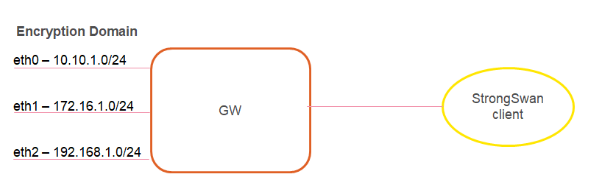
-
Uses the universal IP to connect to the entire Encryption Domain.
-
Configure the "rightsubnet" as a universal IP which is 0.0.0.0/0.
In this configuration, there are routes to the entire Encryption Domain.
-
If you add or remove any network, it requires no modification on the client side.
Note - This choice is highly recommended.
-
-
Specifies one specific network for the connection.
-
Choose one specific network, such as eth0 at
10.10.1.0/24.Configure the "rightsubnet" to be "
10.10.1.0/24" for one tunnel to this network. -
Note - If a change in the Encryption Domain now has the network as
10.10.10.0/24, you must change it on the client side.
-
-
Specifies several networks for the connections.
-
If you do not want to connect to the Encryption Domain or to one network, you can connect to two or more networks.
Configure these with the "
also" macro, which includes connection definitions defined in the ipsec.conf file and add the change to this connection. -
Example:
conn conn_to_eth 0//full configuration with "rightsubnet=10.10.10.0/24"conn coon_to_eth 1rightsubnet=192.168.1.0/24also=coon_to_eth 0 -
Notes:
-
You must still run the
upcommand to establish this connection. If there are any changes in the Encryption Domain that relate to these networks, you must reconfigure the client side. -
If a network is not accessible to you, the connection fails.
-
-
-
-
Debian and Ubuntu Special Configuration
To use EAP authentication on Debian and Ubuntu machines, you must run these commands to install the required plugins before a strongSwan restart:
-
sudo apt-get install libstrongswan-extra-plugins -
sudo apt-get install libcharon-extra-plugins
Useful strongSwan Commands
On CentOS and Fedora, the primary command is: strongswan.
On Ubuntu and Debian, the primary command is: ipsec.
-
"
strongswan restart", or "ipsec restart"Terminates all IPsec connections, stops the IKE daemon "
charon", parses the "ipsec.conf" file, and starts the IKE daemon "charon". -
"
strongswan rereadsecrets", or "ipsec rereadsecrets"Reads all secrets defined in the
ipsec.secretsfile and updates them. -
"
strongswan update", or "ipsec update"Determines any changes in the "
ipsec.conf" file and updates the configuration on the active IKE daemon "charon".Configuration changes do not affect established connections.
Note - To use changes in the "
ipsec.conf" or "ipsec.secrets" file, you must run the command with the "rereadsecrets" options (not with the "update" option). For full command syntax, go to thestrongswan.orgweb site (see theIpsecCommandsection).
How to Convert a P12 File into a Private Key and Public Cert
-
XCA Tool
-
Use the XCA tool.
-
Download it from the hohnstaedt.de site in the XCA directory.
-
-
OpenSSL Commands
-
openssl pkcs12 -in <P12_CERTIFICATE>.p12 -clcerts -nokeys -out <EXTRACTED_CERTIFICATE>.crt -
openssl pkcs12 -in <P12_CERTIFICATE>.p12 -nocerts -out <EXTRACTED_PRIVATE>.key
-
Known Limitations
-
Simultaneous Login
Two simultaneous connections for the same user are not supported. Each connection must be an individual user or the first connection disconnects.
-
Office Mode with Multiple External Interfaces
Enhancements for Gateways with multiple external interfaces require NAT-T usage on the client side.
Enforcement requires the NAT-T environment, or the configuration of "
forceencaps = yes" in the "ipsec.conf" file. -
Back Connection
Connections from the encryption domain to the assigned IP address of the client by the Security Gateway are not supported.
-
Realms
Realms are not supported. The client uses “Legacy authentication”.
-
Machine Authentication
Machine authentication is not supported.
-
Two-Factor Authentication
Two-Factor Authentication is not supported.
-
Encryption Domain
Encryption domain changes must deploy on the client side with configuration file changes in some scenarios.
-
Advanced Remote Access features are not supported
-
Certificate enrollment.
-
Link Selection.
-
Location Awareness.
-
Multiple Entry Point (MEP).
-
Secondary Connect.
-
Secure Configuration Verification (SCV).
-
Visitor Mode.
-
-
IPv6
IPv6 is not supported.
-
Certificate Usage
The customer deploys the certificates.
-
Certificate Authentication
Certificate authentication with ICA
Internal Certificate Authority. A component on Check Point Management Server that issues certificates for authentication. is only supported without a CRL check.