
Web and Files Protection Exclusions
URL Filtering Exclusions
URL Filtering Exclusions
You can exclude specific URLs from a rule. Click + to add the required URL you want to exclude from the rule.
Syntax
-
* indicates a string or a character. For example, A* can be ADomain or AB or AAAA.
-
? indicates a character. For example, A? can be AA or AB or Ab.
For example:
If you enter the domain |
It excludes these domains |
It does not exclude these domains |
|---|---|---|
| www.domain.com |
|
|
| *.domain.com |
|
|
Threat Emulation, Threat Extraction, and Zero-Phishing Exclusions
Threat Emulation, Threat Extraction, and Zero-Phishing Exclusions
You can exclude specific folders, domains or SHA1 hashes from the Threat Emulation, Threat Extraction and Zero-Phishing protection.
Domain exclusions
-
Relevant only for Endpoint Security extension for Browsers.
-
To exclude an IP, in the Element field, enter IP address followed by subnet mask in the format <X.X.X.X>/ <subnet mask >. For example, to exclude a computer with IP address 192.168.100.30, enter 192.168.100.30/24.
-
Domain exclusions must be added without http/s, *, or any other special characters.
Domain exclusions can be added with or without www.
-
Sub-domain exclusions are supported.
Exclusion of a domain will exclude all its subdomains as well.
For example:
If you enter the domain |
It excludes these domains |
It does not exclude these domains |
|---|---|---|
| www.domain.com |
|
|
| domain.com |
|
- |
| sub.domain.com |
|
https://sub2.domain.com |
SHA1 exclusions -
-
Relevant only for Threat Emulation blade (File system monitoring).
For Endpoint Security version E86.40, SHA1 exclusion is supported on Endpoint Security extension for browsers as well (not including Internet Explorer). SHA1 can be used to exclude downloaded files from File Protection.
-
It is not supported with Internet Explorer.
-
File Reputation exclusions are set by SHA1.
-
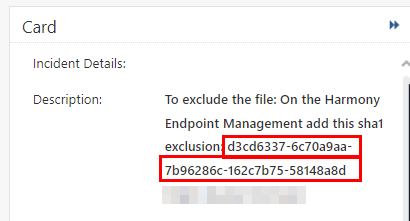
Macro exclusion - To exclude the office files which includes a macro, set exclusions for the SHA1 hash of the macro.
For example, if an exclusion is set to SHA1 hash of the macro, all the files which includes this macro are excluded.

Notes -
-
This is supported with Endpoint Security Client version E88.00 or higher.
-
To view the hash of a macro, see the Description in the Forensic Details section in the Card of the event. For more information see, Adding Exclusions from Logs.
-
Folder exclusions -
-
Relevant only for Threat Emulation blade (File system monitoring).
-
Folder path cannot contain environment variables.
-
When you exclude a folder, enter the folder as a windows path. For example:
C:\Program Files\MyTrustedDirectory\ -
If the path of created file begins with exclusion, it will be excluded.
-
Folder exclusions support wildcards. These wildcards are supported:
? - Each question mark masks one character.
* - Each star masks zero or more characters.
-
It is not advised to add * in the middle of path exclusions, as it may hurt the performance.
-
Exclude network files by path
\\ServerName\Share\folder\.This excludes all files located under\ServerName\Share\folder\\.