
Scaled Identity Sharing
Scaled Identity Sharing is an improved way for Policy Decision Point (PDP Check Point Firewall with Identity Awareness enabled that acts as Policy Decision Point: acquires identities from identity sources; shares identities with other gateways.) Identity Awareness Software Blade on a Check Point Firewall that enforces network access and audits data based on network location, the identity of the user, and the identity of the computer. Acronym: IDA. Gateways to share identity information with Policy Enforcement Point (PEP Check Point Firewall with Identity Awareness enabled that acts as Policy Enforcement Point: receives identities via identity sharing; redirects users to Captive Portal.) Gateways. With Scaled Sharing, you can create simple configurations to share identities from a PDP to up to 300 PEPs. Scaled Sharing simplifies the user experience of Check Point administrators, reduces hardware cost, and reduces maintenance burden.
Scaled Sharing uses the industry standard TLS protocol. The older Identity Sharing method uses the Check Point proprietary SIC Secure Internal Communication. The Check Point proprietary mechanism with which Check Point computers that run Check Point software authenticate each other over SSL, for secure communication. This authentication is based on the certificates issued by the ICA on a Check Point Management Server. protocol. The new Scaled Identity Sharing (TLS-based) and the older Identity Sharing mechanism (SIC-based) are both supported.
With TLS-based Scaled Sharing, a PDP can directly share identities with a PEP located in a different Management Domain managed by the same Multi-Domain Security Management. With SIC-based Identity Sharing, sharing between Management Domains is possible only with additional configuration of an Identity Broker Identity Sharing mechanism between Identity Servers (PDP): (1) Communication channel between PDPs based on Web-API (2) Identity Sharing capabilities between PDPs - ability to add, remove, and update the identity session. Gateway. By removing the need for an Identity Broker, Scaled Sharing greatly simplifies sharing across Management Domains.
Comparison between Identity Sharing (SIC-based) and Scaled Identity Sharing (TLS-based)
|
|
Identity Sharing (SIC-based) |
Scaled Sharing (TLS-based) |
|---|---|---|
|
Protocol used for communication between PDP and PEP |
SIC - Check Point proprietary protocol, uses Check Point certificates |
TLS - Industry standard protocol, uses TLS certificates |
|
Number of PEPs supported for each PDP |
20 PEPs for each PDP |
300 PEPs for each PDP |
|
Identity Sharing between PDP and PEP located in different Management Domains |
Supported only using Identity Broker, which adds additional configuration and computational load. |
Simple configuration in Management CLI and SmartConsole |
Comparison of Topology for SIC-based and TLS-based Identity Sharing
SIC-based Identity Sharing - Example Topology
In a SIC-based Identity Sharing configuration, several PDP Identity Broker Gateways may be required to share identities with PEP Gateways. Identity Brokers are needed to process a large number of identities, and share with many PEP Gateways, and share identities with PEP Gateways in a different Management Domain. Administrators must manage and monitor each of the PDP Identity Broker Gateways.

TLS-based Scaled Sharing - Example Topology
In a typical TLS-based Scaled Sharing configuration, a single PDP can share identities with many PEPs. No Identity Broker is needed. Fewer Security Gateways are needed to handle the same load. This reduces hardware costs and administrative burden.
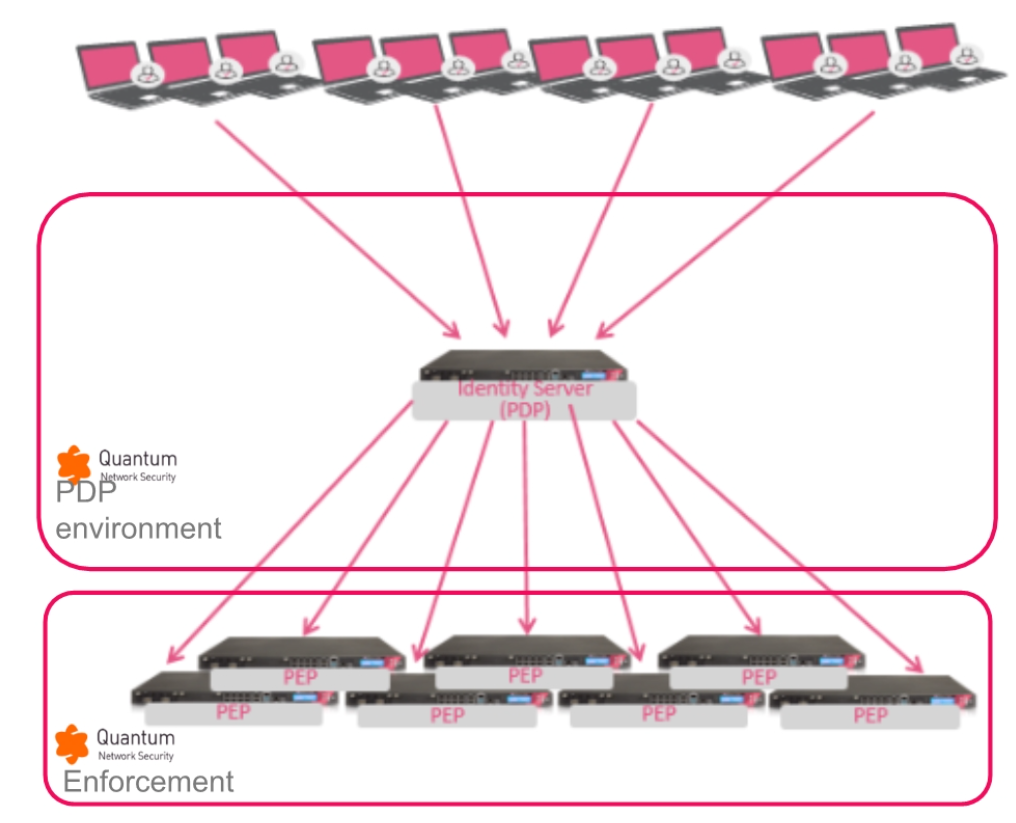
Comparison of Communication between PDP and PEP for SIC-based Identity Sharing and TLS-based Scaled Identity Sharing
SIC-based Identity Sharing: Communication between PDP and PEP
In SIC-based Identity Sharing, there are two separate communication channels between the PDP and each PEP. In the "Networks registration" channel, the PEP queries the PDP for information about IP address ranges. In the "Identity Propagation" channel, the PDP sends information about users on these networks to the PEP.

TLS-based Scaled Sharing: Communication between PDP and PEP
In TLS-based Scaled Identity Sharing, there is one communication channel between the PDP and each PEP. The PDP is a TLS server, and the PEP is a TLS client. This communication is simpler than the two channels used in SIC-based Identity Sharing.

Scaled Sharing Prerequisites and Known Limitations
Scaled Sharing Prerequisites
-
The PDP Gateway must be version R82.10 or higher.
-
The PEP Gateways must be version R82.10 or higher.
-
A Management Server
Check Point Single-Domain Security Management Server or a Multi-Domain Security Management Server. that manages a Scaled Sharing Gateway (PDP or PEP) must be version R82.10 or higher.
|
|
Note - If the PDP Gateway or the PEP Gateway does not support Scaled Sharing, then the Gateways automatically use SIC-based Identity Sharing. |

Scaled Sharing Known Limitations
-
3900 series appliances are not supported as PDP for Scaled Sharing. These appliances are supported as PEP for Scaled Sharing.
-
Scaled Sharing does not support identities that the PDP received from Check Point Identity Agent
Check Point dedicated client agent installed on Windows-based user endpoint computers. This Identity Agent acquires and reports identities to the Check Point Firewall with Identity Awareness enabled. The administrator configures the Identity Agents (not the end users). There are two types of Identity Agents - Full and Light. You can download the Full and Light Identity Agent package from the Captive Portal - 'https://<Gateway_IP_Address>/connect' or from Support Center. for a Terminal Server (also known as Multi-User-Host (MUH)). -
Scaled Sharing between different Domains is supported only if both Domains are managed by the same Multi-Domain Security Management. For sharing between Domains managed by different Multi-Domain Security Management, use Identity Broker (see Identity Broker).
-
It is not supported for the same physical appliance to host Security Gateway(s) that act as a Scaled Sharing PDP and a Scaled Sharing PEP. For example, the same physical appliance hosts Security Gateway A and Security Gateway B. If Gateway A is a Scaled Sharing PDP, then neither Gateway A nor Gateway B can be a Scaled Sharing PEP.
Enabling Scaled Identity Sharing in the same Management Domain
Scaled Sharing must be enabled on all participating PDP and PEP Gateways.
Step 1: In SmartConsole, enable Identity Sharing on the Security Gateway you want to be the PDP
|
|
Note -If Identity Sharing is already enabled on the Gateway, skip this step. |
-
From the left navigation panel, click Gateways & Servers.
-
Open the applicable Security Gateway object.
-
From the left tree, click Identity Awareness > Identity Sharing.
-
Click Share local identities with other gateways.
-
Click OK.
-
In the top toolbar, click Publish to publish the session.
Step 2: In SmartConsole, enable Identity Sharing on the Security Gateways you want to be the PEP
|
|
Note - If all relevant Gateways are already configured as PEP that receive identities from the PDP, skip this step. |
Do this procedure for each additional Gateway that you want to configure as a PEP.
-
Open the applicable Security Gateway object.
-
From the left tree, click Identity Awareness > Identity Sharing.
-
Click Get identities from other gateways.
-
Below Get identities from other gateways, to the right of the table, click the plus button.
A list of PDP Security Gateways appears.
-
Select the PDP Security Gateway that you want to use for Scaled Sharing.
-
Click OK.
-
In the top toolbar, click Publish to publish the session.
Step 3: With Management API, enable Scaled Sharing for the PDP and the PEP Security Gateways
Do this step for every PDP and PEP Gateway that does not already have Scaled Sharing enabled. If Scaled Sharing is already enabled for all relevant Gateways, skip this step.
Run the relevant API command on the Security Management Server Dedicated Check Point server that runs Check Point software to manage the objects and policies in a Check Point environment within a single management Domain. Synonym: Single-Domain Security Management Server. / Domain Management Server for the PDP Security Gateway / Cluster Two or more Check Point Firewalls that work together in a redundant configuration - High Availability, or Load Sharing. and for each PEP Security Gateway / Cluster:
|
|
mgmt_cli set simple-cluster name <Name of the Cluster object> identity-awareness-settings.identity-sharing-settings.scaled-sharing true -d <IP Address of Management Server> |
See the Check Point Management API Reference (at the top, select the correct version) .
Step 4: Install Policy
-
Install the Access Control policy on the PDP Gateway.
-
Install the Access Control policy on each PEP Gateway.
Scaled Identity Sharing for PDP Gateways in different Management Domains
Scaled Identity Sharing supports identity sharing between a PDP and a PEP that are in different Management Domains in the same Multi-Domain Security Management. To share identities between a PDP and a PEP that are managed by different Multi-Domain Security Management Servers, use Identity Broker.
Step 1: In SmartConsole, enable Identity Sharing on the Security Gateway you want to be the PDP
|
|
Note -If Identity Sharing is already enabled on the Gateway, skip this step. |
-
From the left navigation panel, click Gateways & Servers.
-
Open the applicable Security Gateway object.
-
From the left tree, click Identity Awareness > Identity Sharing.
-
Click Share local identities with other gateways.
-
Click OK.
Step 2: With the Management API enable Scaled Sharing for the PDP Security Gateway and the PEP Security Gateway(s)
|
|
Note - If Scaled Sharing is already enabled for a Gateway, you do not need to enable it again. If Scaled Sharing is enabled for all relevant Gateways, then skip this step. |
Run the relevant API command on the relevant Security Management Server / Domain Management Server for the PDP Security Gateway / Cluster and for each PEP Security Gateway / Cluster:
|
|
mgmt_cli set simple-cluster name <Name of Cluster object> identity-awareness-settings.identity-sharing-settings.scaled-sharing true -d <IP Address of Management Server> |
|
mgmt_cli set legacy-virtual-system name <Name of Traditional Virtual System object> identity-awareness-settings.identity-sharing-settings.scaled-sharing true -d <IP Address of Management Server> |
See the Check Point Management API Reference (at the top, select the correct version) .
Step 3: Enable Scaled Sharing between the Management Domains
-
Open SmartConsole for the relevant Management Server.
-
From the left toolbar, click Gateways & Servers.
-
Right-click on the table row of the PDP Gateway.
-
Select Share identities cross domain.
The Domain Selection window opens.
-
Select Allow Identity Sharing Cross Domains.
-
Click the + (plus sign) button and select the relevant Management Domain.
-
Click OK.
The Domain Selection window closes.
-
In the Multi-Domain Security Management, publish the global policy.
Step 4: Configure PEP Security Gateways to receive Identities from the PDP Security Gateway
Do this procedure for each additional Gateway that you want to configure as a PEP.
-
Open SmartConsole for the relevant Management Server.
-
Open the applicable Security Gateway / Cluster object.
-
From the left tree, select Identity Awareness > Identity Sharing.
-
Click Get identities from other gateways.
-
Below Get identities from other gateways, to the right of the table, click the plus button.
A list of PDP Security Gateways appears.
-
Select the PDP Security Gateway.
The name of the PDP appears in this format:
[NAME OF GATEWAY]_of_[NAME OF DOMAIN]Example:
GW-A_of_Domain-A -
Click OK.
Step 5: Install Policy for the PDP Gateway
-
Assign global policy for the Domain of the PDP Gateway.
-
Install the Access Control policy on each PDP Gateway.
Step 6: Install Policy for the PEP Gateway(s)
Install the Access Control policy on each PEP Gateway.
Monitoring Scaled Sharing
This section includes monitoring that is specific to Scaled Sharing. Monitoring of the connection between the PDP Gateway and the PEP Gateway is the same for Scaled Sharing and for SIC-based Identity Sharing (see Monitoring Identity Sharing.
Showing whether Scaled Sharing is enabled on an Identity Awareness Gateway
Run the relevant API command on the Security Management Server / Domain Management Server that manages the Identity Awareness Gateway:
|
|
mgmt_cli show simple-cluster name <Name of Cluster object> -d <IP Address of Management Server> | grep scaled-sharing |
|
mgmt_cli show legacy-virtual-system name <Name of Traditional Virtual System object> -d <IP Address of Management Server> | grep scaled-sharing |
See the Check Point Management API Reference (at the top, select the correct version) .
Renewing the PDP Gateway's TLS Server Certificate for Scaled Sharing
-
Run the relevant API command on the Security Management Server / Domain Management Server for the PDP Security Gateway / Cluster and for each PEP Security Gateway / Cluster.
mgmt_cli renew-scaled-sharing-server-certificate <Name of Security Gateway / Cluster object> -d <IP Address of Management Server>mgmt_cli renew-scaled-sharing-server-certificate <Name of Security Gateway / Cluster object> -d <IP Address of Management Server>mgmt_cli renew-scaled-sharing-server-certificate <Name of Traditional Virtual System object> -d <IP Address of Management Server>See the Check Point Management API Reference (at the top, select the correct version) .
-
Install the Access Control policy on each Security Gateway / Cluster object.
Disabling Scaled Identity Sharing
After you disable Scaled Sharing, the PDP uses SIC-based Identity Sharing. Configurations of PEP Gateways in the same Management Domain are preserved. Configurations of PEP Gateways in a different Domain are not preserved.
Disabling Scaled Identity Sharing
-
Run this API command on the Security Management Server / Domain Management Server for the PDP Security Gateway / Cluster and for each PEP Security Gateway / Cluster:
mgmt_cli set simple-gateway name <Name of the Security Gateway object> identity-awareness-settings.identity-sharing-settings.scaled-sharing false -d <IP Address of Management Servermgmt_cli set simple-cluster name <Name of the Cluster object> identity-awareness-settings.identity-sharing-settings.scaled-sharing false -d <IP Address of Management Servermgmt_cli set legacy-virtual-system name <Name of Traditional Virtual System object> identity-awareness-settings.identity-sharing-settings.scaled-sharing false -d <IP Address of Management Server>
See the Check Point Management API Reference (at the top, select the correct version) .
-
If the PDP Gateway and PEP Gateway are in different Management Domains, do this for each PEP Gateway:
-
Open SmartConsole for the Management Server that manages the PEP Gateway.
-
Open the Security Gateway / Cluster object of the PEP Gateway.
-
From the left tree, select Identity Awareness > Identity Sharing.
-
In the Identity Sharing section, in the Server Name table, select the table row for the PDP Gateway that is located in a different Management Domain.
The name of the PDP appears in this format:
[NAME OF GATEWAY]_of_[NAME OF DOMAIN] -
Click the minus sign button.
The name of the PDP Gateway is deleted from the table.
-
Click OK.
The Security Gateway / Cluster object closes.
-
-
Install the Access Control policy on the Security Gateway / Cluster object.