
Identity Broker
Identity Broker Identity Sharing mechanism between Identity Servers (PDP): (1) Communication channel between PDPs based on Web-API (2) Identity Sharing capabilities between PDPs - ability to add, remove, and update the identity session. is an identity sharing method between Policy Decision Points (PDP Check Point Firewall with Identity Awareness enabled that acts as Policy Decision Point: acquires identities from identity sources; shares identities with other gateways. Gateways). The Policy Decision Points can share identities across different management domains in a distributed environment with multiple Identity Awareness Software Blade on a Check Point Firewall that enforces network access and audits data based on network location, the identity of the user, and the identity of the computer. Acronym: IDA. Security Gateways.
In a distributed environment with multiple Identity Awareness Security Gateways, you can use Identity Broker to propagate any received identity from one PDP Gateway to another. This helps to create a more scalable and robust sharing of hierarchy and topologies.
Identity Broker is a Web-API based functional part of the PDP instance. Identity Broker adds a new communication channel between PDPs.
The Identity Broker Solution
Identity Broker propagates identities between PDP Gateways. A PDP Gateway learns the Identities from the Identity Sources. This PDP Gateway performs the group membership query, calculates Access Roles, and then shares the identities to other PDP Gateways. This reduces the load on the PDP Gateways receiving the identities, identity sources, and/or User Directories.
The sharing can be performed between PDP Gateways managed by different Security Management Servers / Domain Management Servers.
Identity sharing between the Identity Brokers can be controlled through filters. You can:
-
Filter identities by network , user/machine name, domain, identity source, access roles, and distinguished name.
-
Share only local Identity sessions. When enabled, the PDP forwards only its own sessions, and not the sessions it learned from other PDPs.
The Identity Broker solution shares all the received identities by default. By applying filters, you can avoid sharing identities that are not required for other PDPs.
Terms and Descriptions
Publisher
A Security Gateway defined to share identities with one or more Subscribers.
Subscriber
A Security Gateway defined to receive identities from one or more Publishers.
Identity Broker Communication
Identity Broker uses WEB-API to communicate. Security Gateways share information in JSON format over HTTP post requests.
Each Identity Broker node verifies the other:
-
The Publisher identifies the Subscriber by verifying the presented SSL Certificate.
-
The Subscriber identifies the Publisher by verifying a pre-shared secret key.

Publisher PDP Security Gateway
New Identity Sharing method

Publish identity
Delete identity
Update identity
Subscriber PDP Security Gateway
Example Scenario
Logical topology:

|
Item |
Description |
|---|---|
|
1 |
Security Gateway #1 |
|
2 |
Security Gateway #2 |
|
3 |
A user on a computer (3) behind the Security Gateway #1 |
|
4 |
Identity Source (for example, Active Directory) |
|
5 |
A resource (for example, a server) behind the Security Gateway #2 |
General Flow of Events:
-
The Security Gateway #1 is configured as an Identity Broker Publisher.
It gets and learns the identity from the Identity Source (4), and shares it with the remote Security Gateway #2.
-
The Security Gateway #2 is configured as an Identity Broker Subscriber.
It gets the identities of the users from remote the Security Gateway #1.
-
When the user connects to the resource (5), the Security Gateway #2 identifies the user and enforces identity-based rules.
-
Optional: You can apply filters to control which identities the Security Gateway #1 publishes and to which identities the Security Gateway #2 subscribes.
-
Optional: You can manage the Security Gateway #1 and Security Gateway #2 with different Management Servers.
|
|
Important - In addition to the topology configuration in the presented scenario, you can configure Security Gateway 2 as a Publisher and Security Gateway 1 as a Subscriber. That way, the two Security Gateways simultaneously give and receive identities to each other. Each Broker Publisher to Broker Subscriber relation is independent, and does not change any other Publisher-Subscriber relationship. |
Configuration File "identity_broker.C"
You configure the Identity Broker in the file called $FWDIR/conf/identity_broker.C that is located on the Security Gateway / each Cluster Member Check Point Firewall that is part of a cluster..
|
|
Important:
|
Templates for the "$FWDIR/conf/identity_broker.C" file
These are the example templates for the $FWDIR/conf/identity_broker.C file:
-
Security Gateway that works as a PDP Publisher
-
Security Gateway that works as a PDP Subscriber
-
Security Gateway that works as a PDP Publisher and as a PDP Subscriber
Example template with mandatory parameters for a Security Gateway that works as a PDP Publisher
This template contains the mandatory parameters to configure the Identity Broker on a PDP Publisher that works with two PDP Subscribers.
See:
#############################################################
#  Configuration file for Identity Broker - Identity Distribution between PDPs.
#  For more information , please refer to Identity Awareness Admin Guide.
#############################################################
(
  :sharing_id (ENTER_UNIQUE_SHARING_ID_FOR_THIS_PUBLISHER_GATEWAY)
  :identity_subscribers (
    : (
      :Name (DESCRIPTIVE_NAME_OF_SUBSCRIBER_GATEWAY_1)
      :sharing_id (UNIQUE_SHARING_ID_OF_SUBSCRIBER_GATEWAY_1)
      :ipaddr (IP_ADDRESS_OF_INTERFACE_ON_SUBSCRIBER_GATEWAY_1)
      :certificate_subject ("CERTIFICATE_SUBJECT_OF_SUBSCRIBER_GATEWAY_1")
    )
    : (
      :Name (DESCRIPTIVE_NAME_OF_SUBSCRIBER_GATEWAY_2)
      :sharing_id (UNIQUE_SHARING_ID_OF_SUBSCRIBER_GATEWAY_2)
      :ipaddr (IP_ADDRESS_OF_INTERFACE_ON_SUBSCRIBER_GATEWAY_2)
      :certificate_subject ("CERTIFICATE_SUBJECT_OF_SUBSCRIBER_GATEWAY_2")
    )
  )
)This template contains the mandatory parameters to configure the Identity Broker on a PDP Subscriber that works with two PDP Publishers.
See:
#############################################################
#  Configuration file for Identity Broker - Identity Distribution between PDPs.
#  For more information , please refer to Identity Awareness Admin Guide.
#############################################################
(
  :sharing_id (ENTER_UNIQUE_SHARING_ID_FOR_THIS_SUBSCRIBER_GATEWAY)
  :identity_publishers (
    : (
      :Name (DESCRIPTIVE_NAME_OF_PUBLISHER_GATEWAY_1)
      :sharing_id (UNIQUE_SHARING_ID_OF_PUBLISHER_GATEWAY_1)
      :ipaddr (IP_ADDRESS_OF_INTERFACE_ON_PUBLISHER_GATEWAY_1)
    )
    : (
      :Name (DESCRIPTIVE_NAME_OF_PUBLISHER_GATEWAY_2)
      :sharing_id (UNIQUE_SHARING_ID_OF_PUBLISHER_GATEWAY_2)
      :ipaddr (IP_ADDRESS_OF_INTERFACE_ON_PUBLISHER_GATEWAY_2)
    )
  )
)This template contains all supported parameters to configure the Identity Broker.
|
|
Important:
|
See:
######################################################################################
#    Configuration file for Identity Broker - Identity Distribution between PDPs.    #
#    For more information, see  the Identity Awareness Administration Guide.         #
######################################################################################
(
  :sharing_id ()
  :identity_subscribers (
    : (
      :Name ()
      :sharing_id ()
      :ipaddr ()
      :certificate_subject ("")
      :crl_validation_config (fail_closed)
      :share_only_local_sessions (false)
      :filter (
        :include_users_and_machines ()
        :exclude_users_and_machines ()
        :include_networks ()
        :exclude_networks ()
        :include_identity_source ()
        :exclude_identity_source ()
        :include_domains ()
        :exclude_domains ()
        :include_roles ()
        :exclude_roles ()
        :include_distinguished_names ()
        :exclude_distinguished_names ()
        :include_owners ()
        :exclude_owners ()
        :include_immediate_publishers ()
        :exclude_immediate_publishers ()
      )
    )
  )
  :identity_publishers (
    : (
      :Name ()
      :sharing_id ()
      :ipaddr ()
      :recalculate_access_roles (false)
      :filter (
        :include_users_and_machines ()
        :exclude_users_and_machines ()
        :include_networks ()
        :exclude_networks ()
        :include_identity_source ()
        :exclude_identity_source ()
        :include_domains ()
        :exclude_domains ()
        :include_roles ()
        :exclude_roles ()
        :include_distinguished_names ()
        :exclude_distinguished_names ()
        :include_owners ()
        :exclude_owners ()
        :include_immediate_publishers ()
        :exclude_immediate_publishers ()
      )
    )
  )
  :global_outgoing_filter (
    :include_users_and_machines ()
    :exclude_users_and_machines ()
    :include_networks ()
    :exclude_networks ()
    :include_identity_source ()
    :exclude_identity_source ()
    :include_domains ()
    :exclude_domains ()
    :include_roles ()
    :exclude_roles ()
    :include_distinguished_names ()
    :exclude_distinguished_names ()
    :include_owners ()
    :exclude_owners ()
    :include_immediate_publishers ()
    :exclude_immediate_publishers ()
  )
  :global_incoming_filter (
    :include_users_and_machines ()
    :exclude_users_and_machines ()
    :include_networks ()
    :exclude_networks ()
    :include_identity_source ()
    :exclude_identity_source ()
    :include_domains ()
    :exclude_domains ()
    :include_roles ()
    :exclude_roles ()
    :include_distinguished_names ()
    :exclude_distinguished_names ()
    :include_owners ()
    :exclude_owners ()
    :include_immediate_publishers ()
    :exclude_immediate_publishers ()
  )
)See Example of a Configured Identity Broker.
|
# |
Section |
Type |
Description |
|||
|---|---|---|---|---|---|---|
|
1 |
Sharing ID
|
|
Identifies this Security Gateway when it communicates with other Security Gateways. The Sharing ID is an alphanumeric unique identifier for a Security Gateway. You configure the Sharing ID for a PDP Publisher or a PDP Subscriber. See Part 2 of 2 - PDP Publisher Configuration in Command Line and Part 2 of 2 - PDP Subscriber Configuration in Command Line.
|
|||
|
2 |
Identity Subscribers
|
Mandatory on a Publisher |
Configures Identity Subscribers on a Security Gateway that works as a PDP Publisher. These parameters in the Identity Subscribers section are mandatory:
These parameters in the Identity Subscribers section are optional:
|
|||
|
3 |
Identity Publishers
|
Mandatory on a Subscriber |
Configures Identity Publishers on a Security Gateway that works as a PDP Subscriber. These parameters in the Identity Publishers section are mandatory:
These parameters in the Identity Publishers section are optional:
|
|||
|
4 |
Global Outgoing Filters
|
Optional on a Publisher |
Configures global outgoing filters on a Security Gateway that works as a PDP Publisher. These filters apply to all identity sessions this Publisher sends to all Subscribers that are configured on this Publisher. |
|||
|
5 |
Global Incoming Filters
|
Optional on a Subscriber |
Configures global incoming filters on a Security Gateway that works as a PDP Subscriber. These filters apply to all identity sessions this Subscriber receives from all Publishers that are configured on this Subscriber. |
Configuring an Identity Broker
Configuring a PDP Publisher
A Publisher Security Gateway shares identities with other Security Gateways that are considered Identity Subscribers.
For a Publisher Security Gateway to share identities, you must configure the Identity Subscribers in the $FWDIR/conf/identity_broker.C file on the Publisher Security Gateway.
Part 1 of 2 - PDP Publisher Configuration in SmartConsole
-
From the left navigation panel, click Gateways & Servers.
-
Double-click the Security Gateway / Cluster object.
-
Enable the Identity Awareness Software Blade
Specific security solution (module): (1) On a Check Point Firewall, each Software Blade inspects specific characteristics of the traffic (2) On a Management Server, each Software Blade enables different management capabilities. and complete the Identity Awareness Configuration wizard. -
From the left tree, click Identity Awareness.
-
Select the applicable Identity Sources - the Identity Providers from which to get the identities.
Near each Identity Source you selected, click Settings and configure the applicable settings.
-
Optional: Configure this Security Gateway / Cluster as a Subscriber of a different Identity Awareness Security Gateway / Cluster.
-
Click OK.
-
Install the Access Control Policy on this Security Gateway / Cluster object.
Part 2 of 2 - PDP Publisher Configuration in Command Line
|
|
Best Practice - Prepare these files in advance on your computer:
|
-
Connect to the command line on this Security Gateway / each Cluster Member.
-
Log in to the Expert mode.
-
Back up the current file:
cp -v $FWDIR/conf/identity_broker.C{,_BKP} -
Edit the current file:
vi $FWDIR/conf/identity_broker.C -
In the section "
:sharing_id()", enter an alphanumeric unique identifier for this PDP Publisher.Enter at minimum 16 characters. You can use a UUID generator.
You use this identifier in the
$FWDIR/conf/identity_broker.Cfile on Subscribers in the section ":identity_publishers ()".For example:
:sharing_id (b2L4Sri5K9HxJw63GjAb) -
In the section "
:identity_subscribers ()", enter the applicable data for each Subscriber Security Gateway / Cluster. -
In the Subscriber Security Gateway object in SmartConsole, enable Get Identities from Identity Broker.
-
Fetch the Server Certificate from the Subscriber to the Publisher. This is the certificate that you created in Part 1 of 2 - PDP Subscriber Configuration in SmartConsole.
On the Publisher Security Gateway / each Cluster Member, run:
$FWDIR/bin/BrokerCertFetcher <IP Address of Subscriber> -
Make sure the CA Fingerprint and the "Subject" for the Subscriber Security Gateway are correct.
-
Configure the "Subject" for the Subscriber Security Gateway in the "
certificate_subject" field. -
Make sure this file exists:
stat $FWDIR/nac/broker_ca_certs/<IP_Address_of_Subscriber>.pem -
fail_closed- Start to download the CRL list. If the download fails, deny the connection (default). -
fail_open- Start to download the CRL list. If the download fails, allow the connection. -
skip_crl_check- Do not use CRL to validate the Certificate. -
true -
false(default)
|
Parameter |
Description |
||||
|---|---|---|---|---|---|
|
|
Specifies a descriptive name for this Subscriber Security Gateway / Cluster.
|
||||
|
|
Specifies the unique identifier of the Subscriber Security Gateway / Cluster. Get this value from the
|
||||
|
|
Specifies the IPv4 address of the applicable interface on the Subscriber Security Gateway / Cluster, to which this Publisher connects.
|
||||
|
|
|
||||
|
|
Optional: Specifies the mode for CRL (Certificate Revocation List) validation. The options are: |
||||
|
|
Optional: Specifies to publish only local sessions to this Subscriber. Identities of local sessions are those identities that are directly learned from the locally connected identity sources. The options are: |
||||
|
|
Optional: Specifies an outgoing filter for this specific Subscriber. Follow the instructions in Configuring Identity Filters. |
Configuring a PDP Subscriber
A Subscriber Security Gateway gets its identities from other Security Gateways. These are considered Identity Publishers.
For a Subscriber Security Gateway to get identities, you must configure the Identity Publishers in the $FWDIR/conf/identity_broker.C file on the Subscriber Security Gateway.
Part 1 of 2 - PDP Subscriber Configuration in SmartConsole
-
From the left navigation panel, click Gateways & Servers.
-
Double-click the Security Gateway / Cluster object.
-
Enable the Identity Awareness Software Blade and complete the Identity Awareness Configuration wizard.
-
From the left tree, click Identity Awareness > Identity Sharing.
-
In the right pane:
-
Enable Get Identities from Identity Broker.
-
Click Settings.
The Portal Access Settings window opens.
-
-
Import a dedicated internal CA certificate for the Subscriber to present to the Publishers as an HTTPS Server certificate:
-
Connect to the command line on the Management Server
Check Point Single-Domain Security Management Server or a Multi-Domain Security Management Server.. -
Log in to the Expert mode.
-
Run this command for the Security Gateway / Cluster object you configure:
cpca_client create_cert -n "CN=<Name of Security Gateway / Cluster Object>.broker.portal" -f <Name of Security Gateway / Cluster Object>_broker.p12 -k IKE -w "<Password>" -
Transfer this P12 file from the Management Server to the SmartConsole Client computer.
-
In the Certificate section, click Import.
-
Select the P12 file and click Open.
-
-
Configure the Accessibility settings.
By default, the Publisher Security Gateway tries to connect to the internal interface of the Subscriber Security Gateway.
If one of the Publisher Security Gateways connects to the Subscriber Security Gateway through a different interface:
-
In the Accessibility section, click Edit.
-
Select the applicable option.
-
Click OK to close the Portal Access Settings window.
-
-
Click OK.
-
Install the Access Control Policy on the Security Gateway / Cluster object.
Part 2 of 2 - PDP Subscriber Configuration in Command Line
|
|
Best Practice - Prepare these files in advance on your computer:
|
-
Connect to the command line on the Subscriber Security Gateway / each Cluster Member.
-
Log in to the Expert mode.
-
Back up the current file:
cp -v $FWDIR/conf/identity_broker.C{,_BKP} -
Edit the current file:
vi $FWDIR/conf/identity_broker.C -
In the section "
:sharing_id()", enter an alphanumeric unique identifier for this PDP Subscriber.Enter at minimum 16 characters. You can use a UUID generator.
You use this identifier in the
$FWDIR/conf/identity_broker.Cfile on Publishers in the section ":identity_subscribers ()".For example:
:sharing_id (b2L4Sri5K9HxJw63GjAb) -
In the section "
:identity_publishers ()", enter the applicable data for each Publisher Security Gateway / Cluster.Parameter
Description
NameSpecifies a descriptive name for this Publisher Security Gateway / Cluster.

Best Practice - Use the object name of this Publisher Security Gateway / Cluster as configured in SmartConsole.
sharing_idSpecifies the unique identifier of the Publisher Security Gateway / Cluster.
Get this value from the
$FWDIR/conf/identity_broker.Cfile on the Publisher - from the top section ":sharing_id ()".
Note - The sharing_id must be identical to all cluster members and set the IP address to one of the cluster's VIPs. From the subscriber's perspective, the Cluster Publisher is seen as a single publisher in common cluster topologies.
ipaddrSpecifies the IPv4 address of the applicable interface on the Publisher Security Gateway to which this Subscriber connects.

Important - If this IP address changes in the Subscriber Security Gateway / Cluster object, you must update it in the
$FWDIR/conf/identity_broker.Cfile.
Note - For IPv6, use "
ipaddr6".filterOptional: Specifies an incoming filter for this specific Publisher.
Follow the instructions in Configuring Identity Filters.
recalculate_access_rolesOptional: Specifies if recalculation of Access Roles is needed for each shared session from this Publisher. This way, the Subscriber can use the Access Roles from the Access Control Policy instead of the Access Roles from the Publisher.
This feature is disabled by default. For more information, see sk164474.
Identity Broker Filters
By default:
-
A Publisher sends all Identity Sessions to all its Subscribers.
-
A Subscriber receives all Identity Sessions from all its Publishers.
You can configure filters in the $FWDIR/conf/identity_broker.C file to control identity sharing between Identity Brokers.
On a Publisher, you can configure:
-
Global filters that apply to all identity sessions this Publisher sends to all Subscribers that are configured on this Publisher. Global filters take precedence over local filters.
-
Local filters that apply to identity sessions this Publisher sends to specific Subscribers that are configured on this Publisher.
On a Subscriber, you can configure:
-
Global filters that apply to all identity sessions this Subscriber receives from all Publishers that are configured on this Subscriber. Global filters take precedence over local filters.
-
Local filters that apply to identity sessions this Subscriber receives from specific Publishers that are configured on this Subscriber.
|
|
Best Practice - Configure a filter to control which Identity Sessions a Publisher sends to its Subscribers. Configure the applicable local filters for specific subscribers, or configure the applicable global filters. |
There two types of filters- include filters and exclude filters.
Algorithm on the Security Gateway:
-
Apply the "include" filter, if it is configured.
"AND"
-
Apply the "exclude" filter, if it is configured.
When an exclude filter includes multiple statements, the Security Gateway performs a logical "OR" between these "exclude" statements.
Filters
See Global Filters (Optional) and Example of a Configured Identity Broker.
-
Users/Machines name
You can use Regular Expressions. Specify the word
regexp:in the prefix.For example, if you want to exclude user
johndoeOR all users staring withsrv_, configure this filter::exclude_users_and_machines (
: ("johndoe"): ("regexp:^srv_*$"))
-
Network
For example, to include only sessions from the 192.168.0.1/24 network, configure this filter:
:include_networks (192.168.0.1/255.255.255.0) -
Identity Source
To exclude or include all identities from any of the available Identity Sources, specify one or more of any of the necessary Sources.
These are the Identity Sources that you can use in this filter:
-
portal
-
Remote Access
-
Terminal Servers Identity Agent
-
RADIUS Accounting
-
Identity Awareness API
For example, to exclude all identities from Identity Collector, configure this filter:
:exclude_identity_source (
: ("Identity Collector"))
-
-
Domain Name
You can use Regular Expressions. Specify the word
regexp:in the prefix.For example, to exclude all the identities from the domain name example.com OR all the identities from a domain name that ends with company.com, configure this filter:
:exclude_domains (
: ("example.com"): ("regexp:^.*company\.com$"))
-
Distinguished Name
You can use Regular Expressions. Specify the word
regexp:in the prefix.For example, to include all identities with a distinguished name that contains the organization unit "OU_01" ,configure this filter:
:include_distinguished_names (
: ("regexp:^.*OU=OU_01.*$"))
-
Access Role
To exclude or include identities matched to specific Access Roles, specify the applicable Access Role
Access Role objects let you configure network access according to: Networks, Users and user groups, Computers and computer groups, Remote Access Clients. After you activate the Identity Awareness Software Blade, you can create Access Role objects and use them in the Source and Destination columns of Access Control Policy rules. object name.You can use Regular Expressions. Specify the word
regexp:in the prefix.For example, to send only the identities that match an Access Role named "UK_Finance" and an Access Role that starts with the phrase "Manager_", configure this filter:
:include_roles (
: ("UK_Finance"): ("regexp:^Manager_.*$"))
-
Immediate Publishers
An Immediate Publisher propagates identities to an Identity Broker one hop away, In other words, a direct publisher-subscribe connection exists between two Identity Broker peers.
To exclude or include immediate publishers of the configured subscribers, specify one or more to the filter set:
:include_immediate_publishers (
: ("192.168.1.72"): ("192.168.1.66"))
Example - large scale environment scenario:
-
Identity Broker A (192.168.1.72) and B publish identity sessions to the Identity Broker peer C.
-
Identity Broker C (192.168.1.66) publishes identity sessions to Identity Broker D.
-
Without any filtering, Identity Broker D learns about all the Identity Sessions from A, B and C.
-
In case Identity Broker D only learns about Identity Sessions from Identity Broker A:
In the Identity Broker C configuration file, in the section that describes "subscriber D", add a filter to show Identity Broker A as "immediate publishers".
:include_immediate_publishers (
: ("192.168.1.72"))
-
If you apply the above filter settings, Identity Broker D learns Identity Sessions from Identity Broker A and Identity Broker C.
-
-
Immediate Owners
A PDP instance creates an Identity Session based on a login event learned from an identity source. For example, when an Identity Agent terminates a PDP instance, this PDP instance creates the Identity Session and is the owner of this session.
When this PDP instance publishes this Identity Session to a subscribing Identity Broker peer, it includes its IP address as "owner" in the Identity Session properties.
This example shows the Identity Broker with the IP address 192.168.51.229 that owns the identity session 94a9f4c:
Session: 94a9f4c2Session UUID: {B4E4634F-E98E-FCE7-A52B-CCB38B5705DB}Ip: 192.168.51.188
Users:
alice {94fbed73}Groups: InternalSales;All Users
Roles: InternalSalesAccessRole
Client Type: portal
Authentication Method: User & Password
Distinguished Name:
Connect Time: Thu Jan 9 16:00:27 2020
Next Reauthentication: -
Next Connectivity Check: -
Next Ldap Fetch: -
Packet Tagging Status: Not Active
Published Gateways: Local
Owner: 192.168.51.229
Immediate Publisher: 192.168.51.229
Published PDPs: 192.168.51.226
To exclude or include identities from a specific owner, set the applicable owner IP address.
Best Practice - Configure a list of "include_owners" for an Identity Broker to only learn Identity Sessions created by dedicated Identity Brokers in the network.
For example, to share only identities whose origin is two specific owners, configure this filter:
:include_owners (
: ("172.23.106.72"): ("172.23.106.66"))
Global Filters (Optional)
Filters can be configured globally for Identity Brokers using the global_outgoing_filter and global_incoming_filter parameters:
|
|
Important - Global filters take precedence over local filters. For example, if you configure an outgoing global filter to exclude Identities from network 10.10.10.0/24 and configure a contradicting local filter to include and publish the 10.10.10.0/24 network identities, this network's identities are not published. |
|
Parameter |
Description |
|---|---|
|
|
Specify global outgoing filters on the Publisher. These filters apply to all the identity sessions published to ALL the configured Subscribers. |
|
|
Specify global incoming filters for the Subscribers. These filters apply to all the identity sessions received from ALL configured Publishers. |
Configuring Identity Filters
These are all the Possible Filter configuration templates.
|
|
Note - All fields are optional. |
|
|
Important:
|
:filter
:filter (
  :include_users_and_machines ()
  :exclude_users_and_machines ()
  :include_networks ()
  :exclude_networks ()
  :include_identity_source ()
  :exclude_identity_source ()
  :include_domains ()
  :exclude_domains ()
  :include_roles ()
  :exclude_roles ()
  :include_distinguished_names ()
  :exclude_distinguished_names ()
  :include_owners ()
  :exclude_owners ()
  :include_immediate_publishers ()
  :exclude_immediate_publishers ()
)
:global_outgoing_filter (
:include_users_and_machines ()
:exclude_users_and_machines ()
:include_networks ()
:exclude_networks ()
:include_identity_source ()
:exclude_identity_source ()
:include_domains ()
:exclude_domains ()
:include_roles ()
:exclude_roles ()
:include_distinguished_names ()
:exclude_distinguished_names ()
:include_owners ()
:exclude_owners ()
:include_immediate_publishers ()
:exclude_immediate_publishers ()
):global_incoming_filter (
:include_users_and_machines ()
:exclude_users_and_machines ()
:include_networks ()
:exclude_networks ()
:include_identity_source ()
:exclude_identity_source ()
:include_domains ()
:exclude_domains ()
:include_roles ()
:exclude_roles ()
:include_distinguished_names ()
:exclude_distinguished_names ()
:include_owners ()
:exclude_owners ()
:include_immediate_publishers ()
:exclude_immediate_publishers ()
)Example of a Configured Identity Broker
Logical topology:
|
Security Gateway #1 10.10.10.1 |
|
|
|
Security Gateway #2 10.10.10.2 |
|
|
|
|
|
|
|
|
|
10.10.10.3
Security Gateway #3 192.168.10.3 |
|
|
|
|
|
|
|
|
|
|
|
|
|
192.168.10.4
Security Gateway #4 |


|
Security Gateway |
Gets identities from these PDP Publishers |
Shares identities with these PDP Subscribers |
|---|---|---|
|
Security Gateway #1 |
None |
Security Gateway #3 over 10.10.10.x |
|
Security Gateway #2 |
None |
Security Gateway #3 over 10.10.10.x |
|
Security Gateway #3 |
Security Gateway #1 over 10.10.10.x Security Gateway #2 over 10.10.10.x |
Security Gateway #4 over 192.168.10.x |
|
Security Gateway #4 |
Security Gateway #3 over 192.168.10.x |
None |
Example of a configured Identity Broker on Security Gateway #1
The $FWDIR/conf/identity_broker.C file configured on Security Gateway #1:
(
  :sharing_id (z8JXd28t0taHnhifKnYm8)
  :identity_subscribers (
    : (
      :Name (GW3)
      :sharing_id (Ac65e4dCc4aBa06b140dE)
      :ipaddr (10.10.10.3)
      :certificate_subject ("GW3.broker.portal")
      :share_only_local_sessions (false)
      :filter ()
    )
  )
  :global_outgoing_filter (
    :exclude_identity_source (
      : ("Identity Collector")
    )
  )
)
The $FWDIR/conf/identity_broker.C file configured on Security Gateway #2:
(
  :sharing_id (Y2l885i5u49xJw63hHACP)
  :identity_subscribers (
    : (
      :Name (GW3)
      :sharing_id (Ac65e4dCc4aBa06b140dE)
      :ipaddr (10.10.10.3)
      :certificate_subject ("GW3.broker.portal")
      :share_only_local_sessions (false)
      :filter ()
    )
  )
  :global_outgoing_filter (
    :exclude_identity_source (
      : ("Identity Collector")
    )
  )
)
The $FWDIR/conf/identity_broker.C file configured on Security Gateway #3:
(
  :sharing_id (Ac65e4dCc4aBa06b140dE)
  :identity_subscribers (
    : (
      :Name (GW4)
      :sharing_id (0N8NbkP0XMuvAw3F62d20)
      :ipaddr (192.168.10.4)
      :certificate_subject ("GW4.broker.portal")
      :share_only_local_sessions (false)
      :filter ()
    )
  )
  :identity_publishers (
    : (
      :Name (GW1)
      :sharing_id (z8JXd28t0taHnhifKnYm8)
      :ipaddr (10.10.10.1)
      :filter ()
    )
    : (
      :Name (GW2)
      :sharing_id (Y2l885i5u49xJw63hHACP)
      :ipaddr (10.10.10.2)
      :filter ()
    )
  )
  :global_outgoing_filter (
    :exclude_identity_source (
      : ("Identity Collector")
    )
  :global_incoming_filter (
    :exclude_networks (
      : (192.168.1.0/255.255.255.0)
    )
    :exclude_identity_source (
      : ("Radius Accounting")
    )
  )
)
The $FWDIR/conf/identity_broker.C file configured on Security Gateway #4:
(
  :sharing_id (0N8NbkP0XMuvAw3F62d20)
  :identity_publishers (
    : (
      :Name (GW3)
      :sharing_id (Ac65e4dCc4aBa06b140dE)
      :ipaddr (10.10.10.3)
      :filter ()
    )
  )
  :global_incoming_filter (
    :exclude_networks (
      : (172.33.40.0/255.255.255.0)
    )
    :exclude_identity_source (
      : ("Radius Accounting")
    )
  )
)
Renewing the Certificate for Communication between an Identity Broker Subscriber and Publisher
To use Identity Broker to share Identity Sessions, each Identity Publisher and Identity SubscriberGateway must have a valid X.509v3 certificate in its multi-portal infrastructure. The Identity Subscriber sends the certificate to the Identity Publisher as part of a TLS handshake.
As in any TLS connection, Identity Broker peering requires valid certificates and access to Certificate Revocation List distribution points (in case CRL verification is enabled in the Identity Broker Configuration settings)
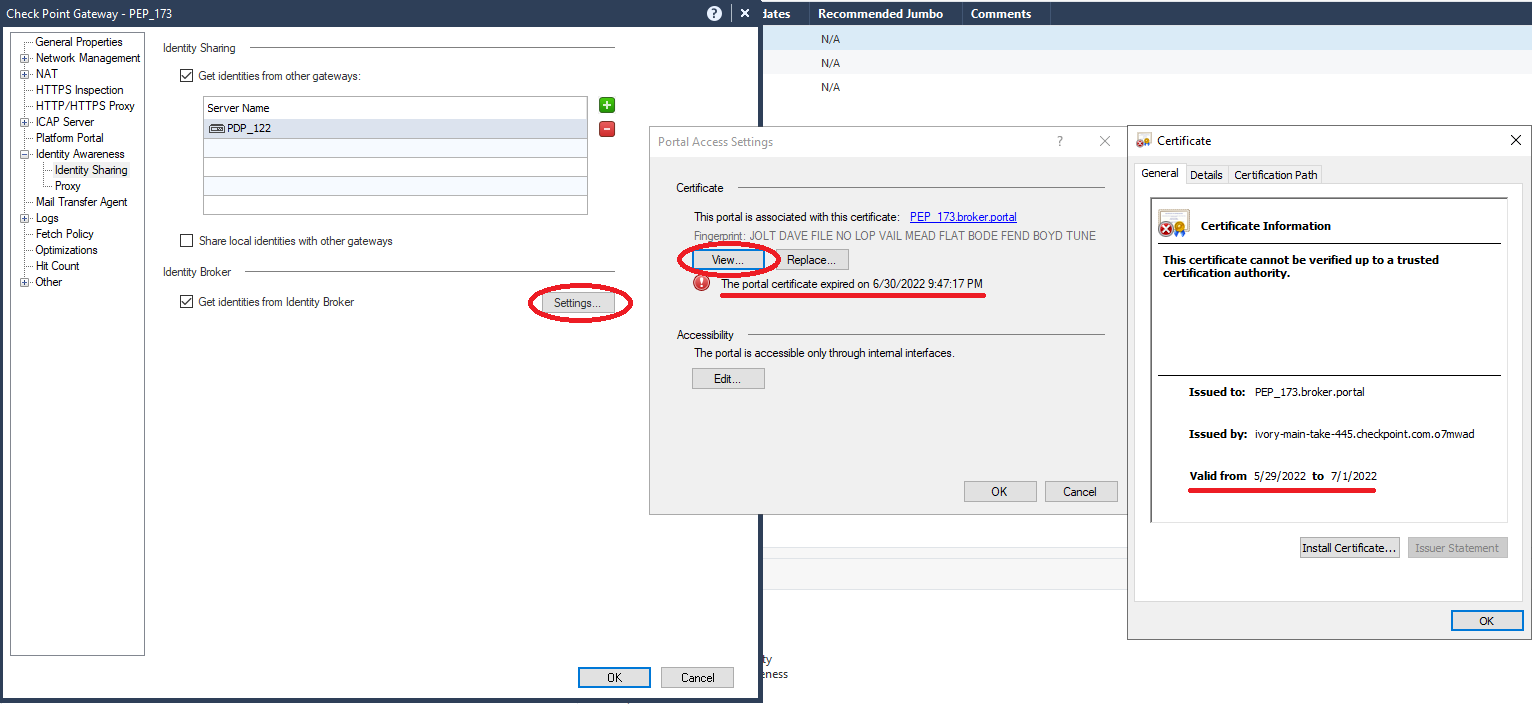
If certificates are expired or one of the Identity Broker peers cannot check a Certificate Revocation List, the Identity Broker peering is not established and Identity Sessions are not shared. As a result, identity-based policy rules do not match as expected.
Example CLI command output for an Identity Broker peering that is not established:

Example of Security Gateway object properties showing an expired certificate:
To create and Import a new dedicated certificate for the Subscriber to present to the Publishers as an HTTPS Server certificate:
No downtime is expected when you do the procedure below. Because the procedure includes complex manual configurations, we recommend to do it during a maintenance window.
Steps 1-4 are relevant for issuing a certificate from the Management Server's Internal Certificate Authority.
To use a certificate issued by an external Certificate Authority, renew the certificate by following the relevant procedures for the Certificate Authority. Then, begin the procedure below at Step 5.
-
Connect to the CLI of the Security Management Server
Dedicated Check Point server that runs Check Point software to manage the objects and policies in a Check Point environment within a single management Domain. Synonym: Single-Domain Security Management Server. / Domain Management Server. -
Log in to the Expert mode.
-
Run this command for the Security Gateway / Cluster object of the Identity Subscriber:
cpca_client create_cert -n "CN=<Name of Gateway / Cluster Object of the Identity Subscriberr>.broker.portal" -f <Name of Gateway /Cluster Object of the Identity Subscriber>_broker.p12 -k IKE -w "<Password>" -
Transfer the P12 file from the Management Server to the SmartConsole client computer.
-
In SmartConsole, from the left navigation panel, clickGateways & Servers.
-
Double-click on the relevant Identity Broker Subscriber Security Gateway / Cluster object.
-
From the left tree, click Identity Awareness > Identity Sharing.
-
In the right pane, in the Identity Broker section, click Settings.
-
In the Certificate section, click Replace.
-
Select the newly created P12 file and click Open.
-
Install the Access Control Policy on the Gateway / Cluster object for the Identity Broker Subscriber.
-
On the CLI of the Identity Awareness Gateway that is an Identity Publisher, fetch the new server certificate from the subscriber. Run:
BrokerCertFetcher <IP Address of Identity Subscriber>Verify that the CA Fingerprint and "Subject" shown are correct.
Note - If the Identity Subscriber is a cluster, you must run this command on each Cluster Member.
On the CLI of the Identity Awareness Gateway that is an Identity Publisher, run:
pdp broker reconnect <IP Address of Identity Subscriber>
Note - If the Identity Publisher is a cluster, you must run this command on each Cluster Member.
CLI Commands
You can use the "pdp broker <commands>" commands to monitor and do an inspection on the Identity Broker.
For full syntax and description of all the available CLI commands, see Command Line Reference.