
Granularity Control on Gateways and Plans
Spark Management provides granularity control that defines where and how specific settings are managed.
|
|
Note - Unless stated otherwise, "MSP account" refers to both types: MSP and MSSP. |
Management Overview
-
MSP accounts can manage their customer accounts’ Plans through a Shared Plan from the MSP account
-
Each Gateway object must to be assigned to a Plan (see Plans.)
-
A Plan can contain several Gateways.
There are 4 levels of granularity:
-
Shared Plan (MSP account only)
-
Customer account's Plan - Can be shared from the MSP or locally on the customer account.
-
A Gateway object (from Spark Management)
-
Locally managed from the device WebUI.
By default, a Gateway object fetches the configuration from the Plan to which it is assigned.

Exclude for a customer account (When it is a Shared Plan from MSP only):
Exclude one or more settings sections while keeping other settings synchronized with the Shared Plan to the assigned Gateways:
-
The administrator must open the Shared Plan within the customer account and navigate to the required settings section.
-
Click Override settings section and configure the applicable fields.
After you save your changes, the override applies immediately to all Gateways that are assigned to this Plan in the specific customer account.
The MSP administrator can always Revert override to the previous settings. A customer account administrator cannot revert. See Managing Shared Plans Across MSP Accounts.


Note - There are a few limited setting sections that by design are not synced with the Shared Plan and are managed only by the customer account. For details see, Managing Shared Plans Across MSP Accounts.
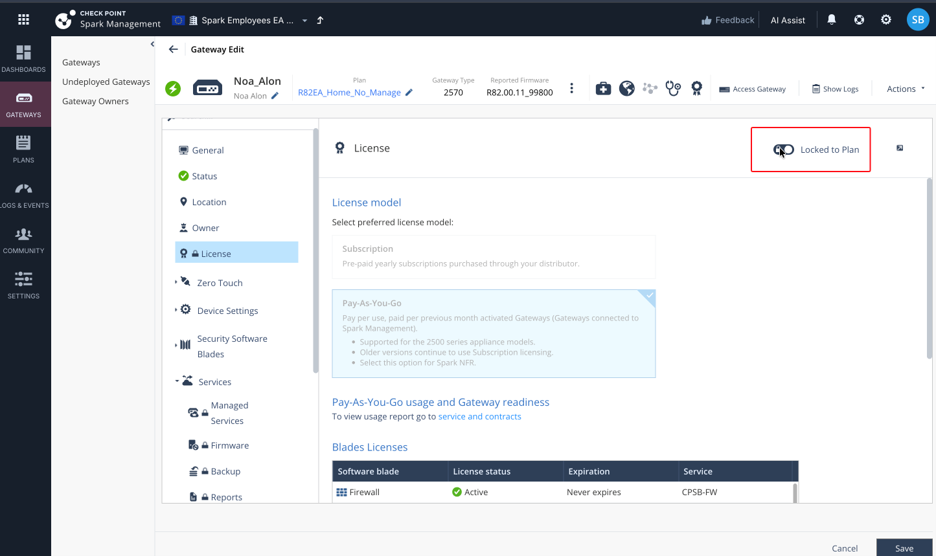
Exclude for a Gateway
Exclude one or more setting sections for a Gateway while keeping other settings synchronized with the assigned Plan:
-
Open the Gateway object and navigate to the specific settings section.
-
In the upper right corner, switch from Locked to Plan to Unlocked from Plan.
-
Configure and save your changes.
|
|
Notes:
|
Exclude from Plan or Gateway to manage locally on the device
Exclude a settings section from Spark Management and manage it directly on the device. The other sections are still managed by Spark Management.
-
Open the required setting section. Note there is no difference if this is from a Shared Plan, a customer account Plan, or a Gateway object.
-
Switch off the toggle Manage in SMP.

Note - When you turn off the toggle Manage in SMP, your configurations are no longer saved.
The Manage in SMP toggle controls whether a specific settings section is managed through Spark Management or locally on the Gateway device.
When enabled (ON):
-
The settings section is managed through Spark Management.
-
These settings on the Gateway's device WebUI are locked and cannot be modified.
-
All changes must be made through Spark Management.
When disabled (OFF):.
-
All management is through the device WebUI.
-
The configuration is no longer managed through Spark Management.
-
If you had previous changes, they are no longer saved in Spark Management.
"Enable" Toggle
-
This toggle is available and has an effect only when the Manage in SMP toggle is turned ON.
-
The Enable toggle activates or deactivates a specific settings section. It does not control where the configuration is managed.
|
|
Note - There are some special settings sections that can be managed only from Spark Management. The relevant toggles are provided in those cases. |
Watch the Video