
Terminal Server Identity Agent
Terminal Server Identity Agent can identify user and service accounts from your domain. It communicates with the Identity and Trust cloud service, and by using it, you can distinguish between each end user's traffic on the same terminal server.
Prerequisites to integrate Terminal Server Identity Agent with Identity and Trust:
-
You must have administrator permissions in the Terminal Server and the Identity and Trust service in the Check Point Portal.
-
The Terminal Server Identity Agent is provided as part of the Early Availability (EA) program.
For information about how to install the Identity Agent Check Point dedicated client agent installed on Windows-based user endpoint computers. This Identity Agent acquires and reports identities to the Check Point Firewall with Identity Awareness enabled. The administrator configures the Identity Agents (not the end users). There are two types of Identity Agents - Full and Light. You can download the Full and Light Identity Agent package from the Captive Portal - 'https://<Gateway_IP_Address>/connect' or from Support Center. for a Terminal Server, see sk134312.
To integrate Terminal Server Identity Agent with Identity and Trust:
-
Configure the Identity and Trust service in the Check Point Portal
-
Access the Identity and Trust service from an account with the administrator permissions.
-
From the left navigation pane, click Integrations.
-
On the Integrations page, click the + icon and select Identity Integrations > Terminal Server Agent.
-
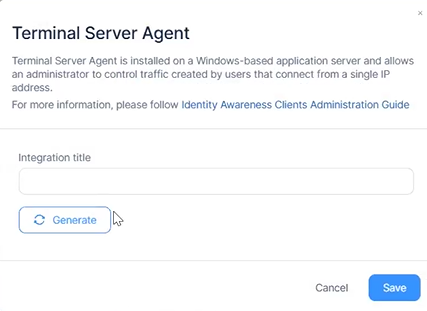
In the Integration title field, enter a name for the integration, and then click Generate.
-
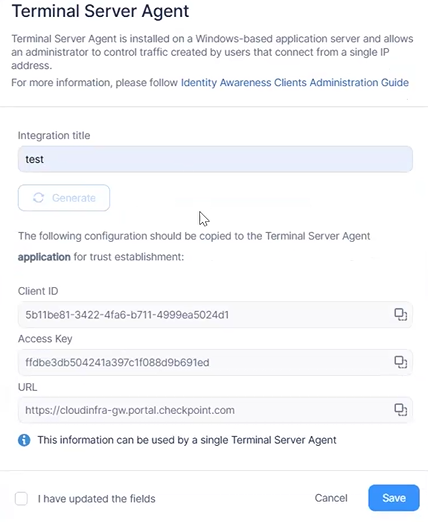
Copy the Client ID, Access Key, and the URL.

Note - The Access Key will be visible only until you close this window. Once closed, you will no longer be able to view the Access Key.
-
Select the I have updated the fields checkbox.
-
Click Save.
The status of the Terminal Server Identity Agent card shows Pending, indicating that Identity and Trust is awaiting integration with the Terminal Server Identity Agent.
-
-
Configure the Terminal Server Identity Agent
-
Access the Terminal Server from an account with the administrator permissions.
-
Open the Terminal Server Identity Agent.
-
In the Overview tab, in the Advanced section, click Cloud integration.
-
Enter the Client ID, Access Key,and the URL you copied in step 1.e.
-
Click Test.
The system checks and confirms the connectivity of the Terminal Server Identity Agent with Identity and Trust.
Note - If the test fails, perform these actions and then test the configuration:
-
Check the internet connectivity of the Terminal Server.
-
Verify the Client ID, Access Key, and URL.
-
Reboot the Terminal Server.
-
If the issue persists, contact Check Point Support.
-
-
Click Save.
The status of the Terminal Server Identity Agent card changes to Active.
-
To monitor the Terminal Server Identity Agent integration:
|
Card Status |
Description |
Action Required |
|---|---|---|
| Pending |
Identity and Trust is waiting for a connection with the Terminal Server Identity Agent. |
Complete the integration in the Terminal Server Identity Agent. See Configure the Terminal Server Identity Agent. |
|
Active |
Identity and Trust is connected with the Terminal Server Identity Agent. |
No action is required unless there is a change in the integration. The card shows the IP address of the Terminal Server and the number of connected users. See Managing Integrations. |