
Active Directory Authentication
Endpoint Security Active Directory Authentication
When an Endpoint Security client connects to the Endpoint Security Management Server, an authentication process identifies the endpoint client and the user currently working on that computer.
The Endpoint Security system can function in these authentication modes:
-
Unauthenticated mode - Client computers and the users on those computers are not authenticated when they connect to the Endpoint Security Management Server. They are trusted "by name". This operation mode is recommended for evaluation purposes only.
-
Strong Authentication mode - Client computers and the users on those computers are authenticated with the Endpoint Security Management Server when they connect to the Endpoint Security Management Server. The authentication is done by the Active Directory server using the industry-standard Kerberos protocol. This option is only available for endpoints that are part of Active Directory.
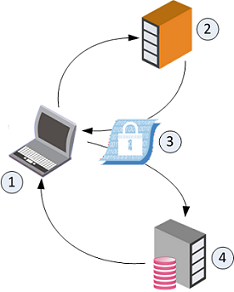
The authentication process:
-
The Endpoint Security client (1) requests an authentication ticket from the Active Directory server (2).
-
The Active Directory server sends the ticket (3) to the client (1).
-
The client sends the ticket to the Endpoint Security Management Server (4).
-
The Endpoint Security Management Server returns an acknowledgment of authentication to the Endpoint Security client (1).
If you use Active Directory Authentication, then Full Disk Encryption and Media Encryption & Port Protection are only supported on endpoint computers that are part of Active Directory.
Note - Full Disk Encryption and Media Encryption & Port Protection are not supported on endpoint computers in your environment that are not part of the Active Directory.