
Appendix M: Configuring Postfix as an Internal SMTP Relay for Non‑TLS Senders to Check Point Cloud SMTP Relay
Overview
Check Point Cloud SMTP Relay accepts SMTP connections only when they are encrypted with TLS.
Some internal systems, applications, printers, scanners, or legacy services may need to send email through Check Point Cloud SMTP Relay, but may not support TLS encryption. In such cases, you can use an internal mail relay as an intermediary.
This guide explains how to configure Postfix on Linux as an internal SMTP relay. Postfix accepts SMTP connections from trusted internal senders that do not support TLS and securely forwards those email messages to Check Point Cloud SMTP Relay using a TLS-encrypted connection.
Postfix is a widely used open-source Mail Transfer Agent (MTA) that supports secure SMTP communication using TLS encryption. Its official documentation includes support for TLS-encrypted SMTP sessions.
Use Case
Use this configuration when an internal sender needs to send email through Check Point Cloud SMTP Relay but cannot establish a TLS-encrypted SMTP connection directly.
In this setup:
Non-TLS sender > Postfix internal relay > TLS-encrypted connection > Check Point Cloud SMTP Relay
The connection between the sender and Postfix may be unencrypted, but the connection from Postfix to Check Point Cloud SMTP Relay must use TLS encryption.
Security Considerations
-
Relay access is restricted to internal networks.
-
TLS is enforced for outbound traffic.
-
No open relay exposure.
Limitations
-
No TLS for inbound connections (intentional for legacy devices).
-
Trust model is network-based not identity-based.
Prerequisites
Before configuring Postfix as an internal SMTP relay, ensure that the following requirements are met:
-
Linux Server for the Internal Relay
A Linux server is required to host Postfix. Deploy the Linux server inside the customer’s trusted internal network.
-
Software Requirements
-
Postfix
-
Check Point Cloud SMTP Relay
-
-
Postfix Installation
Install and configure Postfix as the local SMTP relay.
-
Network Access to Check Point Cloud SMTP Relay
The Postfix server must be able to make outbound SMTP connections to Check Point Cloud SMTP Relay on the required SMTP port.
-
Trusted Internal Senders only
Allow only approved internal systems to send email through the Postfix relay. The relay must not be exposed as an open relay.
-
TLS Support on the Postfix Server
Configure Postfix to forward all outbound email to Check Point Cloud SMTP Relay using TLS encryption.
-
IP-Based Authentication
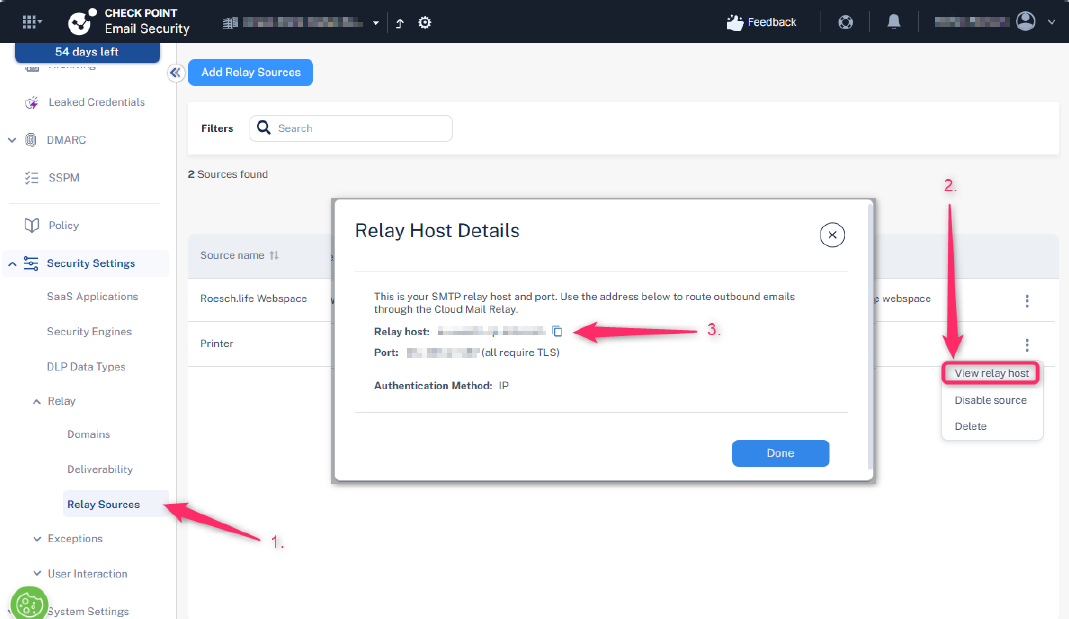
Check Point Cloud SMTP Relay currently authenticates the relay based on the source IP address of the Postfix server. The public outbound IP address used by the Postfix server must be allowed in the Check Point Cloud SMTP Relay service.

Note - Additional SMTP authentication mechanisms (such as username/password authentication) are planned and will be documented when available.
-
Basic Linux Administration Knowledge
This guide assumes familiarity with:
-
Installing Linux packages
-
Editing configuration files
-
Restarting services
-
Reviewing system logs
-
Architecture
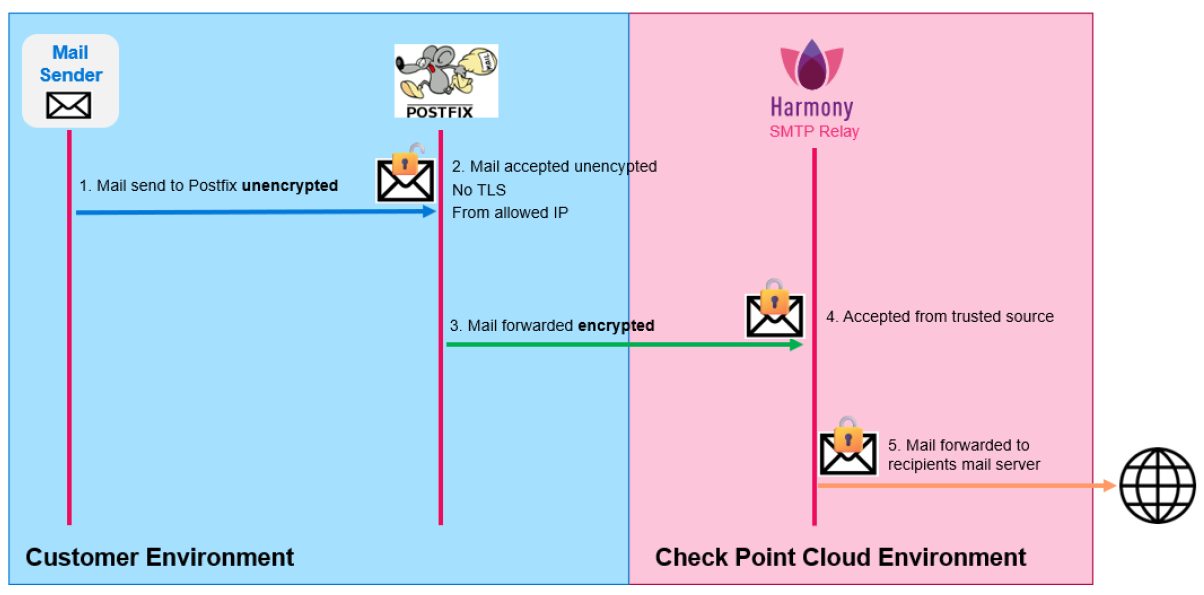
Postfix Configuration
Postfix must be configured as a mail relay (smarthost gateway). Its purpose is to:
-
Accept unencrypted SMTP connections (no TLS, no AUTH) from trusted internal devices.
-
Forward all outgoing mail to an external SMTP relay.
-
Enforce TLS encryption for outbound delivery.
-
Operate using an IP-based trust model (without SMTP authentication).
Core Configuration Concepts
If parameters are not explicitly mentioned, they remain unchanged from the default configuration.
The configuration file is usually located at:
/etc/postfix/main.cf
If you cannot find the configuration file, the following command displays the location of the file:
# postconf config_directory
To display only active Postfix configuration parameters:
# postconf -n
Identity and Host Configuration
myhostname = raspi.customerdomain.com
myorigin = $myhostname
smtp_helo_name = raspi.customerdomain.com
This configuration defines the system identity used in:
-
SMTP HELO/EHLO
-
Locally generated emails
This ensures a consistent and valid hostname is presented to the upstream relay.
Network and Trust Boundary
inet_interfaces = all

mynetworks = 127.0.0.0/8 [::1]/128 10.0.1.0/24
mynetworks_style = host
This configuration:
-
Allows Postfix to listen on all interfaces
-
Restricts relay usage to trusted IP ranges. Only clients within the following IP ranges are allowed to relay mail:
-
localhost
-
Internal subnet 10.0.1.0/24
-
This prevents the system from becoming an open relay.
It is recommended to leave mynetworks_style = host and manually define allowed trusted networks using the mynetworks parameter.
Ensure that you replace, add, or remove networks or interfaces according to the IP ranges for which you want to allow the relay to be used.
Relay Restrictions
smtpd_relay_restrictions =
    permit_mynetworks
    permit_sasl_authenticated
    reject_unauth_destinations
This parameter is one of the most important security mechanisms in Postfix because it prevents the server from being abused as an open relay.
smtpd_relay_restrictions defines the access control rules for SMTP relay requests in Postfix. It determines which clients are allowed to relay emails through the server to external domains.
This configuration:
-
Allows relaying only for:
-
permit_mynetworks: Trusted networks defined in mynetworks. -
permit_sasl_authenticated: Authenticated SMTP users (reserved for future compatibility).
-
-
Avoids open relay or relay to other domains:
reject_unauth_destinations: Blocks unauthorized relay attempts or destinations.
Inbound SMTP
smtpd_tls_security_level = noneThis configuration:
-
Disables TLS requirements for incoming SMTP.
-
Allows legacy devices (for example, printers) to send email without encryption.
Outbound SMTP (to relay)
relayhost = [eu-west-1.cp-mta.com]:587This configuration forwards all outgoing mail to the smart host.
|
|
Notes:
|
TLS Enforcement
smtp_tls_security_level = encrypt
smtp_tls_CAfile = /etc/ssl/certs/ca-certificates.crt
smtp_tls_session_cache_database = btree:${data_directory}/smtp_scache
This configuration:
-
Enforces TLS encryption for all outbound SMTP connections.
-
Uses the system CA store for certificate validation.
-
Enables TLS session caching for performance optimization.
No SMTP Authentication
smtp_sasl_auth_enable = noThis configuration:
-
Disables SMTP authentication.
-
Assumes the relay trusts the source IP address (IP whitelisting).
TLS Certificates (Inbound)
smtpd_tls_cert_file = /etc/ssl/certs/ssl-cert-snakeoil.pem
smtpd_tls_key_file = /etc/ssl/private/ssl-cert-snakeoil.key-
These are default self-signed certificates.
-
They are included for completeness but are not actively used because inbound TLS is disabled.
Local Delivery Settings
mydestination = $myhostname, raspi, localhost.localdomain, localhost
mailbox_size_limit = 0
mailbox_command =-
Local delivery is not a primary use case.
-
Mailboxes are effectively unused.
-
The system acts primarily as a relay.
Aliases
alias_maps = hash:/etc/aliases
alias_database = hash:/etc/aliases
This configuration enables standard alias handling for system users.
Compatibility Level
compatibility_level = 3.9This ensures that Postfix uses modern default behaviors aligned with Postfix version 3.9.
Restart Postfix to Load the New Configuration
After every change in the configuration file, make sure to restart the Postfix service.
Depending on the Linux version, the command may differ.
Example:
# sudo postfix reload
or
systemctl reload postfix
Postfix Configuration File
Here is an example of a working Postfix configuration file:
/etc/postfix/main.cf
# See /usr/share/postfix/main.cf.dist for a commented, more complete version
# See http://www.postfix.org/COMPATIBILITY_README.html
compatibility_level = 3.9


# Which domain that locally-originated mail appears to come from.
# Debian policy suggests to read this value from /etc/mailname.
#XX needs a review in postinst&config
#myorigin = /etc/mailname
#myorigin = $mydomain
myorigin = $myhostname


# Text that follows the 220 code in the SMTP server's greeting banner.
# You MUST specify $myhostname at the start due to an RFC requirement.
smtpd_banner = $myhostname ESMTP $mail_name (Debian)


# IP protocols to use: ipv4, ipv6, or all
# (set this explicitly so `post-install upgrade-configuration' wont complain)
inet_protocols = all


# List of "trusted" SMTP clients (maptype:mapname allowed) that have more
# privileges than "strangers". If mynetworks is not specified (the default),
# mynetworks_style is used to compute its value.
#mynetworks_style = class
#mynetworks_style = subnet
mynetworks_style = host
#
mynetworks = 127.0.0.0/8 [::ffff:127.0.0.0]/104 [::1]/128 10.0.1.0/24


# Uncomment the next line to generate "delayed mail" warnings
#delay_warning_time = 4h
# List of domains (maptype:mapname allowed) that this machine considers
# itself the final destination for.
mydestination = $myhostname, raspi, localhost.localdomain, , localhost


# Maximum size of a user mailbox
mailbox_size_limit = 0


# Optional external command to use instead of mailbox delivery. If set,
# you must set up an alias to forward root mail to a real user.
#mailbox_command = /usr/bin/procmail
#mailbox_command = /usr/bin/procmail -a "$EXTENSION"
mailbox_command =


# List of alias maps to use to lookup local addresses.
# Per Debian Policy it should be /etc/aliases.
alias_maps = hash:/etc/aliases


# List of alias maps to make indexes on, when running newaliases.
alias_database = hash:/etc/aliases


# Notify (or not) local biff service when new mail arrives.
# Rarely used these days.
biff = no


# Separator between user name and address extension (user+foo@domain)
#recipient_delimiter = +
recipient_delimiter = +


# A host to send "other" mail to
#relayhost = $mydomain
#relayhost = [gateway.example.com]
#relayhost = [ip.add.re.ss]:port
#relayhost = uucphost
relayhost = [eu-west-1.cp-mta.com]:587


# Where to look for Cyrus SASL configuration files. Upstream default is unset
# (use compiled-in SASL library default), Debian Policy says it should be
# /etc/postfix/sasl.
cyrus_sasl_config_path = /etc/postfix/sasl


# SMTP server RSA key and certificate in PEM format
smtpd_tls_key_file = /etc/ssl/private/ssl-cert-snakeoil.key
smtpd_tls_cert_file = /etc/ssl/certs/ssl-cert-snakeoil.pem
# SMTP Server security level: none|may|encrypt
smtpd_tls_security_level = none


# List of CAs for SMTP Client to trust
# Prefer this over _CApath when smtp is running chrooted
smtp_tls_CAfile = /etc/ssl/certs/ca-certificates.crt
# SMTP Client TLS security level: none|may|encrypt|...
smtp_tls_security_level = encrypt
# SMTP Client TLS session cache
smtp_tls_session_cache_database = btree:${data_directory}/smtp_scache
smtpd_relay_restrictions = permit_mynetworks permit_sasl_authenticated reject_unauth_destinations


myhostname = raspi.customerdomain.com
smtp_helo_name=raspi.customerdomain.com
inet_interfaces = all


smtp_sasl_auth_enable = no
Testing and Debugging
Sending a Test Email via the Internal Mail Relay
Sending a Test Email via PowerShell
You can use PowerShell to send a test email through the Internal relay.
|
|
Note - Ensure that you change the IP address and email addresses. |
Send-MailMessage `
  -SmtpServer "10.0.1.129" `
  -Port 25 `
  -From "smtprelaytest@customerdomain.com" `
  -To "mail@domain.com" `
  -Subject "SMTP relay test mail" `
  -Body "This is SMTP unencrypted"
Sending a Test Email via curl
For more detailed debugging information, use curl because it prints much more debugging information.
curl --url "smtp://10.0.1.129:25" ^
  --mail-from "smtprelay@customerdomain.com" ^
  --mail-rcpt "test@recipient.com" ^
  --upload-file mail.txt ^
-vmail.txt:
From: smtprelay@customerdomain.com
To: test@recipient.com
Subject: SMTP Relay Test

This mail has been sent via mail relay
Ensure that the recipient address in mail.txt matches the address specified in the --mail-rcpt parameter. Otherwise, delivery may fail.
Debugging Postfix
View Mail Logs
To see which emails are being tried to send via Postfix:
# journalctl -u postfix -f
or
# tail -f /var/log/mail.log
Check the Configuration
To check the syntax of the Postfix configuration file:
# postfix check
If you need to review the configuration, this command shows only the used parameters:
# postconf -n
Show the Mail Queue
# mailq
or
# postqueue -p
Flush the Mail Queue
During testing, emails may remain stuck in the queue because of incorrect relay parameters or temporary connectivity issues.
To retry delivery of queued emails:
# postqueue -f
Delete the Mail Queue
To delete all queued emails:
# postsuper -d ALL
To delete a specific queued email with ID:
# postsuper -d QUEUE_ID