
Google Gmail
Overview
Google offers a lot of APIs for Gmail and Google Drive. Email Security initiates the security by fetching all emails, attachments, files, and folders metadata in a bootstrap process. The bootstrap ensures the customer's dedicated virtual appliance has the same cloud state.
How it Works
Gmail offers file sharing and file collaboration tools that allow employees and outside collaborators to share files. Email Security adds additional layers of security, privacy, and compliance not offered by Google.
-
Malware detection with Anti-Virus and Advanced Persistent Threat detection
-
Data Leakage Prevention
-
Revocable Encryption (for files leaving the environment)
-
File sanitization
Required Permissions
The cloud state used for Gmail by Email Security is composed of the following entities:
-
Users
-
Emails
-
Attachments
-
Labels used in emails
Once the cloud state is saved, Email Security starts monitoring the changes for each user. To track each change for each user in the cloud, Email Security uses the following channels:
-
Subscribe each user to Google Push Notifications for new messages (https://developers.google.com/gmail/api/guides/push)
-
Fallback to polling each user history of changes, each minute if Push Notifications fails (https://developers.google.com/gmail/api/guides/sync)
Email Security uses the following resources for Gmail from the APIs:
-
Messages
-
Labels
-
History of changes
-
Attachments
Email Security requires the following permissions from Gmail.
|
Permissions Required by Gmail |
|---|
| View and manage Emails |
| View users on your domain |
| Insert mail into your mailbox |
| Manage mailbox labels |
| View, modify and delete your email |
| View your emails messages and settings |
| Manage your basic mail settings |
| View and manage Pub/Sub topics and subscriptions |
| View your email address |
| View your basic profile info |
Email Security requires delete permission to quarantine emails.
Activating Gmail
For details about the procedure to activate Gmail, see Activating Gmail.
Deactivating Gmail
-
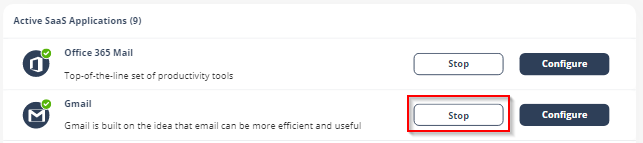
Navigate to Security Settings > SaaS Applications.
-
Click Stop for Gmail.
-
In the confirmation pop-up, click Stop.
Upon deactivation, Check Point will no longer protect your organization's Gmail mailboxes.
To complete the deactivation process:
-
If you receive Google Workspace protection was successfully uninstalled message, remove the Check Point apps.
For the procedure to remove the Marketplace app, see Uninstall a Google Workspace Marketplace app.
-
If you receive Check Point was unable to be uninstalled automatically from Google Workspace message, follow these steps.
-
Delete Check Point settings on Google Workspace:
-
Inbound gateway
-
SMTP relay service
-
Hosts
-
Groups
-
Service Admin User
-
-
Remove the Check Point apps.
For the procedure to remove the Marketplace app, see Uninstall a Google Workspace Marketplace app.
-
After a certain period of time your tenant-related data will be deleted. If you want the data to be deleted immediately, contact Check Point Support.