
Administrator Identity and Access Control
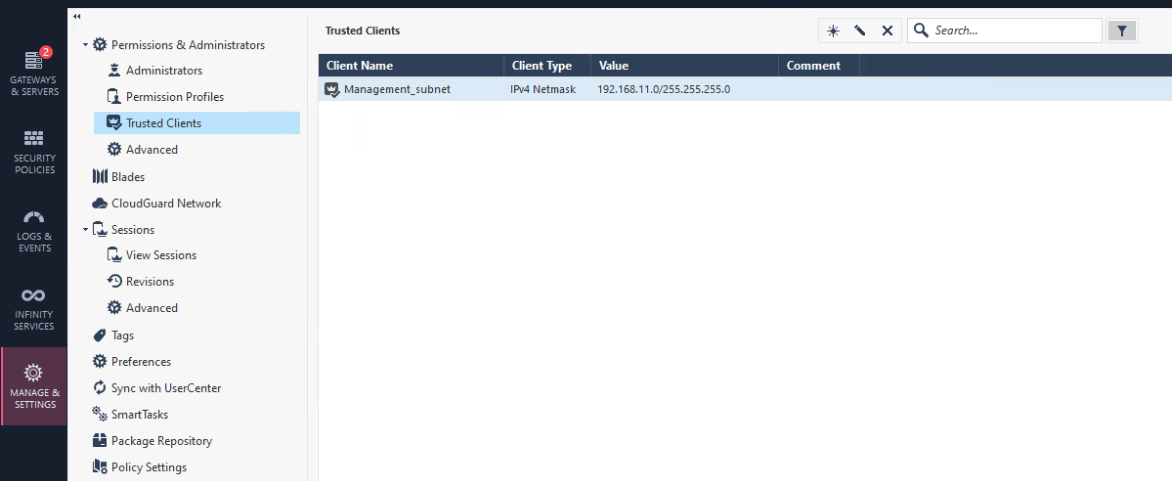
Limit SmartConsole Trusted Client Access settings
Recommendation: Restrict the IP addresses, subnets and ranges that can use a SmartConsole to the necessary minimum.
In addition to network controls that may be in place, the management server can be configured to limit access as well. It is an additional safeguard to ensure access is limited only to the required locations.
To validate and apply these settings:
-
SmartConsole > Manage & Settings view > Permissions & Administrators > Trusted Clients.
MFA and Identity Provider Integration
Recommendation: Enforce MFA for all administrative access using an external Identity Provider (for example, SAML-based administrator login or TACACS / RADIUS where applicable).
MFA reduces the risk of credential compromise and enables centralized identity lifecycle management (join / move / leave).
|
Item |
Default (Typical) |
Recommended |
|---|---|---|
|
MFA enforcement |
Not guaranteed |
Mandatory for all administrator roles |
|
Local only admin authentication |
Common |
IdP + MFA for daily admin access; keep break glass accounts controlled |
Implementation reference:
R82.10 Security Management Administration Guide > Creating an Administrator Account with SAML Authentication Login.
Review and Remove Unused Administrator Accounts Regularly
Recommendation: Periodically review administrator accounts and disable / remove accounts that are no longer used.
Dormant accounts are a common entry point for attackers and are often overlooked.
|
Item |
Default (Typical) |
Recommended |
|---|---|---|
|
Admin account reviews |
Ad hoc |
Quarterly review as a minimum |
|
Shared admin accounts |
Sometimes exist |
Avoid. Use named accounts only |
Ensure administrator access, password policy, and idle timeout are set
Recommendations:
-
Administrator access should expire at a set interval of time.
-
Administrator password length should be at least 10 characters long.
-
SmartConsole should be disconnected after 10 minutes of idle time and an administrator account lockout setting should be applied.
Attackers may be able to take control of an administrator host or capture passwords using a keylogger. Restricting access, expiring accounts, and locking accounts after authentication failures will reduce the possibility of an attacker gaining control over the management server.
To validate and apply these settings:
SmartConsole > Manage & Settings view > Permissions & Administrators > Advanced.
