Front Panel
|
|
Note - The diagrams below show the default installed hardware. |
|
Item |
Component |
Description |
|---|---|---|
|
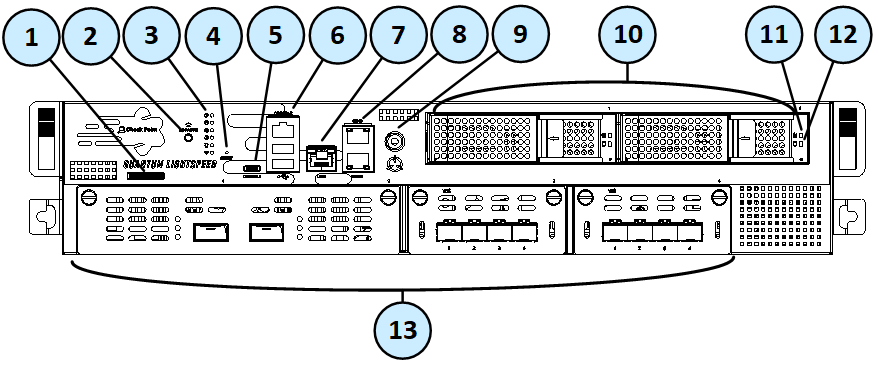
1 |
Service tag |
A slide out card that identifies the appliance and shows its serial number and MAC address. |
|
2 |
Locator button |
Turns the location beacon LED on and off in the appliance. |
|
3 |
System LEDs |
|
|
4 |
Reset |
Insert a pin for 5 to 8 seconds to perform a hardware reset. |
|
5 |
USB Type-C port |
For a serial connection to the appliance. |
|
6 |
1 x RJ45 Console port and 2 x USB 3.0 ports |
RJ45 port for a serial connection to the appliance. |
|
7 |
LOM port |
LOM (Lights Out Management) port to connect to the LOM Card. |
|
8 |
Management and Synchronization ports |
The top synchronization port synchronizes with cluster members or a High Availability peer. |
|
9 |
ESD grounding point |
When servicing the appliance, connect an ESD strap to this point. |
|
10 |
2 Storage devices |
When monitoring the storage devices with the |
|
11 |
Storage device power LED |
|
|
12 |
Storage device activity LED |
|
|
13 |
Expansion line cards |
For more information, see the LightSpeed 10/25/40/100G QSFP28 Ports Administration Guide. |
Legend for MLS200
|
Item |
Component |
Description |
||
|---|---|---|---|---|
|
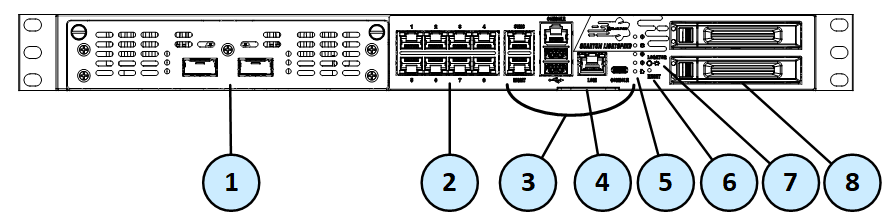
1 |
Expansion line card |
For more information, see the LightSpeed 10/25/40/100G QSFP28 Ports Administration Guide. |
||
|
2 |
On board LAN ports |
Eight 10/100/1000Base-T RJ-45 ports.
|
||
|
3 |
Appliance ports |
See Front Panel Appliance Ports on MLS200 - Use these ports to connect to the appliance. |
||
|
4 |
Identification Service Tag |
A slide out card that identifies the appliance and shows its serial number, MAC address, and model number. |
||
|
5 |
System LEDs |
|||
|
6 |
Reset |
Insert a pin for 5 to 8 seconds to perform a hardware reset. |
||
|
7 |
Locator |
Press the button to turn the Location beacon LED on and off in the appliance. |
||
|
8 |
Storage devices |
When monitoring the storage devices with the |
Front Panel Appliance Ports on MLS200
|
Item |
Component |
Description |
|---|---|---|
|
1 |
Synchronization port |
For synchronization with peer cluster members in ClusterXL configuration. |
|
2 |
RJ45 console port |
For a serial connection to the appliance. See Connecting to the Appliance CLI. |
|
3 |
Port activity LED |
|
|
4 |
Link speed LED |
|
|
5 |
Management port |
For an Ethernet connection from a remote computer. You manage the Gaia settings through this port. |
|
6 |
USB ports |
2 x USB 3.0 ports. |
|
7 |
LOM port |
LOM (Lights Out Management) port to connect to the LOM card. |
|
8 |
Console port |
A USB Type-C port for a serial connection to the appliance. |
Legend for MLS400
|
Item |
Component |
Description |
|---|---|---|
|
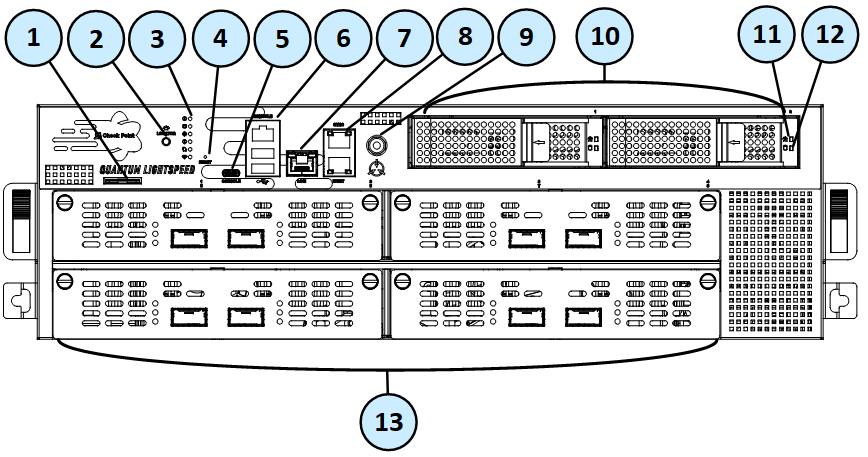
1 |
Service tag |
A slide out card that identifies the appliance and shows its serial number and MAC address. |
|
2 |
Locator button |
Turns the location beacon LED on and off in the appliance. |
|
3 |
System LEDs |
|
|
4 |
Reset |
Insert a pin for 5 to 8 seconds to perform a hardware reset. |
|
5 |
Embedded 2-Port Dual-Width 10/25/40/100G QSFP28 ports |
For more information, see the LightSpeed 10/25/40/100G QSFP28 Ports Administration Guide. |
|
6 |
USB Type-C port |
For a serial connection to the appliance. |
|
7 |
LOM port |
Lights Out Management port to connect to the LOM card. |
|
8 |
Management and Synchronization ports |
The top synchronization port (named " |
|
9 |
RJ45 Console port and |
RJ45 port for a serial connection to the appliance. |