
Security Gateway as ICAP Client
Use Cases
-
A content provider provides a popular web page with a different advertisement each time the page is viewed.
-
Translation of web pages to different formats that are applicable for special physical devices (PDA-based or cell-phone-based browsers).
-
Firewalls send outgoing HTTP / HTTPS requests to a service that makes sure the URI in the HTTP / HTTPS request is allowed. In this case, it is an HTTP / HTTPS request that is being adapted, not an object returned by an HTTP / HTTPS response.
-
Users download an executable program through a caching proxy. This proxy acts as an ICAP client and asks an external server to check the executable for viruses before accepting it into its cache.
Limitations
-
ICAP Client
 The ICAP Client functionality in a Check Point Firewall that enables it to interact with an ICAP Server responses (see RFC 3507), modify their content, and block the matched HTTP connections. does not support ClusterXLLoad Sharing mode.
 -
ICAP Client does not work when strict hold is active (Anti-Virus
Software Blade on a Check Point Firewall that uses real-time virus signatures and anomaly-based protections from ThreatCloud to detect and block malware at the Check Point Firewall before users are affected. Acronym: AV. in deep scan mode, Threat Extraction Software Blade on a Check Point Firewall that removes malicious content from files. Acronym: TEX. on HTTP, Threat Emulation Software Blade on a Check Point Firewall that monitors the behavior of files in a sandbox to determine whether or not they are malicious. Acronym: TE. in Hold mode).
ICAP Decisions
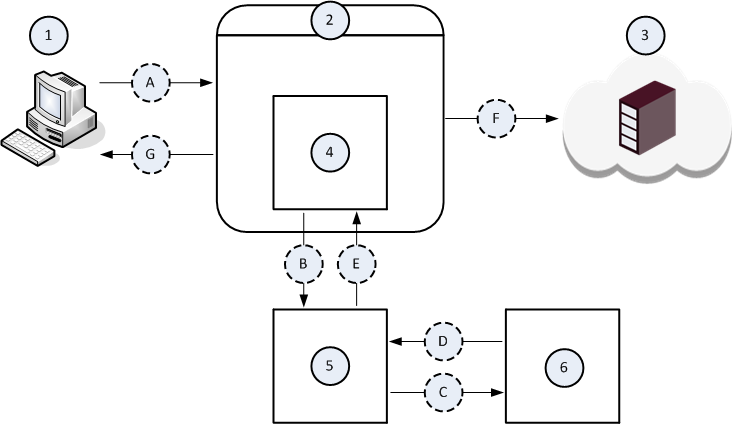
Example Data Flow in the Request Modification (REQMOD) Mode
|
Item |
Description |
|---|---|
|
1 |
The Client computer. |
|
2 |
The Proxy server. |
|
3 |
The Server computer on the Internet. |
|
4 |
The ICAP Client component that runs on the Proxy server (2). |
|
5 |
The ICAP Server component that runs on some computer on the network. |
|
6 |
The Data Loss Prevention component that runs on some computer on the network. |
|
A |
The Client computer (1) initiates a file upload to the Server computer (3). |
|
B |
The ICAP Client component (4) intercepts the uploaded file and sends it to the ICAP Server component (5). |
|
C |
The ICAP Server component (5) forwards the uploaded file to the Data Loss Prevention component (6) for examination, whether the DLP policy allows this file to leave your network. |
|
D |
The Data Loss Prevention component (6) returns its verdict about the uploaded file. |
|
E |
The ICAP Server component (5) returns one of these to the ICAP Client component (4):
|
|
F |
The ICAP Client component (4) forwards the modified file from the ICAP Server component (5) to the Server computer (3). |
|
G |
The ICAP Client component (4) forwards the block message from the ICAP Server component (5) to the Client computer (1). |
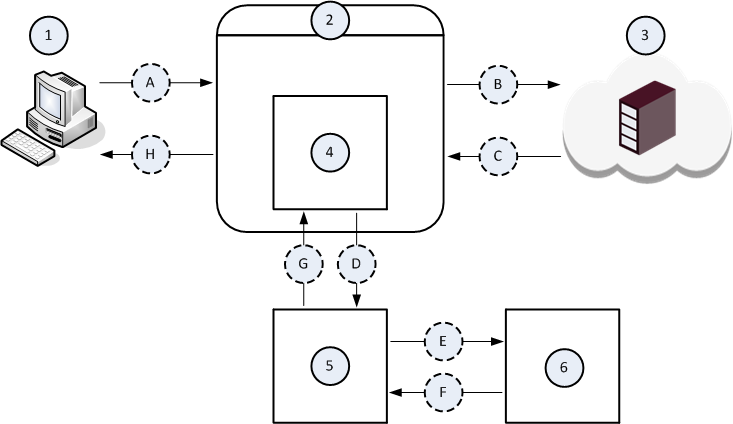
Example Data Flow in Server Response Modification (RESPMOD) Mode
|
Item |
Description |
|---|---|
|
1 |
The Client computer. |
|
2 |
The Proxy server. |
|
3 |
The Server computer on the Internet. |
|
4 |
The ICAP Client component that runs on the Proxy server (2). |
|
5 |
The ICAP Server component that runs on some computer on the network. |
|
6 |
The Threat Emulation component that runs on some computer on the network. |
|
A |
The Client computer (1) initiates a file download from the Server computer (3). |
|
B |
The Proxy server (2) forwards the file download request to the Server computer (3). |
|
C |
The Server (3) sends the requested file. |
|
D |
The ICAP Client component (4) intercepts the downloaded file and sends it to the ICAP Server component (5). |
|
E |
The ICAP Server component (5) forwards the downloaded file to the Threat Emulation component (6) for examination, whether this file is malicious. |
|
F |
The Threat Emulation component (6) returns its verdict about the downloaded file. |
|
G |
The ICAP Server component (5) returns one of these to the ICAP Client component (4):
|
|
H |
The ICAP Client component (4) forwards one of these responses from the ICAP Server component (5) to the Client computer (1):
|