
Maestro Fastforward
Introduction to Maestro Fastforward
The Maestro Fastforward feature offloads chosen policy rules for trusted connections to the Maestro Orchestrator for hardware acceleration of accept / drop rules.
Benefits
-
Low latency: Sub microsecond latency. The feature provides low latency for specific trusted sensitive flows (examples: voice, trading, internal trusted server-to-server communications and more).
-
Throughput: Port line rate throughput (based on the connected interfaces bandwidth). Achieves as much as 200Gbps for one connection. You can enable the feature for high volume trusted connections such as server to server, backups and more.
-
Troubleshooting / Bypassing: Forwards selected tuples as part of a troubleshooting process.
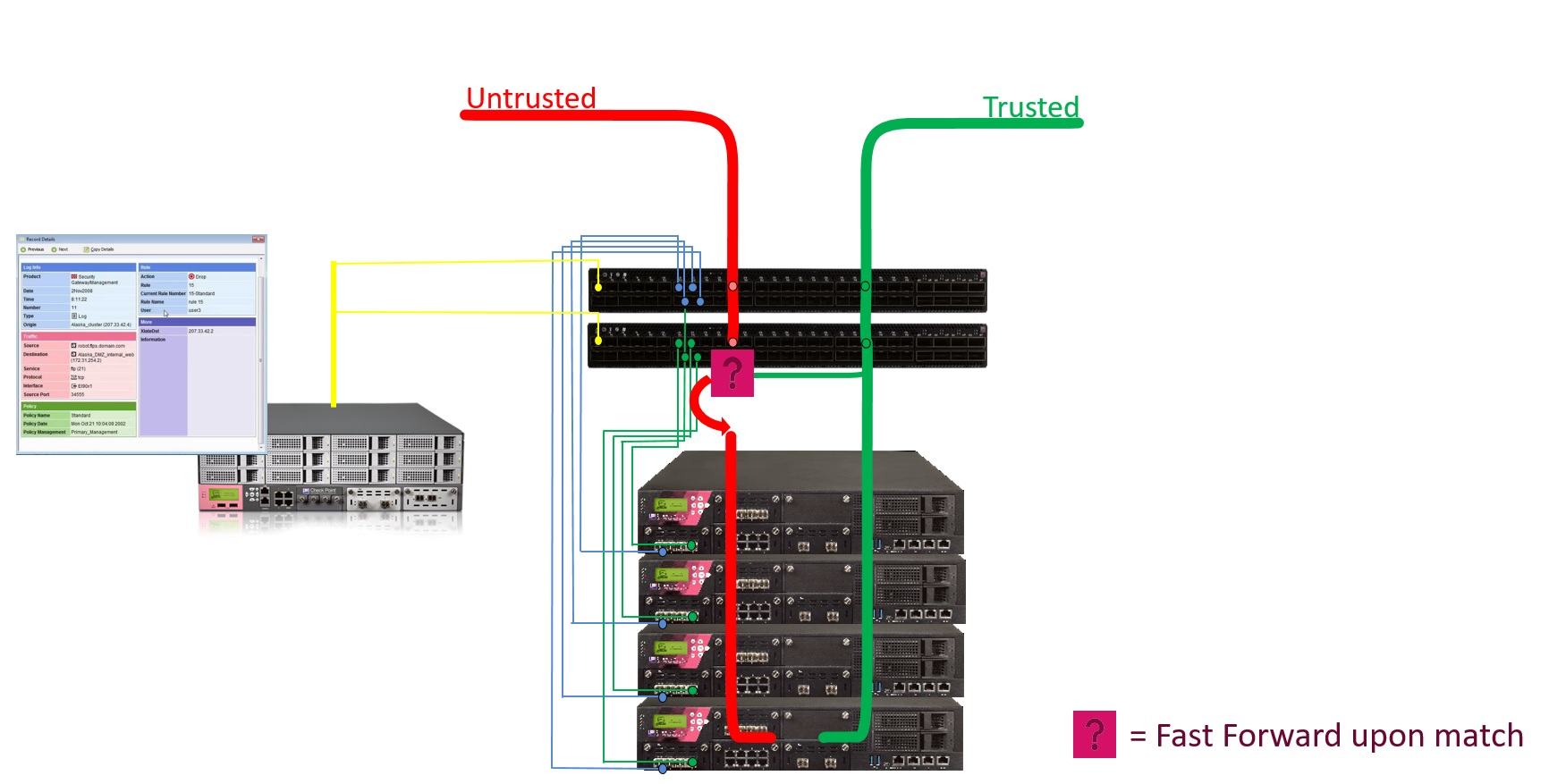
How Maestro Fastforward Works
Policy
The Administrator marks desired rules to be offloaded to the Orchestrator by giving the applicable rule names a specific prefix (the prefix is configurable). During policy installation, the applicable rules are translated into Access Control Lists (ACLs) and offloaded to the Orchestrator to be enforced on the hardware level.
Routing
To accelerate a trusted connection on the Orchestrator at the Layer 3 level (routing), the Orchestrator has to know the networking information of the Security Gateway in order to send the packet through the correct outgoing interface to the correct next hop. The Orchestrator must have the same view of the topology as the Security Gateway. Therefore, the feature replicates the Security Gateway's / Virtual System's routing topology to accelerate traffic at the Orchestrator level. In addition, this logic occurs at the hardware level and is very robust.
|
|
Important:
|
FAQ for Maestro Fastforward
 What are the supported deployment types?
-
Single Site, or Dual Site.
-
One Orchestrator, or two Orchestrators on a site.
-
Gateway mode, or VSX mode (the configuration is for each Virtual System).
Is there Firewall logging for the connections accelerated by Fastforward?
-
For TCP connections:
For rules with the Action "Accept", the Orchestrator sends the TCP SYN packets to the Security Group.
The Security Group generates a corresponding log.
-
For UDP connections:
The Security Group does not generate logs.
Do I need to add a rule for Client-to-Server, and Server-to-Client (return traffic)?
No. The rules should be created as in stateful inspection.
The ACL translation mechanism automatically adds Client-to-Server and Server-to-Client rules.
Does the Firewall inspect traffic accelerated by Fastforward?
Only SYN / SYN-ACK packets (for Accept Rules).
The trade-off of the feature is to fully offload trusted connections to be handled on the Orchestrator hardware level, therefore allowing very low latency and very high throughput without having an effect on the Security Group Members.
Topologies for Maestro Fastforward
| Topology | Explanation |
|---|---|
|
Single Site, One Orchestrator |
With one Orchestrator on a Single Site, there are no restrictions on physical connectivity. Interfaces can be regular or bond interfaces. |
|
Single Site, Two Orchestrators |
With two Orchestrators on a Single Site, only "cross-Orchestrator" bond interfaces are allowed. Meaning, each bond interface has a subordinate interface on each Orchestrator. For more information, see Special Considerations for Maestro Fastforward. |
|
Dual Site |
In Dual Site configuration, only "cross-Orchestrator" bond interfaces are allowed on each site. Meaning, each bond interface has a subordinate interface on each Orchestrator on each site. For more information, see Special Considerations for Maestro Fastforward. In Dual Site configuration, only the active site enforces the ACLs. If there is a site failover, the new active site is activated. |
|
VSX |
In VSX mode, the feature works on each Virtual System, on which you enabled it. |
Configuration of Maestro Fastforward
The Fastforward feature is disabled by default.
You configure the Fastforward feature for each Security Group.
In VSX mode, you configure the feature on each Virtual System.
To enable the Fastforward feature
Part 1 of 2 - Configuration on the Security Group:
-
Connect to the command line on the Security Group.
-
Log in to Gaia gClish.
-
In VSX mode, move to the context of the applicable Virtual System:
set virtual-system <VSID> -
Configure a prefix for the Access Control rules:
set maestro fastforward rulebase-prefix enable prefix <Name Prefix>For example, if your prefix is set to “
ff_rule”, for the policy rule names use: “ff_rule_1”, “ff_rule_2”, and so on.[Global] MyChassis-01> set maestro fastforward rulebase-prefix enable prefix ff_rule1_01:Fastforward prefix status: enabled. Prefix is "ff_rule"Please install policy from SmartConsole for the change to take effect.2_01:Fastforward prefix status: enabled. Prefix is "ff_rule"Please install policy from SmartConsole for the change to take effect. -
Enable the Fastforward feature:
set maestro fastforward state onExample output:
1_01:Routing configuration validation finished successfully.Fastforward status: enabledPlease install policy from SmartConsole for the change to take effect.2_01:Routing configuration validation finished successfully.Fastforward status: enabledPlease install policy from SmartConsole for the change to take effect.
Part 2 of 2 - Configuration in SmartConsole:
-
Connect with SmartConsole to the Management Server that manages this Security Group / Virtual System.
-
Configure the applicable Access Control rules with the prefix you configured earlier on the Security Group.
Example:
Name
Source
Destination
VPN
Services & Applications
Action
Track
Install On
ff_rule_1
Backup_Server_1
Backup_Server_2
Anynfsd-tcpAcceptLogPolicy Targets
Note - You can configure these rules with API calls. See the Check Point Management API Reference (at the top, select the correct version) .

Important:
-
You only have to configure the rules for the Client to Server (C2S) traffic.
-
For rules with the action "
Accept", the Management Server automatically creates the corresponding rules for the Server to Client (S2C) traffic.
-
These rules support only the actions "Accept" and "Drop".
Additional notes about the Access Control rules for Fastforward:
Notes for rules with the action "Accept"
Rule Column
Notes
Source
-
In the "
Source" column, you can add one or more objects of these types only:-
Host -
Network -
Group -
Address Range
-
-
In the "
Source" column, you cannot use the object "Any".You must add an explicit object.
-
The Security Group must be able to connect to the IP address in the explicit object (you added in the "
Source" column) through its Data interfaces (not the Management interface). -
In the "
Source" column, you cannot use objects with IP addresses that belong to networks that are directly connected to the Security Group through its Data interfaces.
Destination
-
In the "
Destination" column, you can add one or more objects of these types only:-
Host -
Network -
Group -
Address Range
-
-
In the "
Destination" column, you cannot use the object "Any".You must add an explicit object.
-
The Security Group must be able to connect to the IP address in the explicit object (you added in the "
Destination" column) through its Data interfaces (not the Management interface). -
In the "
Destination" column, you cannot use objects with IP addresses that belong to networks that are directly connected to the Security Group through its Data interfaces.
Services & Applications
-
You can add one or more service objects of type "
TCP" with these settings:-
single port
-
range of ports
-
source port
-
-
You can add one or more service objects of type "
UDP" with these settings:-
single port
-
range of ports
-
source port
-
-
You can add one or more service objects of type "
Other Service" with an IP-based Protocol.
Notes for rules with the action "Drop"
Note - Orchestrator drops the traffic at an early stage, at the hardware level.
Rule Column
Notes
Source
-
In the "
Source" column, you can add one or more objects of these types only:-
Host -
Network -
Group -
Address Range
-
-
In the "
Source" column, it is supported to use the object "Any".It is not necessary to add an explicit object.
-
In the "
Source" column, you cannot use objects with IP addresses that belong to networks that are directly connected to the Security Group through its Data interfaces.
Destination
-
In the "
Destination" column, you can add one or more objects of these types only:-
Host -
Network -
Group -
Address Range
-
-
In the "
Destination" column, it is supported to use the object "Any".It is not necessary to add an explicit object.
-
In the "
Destination" column, you cannot use objects with IP addresses that belong to networks that are directly connected to the Security Group through its Data interfaces.
Services & Applications
-
You can add one or more service objects of type "
TCP" with these settings:-
single port
-
range of ports
-
source port
-
-
You can add one or more service objects of type "
UDP" with these settings:-
single port
-
range of ports
-
source port
-
-
You can add one or more service objects of type "
Other Service" with an IP-based Protocol.
-
-
Install the Access Control Policy on the Security Gateway object / Virtual System object.
|
|
Notes:
|
To disable the Fastforward feature
Part 1 of 2 - Configuration on the Security Group:
-
Connect to the command line on the Security Group.
-
Log in to Gaia gClish.
-
In VSX mode, move to the context of the applicable Virtual System:
set virtual-system <VSID> -
Disable the Fastforward feature:
set maestro fastforward state offIf this operation fails, it is possible to disable the feature forcefully. See Troubleshooting of Maestro Fastforward.
Example output:
1_01:clearing ACLs from all relevant OrchestratorsFastforward status: disabled2_01:clearing ACLs from all relevant OrchestratorsFastforward status: disabled
Part 2 of 2 - Configuration in SmartConsole:
-
Connect with SmartConsole to the Management Server that manages this Security Group / Virtual System.
-
Disable the applicable Access Control rules with the prefix you configured earlier on the Security Group.
In the No. column, right-click the rule and click Disable.
-
Install the Access Control Policy on the Security Gateway object / Virtual System object.
Monitoring Maestro Fastforward
The Security Group logs TCP connections as usual. See the logs in SmartConsole or SmartView.
The "tor_util fastforward" command on the Orchestrator shows additional information.
To see the hits for the Fastforward rules on the Orchestrator
-
Connect to the command line on the Orchestrator.
-
Log in to the Expert mode.
-
Get the hits for the Fastforward rules:
tor_util fastforward show rules <Security Group ID> {0 | <Virtual System ID>}
Notes:
-
Rule IDs in the left-most column are based on the order of the Fastforward rules, and not on the real Access Control rule IDs.
In Gateway mode, enter the digit 0 (zero) for the second argument.
-
In VSX mode, enter the Virtual System ID.
-
Example output for the Security Group 1 (in the Gateway mode):
To see the current configuration status on the Orchestrator:
-
Connect to the command line on the Orchestrator.
-
Log in to the Expert mode.
-
Get the status:
tor_util fastforward show status <Security Group ID> {0 | <Virtual System ID>} [verbose]
Notes:
-
In Gateway mode, enter the digit 0 (zero) for the second argument.
-
In VSX mode, enter the Virtual System ID for the second argument.
-
For more information, use the optional argument "
verbose".
-
Maestro Fastforward Considerations for Administrators
|
Operation |
Regular Flow |
Additional Flow |
|---|---|---|
|
Policy Installation |
The Management Server transfers the policy to the Security Group. |
The Management Server translates into stateless ACLs the rules that contain the configured prefix in their Name column. The Security Group transfers these ACLs to all Orchestrators. If there are no changes in the policy, the Security Group skips this step. |
|
Modifying topology (physical interfaces / routes / bond interfaces) |
The administrator adds, modifies, or removes an interface or a route.
When done:
This makes sure that enforcement is aware of the modifications (Firewall topology, Anti-Spoofing, and more). |
During each policy installation, the Security Group transfers the networking topology to all Orchestrators (interfaces, neighbors, static routes). If there are no changes in the topology, the Security Group skips this step. |
Routing Mechanism in Maestro Fastforward
Explanation
During a policy installation, the Security Group updates the Orchestrators with the networking information:
-
Interfaces (physical interfaces, VLAN, bond interfaces)
-
Neighbors table (ARP table)
-
Routing table
The Orchestrator builds the topology in its hardware.
If there are two Orchestrators, each Orchestrator builds its own topology based on its present interfaces.
For example, if bond1 with 2 subordinate interfaces eth1-01 and eth2-01 is in the topology, Orchestrator #1 has eth1-01 on its topology, while Orchestrator #2 has eth2-01 in its topology.
This is because each Orchestrator accelerates locally, with no forwarding between the Orchestrator.
When a packet is matched against the Access Control rules that are configured for acceleration, it is forwarded to the Routing mechanism in the Orchestrator to perform a routing decision. Based on the routing decision, it finds the outgoing interface through which to send the packet.
To see the routing topology, run this command on the Orchestrator in the Expert mode:
|
|
Policy Mechanism in Maestro Fastforward
Explanation
Policy rules for trusted flows that are to be enforced and accelerated on the Orchestrator level are defined by unique prefix to the rules' names.
During policy installation, the Management Server translates these rules into stateless ACLs, and transfers them to the Security Group. The Security Group transfers these ACLs to the Orchestrators for enforcement.
The accelerated connections must be trusted, as they bypass firewall security features to achieve high throughput and low latency for specific services.
UDP rules are fully accelerated on the Orchestrators.
TCP rules - for Accept Rules, the SYN and SYN-ACK packets are sent to the Security Group for the first match, and mainly for logging purposes. After that, the other packets are accelerated on the Orchestrator.
The acceleration is for each rule offloaded by the ACLs offloaded, and not for each connection / session as in SecureXL. The acceleration here is stateless.
To see the offloaded rules on the Orchestrator, run this command in the Expert mode (see Monitoring Maestro Fastforward):
|
|
Example output:
[Expert@MHO1:0]# tor_util fastforward show rules 1 0 Fastforward Rule Hits: ====================== +------------+--------------------+-------------+----------+-----------------------------------------------------------------------+ |Counter ID |Hit Count |Port |Direction |Description | +------------+--------------------+-------------+----------+-----------------------------------------------------------------------+ |66240512 |472065 |FF_SG1_VS0 |inbound |Rule 1 C2S UDP, 1.1.1.0/24:ANY -> 2.2.2.0/24:3000, ACCEPT | |66256896 |23740853 |FF_SG1_VS0 |inbound |Rule 1 S2C UDP, 2.2.2.0/24:3000 -> 1.1.1.0/24:ANY, ACCEPT | |66273280 |102381 |FF_SG1_VS0 |inbound |Rule 2 C2S UDP, 1.1.1.0/24:ANY -> 2.2.2.0/24:4000, DROP | |66289664 |589884 |FF_SG1_VS0 |inbound |Rule 3 C2S TCP, 10.10.10.0/24:ANY -> 20.20.20.0/24:22, ACCEPT | |66306048 |968405 |FF_SG1_VS0 |inbound |Rule 3 S2C TCP, 20.20.20.0/24:22 -> 10.10.10.0/24:ANY, ACCEPT | |66322432 |0 |FF_SG1_VS0 |inbound |Rule 4 C2S UDP, 10.10.10.0/24:ANY -> 20.20.20.0/24:445, ACCEPT | |66338816 |0 |FF_SG1_VS0 |inbound |Rule 4 S2C UDP, 20.20.20.0/24:445 -> 10.10.10.0/24:ANY, ACCEPT | |66371584 |0 |FF_SG1_VS0 |inbound |Rule 5 C2S ip proto ANY, 9.9.9.9/32:ANY -> 10.10.10.10/32:ANY, ACCEPT | |66027520 |0 |FF_SG1_VS0 |inbound |Rule 5 S2C ip proto ANY, 10.10.10.10/32:ANY -> 9.9.9.9/32:ANY, ACCEPT | +------------+--------------------+-------------+----------+-----------------------------------------------------------------------+ |
Policy Installation Flow on SMO
-
The SMO receives the policy and converts the policy rules into stateless ACLs.
-
The SMO calculates a unique policy signature based on the content of the rules.
Routing on SMO
-
"Check"- The SMO verifies if new routing topology changes were introduced
-
"Apply" - The SMO applies the routing changes on the Orchestrator.
Policy
-
"Check"- The SMO checks if the Orchestrator has already installed the same policy signature.
-
"Upload and Prepare" - If the policy was not yet applied, the SMO uploads the ACLs to the Orchestrator for preparation.
-
"Apply" - The SMO applies the policy ACLs on the Orchestrator.
-
"Activate" - The SMO activates / deactivates the Fastforward operation state based on the site state (active site activates the feature, standby site deactivates the feature).
|
|
Note - If there are two Orchestrators on the site, the procedure is applied to each Orchestrator. |
Packet Matching
-
A packet enters an uplink port on the Orchestrator (example, eth1-05, port 5).
-
If Fastforward is activated (on the active site), the packet is first matched against its ACL policy.
-
If the packet is accepted, it is forwarded to the Orchestrator routing topology to be routed outside through a routing decision.
-
If there is no match in the policy ACLs, the packet goes through the regular distribution process towards the Security Group members.
Some packets are sent to the Security Group regardless of a match:
-
TCP SYN and TCP SYN-ACK packets (for rules with the action "
Accept") -
Fragmented packets (for rules with a user-defined service)
Special Considerations for Maestro Fastforward
Multiple Orchestrators on the same site
Cross-bond requirement:
Each Orchestrator builds its own virtual routing topology.
There is no forwarding in between Orchestrators. Each side handles the "shortcut" path of Fastforward.
Therefore, you must configure interfaces as cross-Orchestrator bond interfaces, meaning that each bond has subordinate interfaces present on each Orchestrator.
|
Example |
Bond Subordinate Interfaces |
|---|---|
|
Good Example |
Bond1 - eth1-05, eth2-05 Bond2 - eth1-06, eth2-06 |
|
Bad Example |
Bond1 - eth1-05, eth1-06 Bond2 - eth2-05, eth2-06 |
Monitoring of bond subordinate interfaces:
If only one of the Orchestrators loses links on its subordinate interfaces, routing becomes inconsistent because one of the Orchestrators and the Security Group have full routing topology, while the other Orchestrator lost its subordinate interfaces and has no way to accelerate locally. Because one of the subordinate interfaces went down, it now routes the packets differently, probably through an alternate route / default gateway).
In such a scenario, the two Orchestrators enter the temporary bypass state and forward traffic to the Security Group.
When link state return to "up", the Orchestrators exit the temporary bypass state.
|
|
Best Practice - To avoid such a scenario, we recommend to configure two subordinate interfaces for each Orchestrator for a bond (total 4 subordinate interfaces - 2 for each Orchestrator). |

Topology inconsistency:
In a Maestro deployment with multiple Orchestrators, Fastforward requires that all interfaces configured on the Security Group are connected at the active site. This ensures consistent topology visibility across all Orchestrators.
If any interface configured on the Security Group loses connectivity—even one that does not handle important traffic—Fastforward will be disabled, and traffic will be forwarded through the Security Group instead of being accelerated by the Orchestrators.
If a bond interface fails on only one Orchestrator, it creates a topology inconsistency that affects traffic acceleration. In such a case, the Orchestrators on the affected site will enter internal bypass mode.
-
Internal Bypass Mode Behavior: In this mode, all traffic is forwarded to the Security Group, bypassing Fastforward acceleration, until topology consistency is restored.
-
Restoring Normal Operation: When all interfaces regain connectivity, the Orchestrators exit internal bypass mode and resume their previous state (active/inactive).
Example:
Consider a deployment with two Orchestrators and three bond interfaces:
-
Bond1 (External Traffic)
-
Bond2 (Critical Internal Traffic)
-
Bond3 (Non-Critical Internal Traffic)
Each bond has a total of four subordinate interfaces, split between the two Orchestrators.
If a subordinate interface from Bond3 (which does not handle critical traffic) fails on one Orchestrator:
-
Bond2 still has full connectivity
-
Bond1 still has full connectivity
-
Bond3 is partially disconnected
Since Bond3 does not handle critical traffic, Fastforward should continue functioning.
Because the topology is inconsistent, the Orchestrators enter internal bypass mode, forcing all traffic—including Bond2’s critical traffic—through the Security Group. Fastforward is disabled even though the critical traffic paths remain intact.
Dual Site
Fastforward accelerates the traffic only on the active site .The standby site is in a deactivated state.
When a site failover occurs, the new SMO updates the Orchestrators with the new state and activates / deactivates them accordingly.
Monitoring of Downlink Ports
Fastforward monitors link states on downlink ports connected to each Orchestrator.
When all downlink ports fail on an Orchestrator, by default, Fastforward enters the bypass mode on that Orchestrator. This makes sure no traffic is forwarded when there are no members in the Security Group.
Support of Bond Interfaces
If there are multiple bond subordinate interfaces on an Orchestrator (for example, bond1 has eth1-01 and eth1-02), the Orchestrator chooses a primary subordinate interfaces to send traffic.
This is because bond interfaces are not configured on the Orchestrator, but only on the Security Group Members.
To overcome this:
-
Ingress traffic - Incoming traffic on a bond subordinate interface is handled by Fastforward, as usual.
-
Egress traffic - If traffic is routed out through a bond interface, the Orchestrator sends it through the primary subordinate interface of the bond interface. A primary subordinate interface is an interface withe lowest ID with the link in the "up" state.
Known Limitations of Maestro Fastforward
General
|
ID |
Description |
|||
|---|---|---|---|---|
|
PMTR-110663 |
Before you can enable the Fastforward feature, you must make sure that for each configured static route, the Security Group Members learned the MAC Address of the nexthop device and can reach the nexthop device's IP address. |
|||
|
PMTR-76262 |
Fragments are forwarded to the Security Gateway for rules that contain a service. |
|||
|
PMTR-76274 |
Complex connections (FTP, SIP, and more) do not open data connections dynamically.
In general, there are two options for complex connections:
|
|||
|
PMTR-108476 |
Orchestrator MHO-175 supports a maximum of 10,000 ACL rules. If the Access Control policy was translated into more ACL rules, the Maestro Fastforward feature may stop working during policy installation from the Management Server.
Short-term workaround on the Orchestrator:
Long-term workaround on the Management Server: Reconfigure the Access Control policy to contain fewer specific rules (for example, for specific Hosts) and to contain more generic rules (for example, for Networks). |
|||
|
- |
You must not configure subnets for the VPN Encryption Domain as Fastforward rules. This makes sure the Security Gateway handles the encryption and decryption of traffic. |
Layer 3
|
ID |
Description |
|---|---|
|
PMTR-76277 |
Dynamic Routing is not supported. |
|
PMTR-76258 |
IPv6 is not supported for Fastforward accelerated flows. |
|
PMTR-76261 |
It is not supported to configure Fastforward rules for Multicast traffic. |
|
PMTR-86316 |
Policy Based Routing (PBR) is not supported. |
|
PMTR-86565 |
VPN encryption / decryption is not supported for Fastforward accelerated flows. |
|
PMTR-76260 |
NAT is not supported for Fastforward accelerated flows. |
|
PMTR-76271 |
Anti-Spoofing is not enforced for Fastforward accelerated flows. |
Security Group
|
ID |
Description |
|---|---|
|
PMTR-76273 |
The Security Group creates logs only for TCP connections (for Fastforward accelerated connections). |
|
PMTR-86318 |
The rules Hit Count in SmartConsole does not reflect Fastforward acceleration. |
|
PMTR-76267 |
Disabling / bypassing the feature can lead to traffic drops of Fastforward accelerated TCP connections. |
Topology
|
ID |
Description |
|---|---|
|
PMTR-76268 |
Fastforward acceleration towards the Management interface is not supported. |
|
PMTR-76263 |
Fastforward acceleration is not supported for directly connected subnets. |
|
PMTR-76270 |
In a configuration with two Orchestrators on each site, deployment interfaces must be configured as bond interfaces with subordinate interfaces on each Orchestrator. |
|
PMTR-76272 |
When accelerating traffic through a bond interface, egress traffic goes out only through one subordinate interface (for each Orchestrator). |
Layer 2
|
ID |
Description |
|---|---|
|
PMTR-76275 |
Bridge Mode is not supported. |
|
PMTR-76259 |
Source MAC address of the Fastforward accelerated traffic differs from source MAC address of the Security Group interfaces. |
|
PMTR-76278 |
The "Same VMAC" feature is not supported. |
Troubleshooting of Maestro Fastforward
How to track a traffic flow
On the Orchestrator check if the rules' hit counts show that counters are increasing.
For a TCP connection, capture the traffic (with the tcpdump command), or examine logs in SmartConsole.
How to bypass and resume the feature on-the-fly
As part of troubleshooting, you can bypass the Fastforward feature.
Bypassing sends the traffic to the applicable Security Group and skips the matching to Fastforward offloaded rules.
This allows you to bypass, rather than disable, the feature.
Procedure:
-
Connect to the command line on the Security Group.
-
Log in to the Expert mode.
-
Connect to the command line on the applicable Orchestrator:
member {ssm1 | ssm2}
Note - To bypass the feature, you must run the command on each Orchestrator.
-
Configure the applicable bypass state:
-
To start the bypass:
tor_util fastforward policy operation_mode <Security Group ID> {0 | <Virtual System ID>} bypass
Warning - When you start the bypass, the Orchestrator might drop stateful TCP connections if already expired on the Security Group. See Known Limitations of Maestro Fastforward.
-
To resume the normal operation (to stop the bypass):
-
Run this command:
tor_util fastforward policy operation_mode <Security Group ID> {0 | <Virtual System ID>} skip_bypass -
In SmartConsole, install the Access Control policy.
-
Notes:
-
When you start the bypass, this configuration survives reboot of the Orchestrator and policy installations.
-
In Gateway mode, enter the digit 0 (zero) for the second argument.
-
In VSX mode, enter the Virtual System ID for the second argument.
Example output:
[Expert@MHO1:0]# tor_util fastforward policy operation_mode 1 0 bypass
operation mode was set successfully

[Expert@MHO1:0]# tor_util fastforward policy operation_mode 1 0 skip_bypass
operation mode was set successfully

It is required to install policy in order for the change to take effect.
-
How to troubleshoot policy failure
Examine these files on the SMO Security Group Member:
|
Type |
File |
|---|---|
|
Log |
|
|
Log |
|
Examine these files on the Orchestrators:
|
Type |
File |
Contains |
Comment |
|---|---|---|---|
|
Log |
|
Logging information |
|
|
Configuration |
|
Routing topology information |
You must not edit this file |
|
Configuration |
|
Fastforward policy information |
You must not edit this file |
How to disable Fastforward forcefully
If the disable operation fails, it is possible to disable the feature forcefully.
-
On the Security Group:
-
Connect to the command line on the Security Group.
-
Log in to the Expert mode.
-
Run:
g_all "/usr/scripts/acl_cli/acl_cli fastforward disable --force"
Note - This command removes the feature configuration on the Security Group (in VSX mode, from all Virtual Systems).
Example output:
1_01:
clearing ACLs from all relevant Orchestrators
Fastforward status: disabled
1_02:
clearing ACLs from all relevant Orchestrators
Fastforward status: disabled
1_03:
clearing ACLs from all relevant Orchestrators
Fastforward status: disabled
1_04:
clearing ACLs from all relevant Orchestrators
Fastforward status: disabled
-
-
On each Orchestrator in the environment:
-
Connect to the command line on the Orchestrator.
-
Log in to the Expert mode.
-
Stop and start the
orchddaemon:orchd restart
Warnings:
-
No traffic flows through the Orchestrator until this daemon stops and starts.
-
If there are several Orchestrators, then stop and start this daemon on the next Orchestrator only after this daemon starts on the current Orchestrator.
-
-