
Install Policy Presets
SmartConsole Check Point GUI application used to manage a Check Point environment - configure Security Policies, configure devices, monitor products and events, install updates, and so on. lets you create Policy Presets for better policy installation planning. A Policy Preset is a collection of Security Gateways or Policy Packages for policy installation purposes. After you define a Preset, you can install policy on all the items which are included in the Preset at the same time. You also have the option to define a policy installation schedule for a specific Preset. In a large deployment Multi-Domain Domain is a logical management environment that contains its own security policies, network objects, and configuration settings. Each Domain operates independently, allowing organizations to manage different business units, geographic regions, or security functions separately within a single Multi-Domain Management platform. Server environment, Policy Presets help you save time and manage the policy installation process more efficiently.
You can create 2 types of Policy Presets:
-
By Gateways - Policies are installed on all Security Gateways in the Preset. The applicable policy is installed on each Security Gateway in the Preset. A Preset can include Security Gateways from different Domains, from the same Domain, Security Gateways with different policies or identical policies.
-
By Policy Packages - All Policy Packages included in the Preset are installed on the Security Gateways that enforce it at the same time.
|
|
Note - A Preset by Policy Packages installs policy only on Security Gateways which enforce the selected Policy Packages included in the Preset. It does not necessarily install policy on all Security Gateways in a Domain. |
You can use Presets for policy installation only after you installed policy on the installation targets for the first time. Security Gateways with no policy installed on them are skipped during the installation process.
|
|
Limitation - On Multi-Domain Servers, you cannot create an Install Policy Preset for a policy package that has an OSE device as the target. This limitation is due to an internal error that occurs when retrieving target information for OSE devices. |
To create a Policy Preset:
-
In the Multi-Domain view, go to Multi-Domain > Install Policy Presets > New.
-
In Installation Targets, select one of these options:
-
By Gateways - This Policy preset is installed on the Security Gateways that you select.
-
By Policy Packages - This Policy preset is installed on the Security Gateways which enforce the selected Policy Packages.
-
-
In Policy Types, select which policy to install: Access Control policy, Threat Prevention policy, or both.
-
In Scheduling:
You can schedule the policy installation to specific days and hours.
The hour of the policy installation is set to the time zone of:
-
The SmartConsole client - for a one-time installation.
-
The Multi-Domain Management Server
Check Point Single-Domain Security Management Server or a Multi-Domain Security Management Server. - for a recurring installation.
Use Case - Time Set for a Recurring Installation
In a one time installation, the installation time is according to the SmartConsole client. In a recurring installation, the installation time is according to the Multi-Domain Server. This affects how you set both the hour and the day on your local SmartConsole client.
Example 1:
Your SmartConsole client is in Israel, and your Multi-Domain Server is in New York.
- You want to schedule a recurring installation on Saturday 2 PM Israel time (14:00):
In your SmartConsole client > New Install Policy Preset > Scheduling, select:
Install policy at 14:00
Recurrence > Configure > Days in week > Saturday
- You want to schedule a recurring installation on Saturday 2 PM New York time (14:00):
In your SmartConsole client > New Install Policy Preset > Scheduling, select: Install policy at 21:00
Recurrence > Configure > Days in week > Saturday
Example 2:
Your SmartConsole client is in Israel, and your Multi-Domain Server is in New York.
- You want to schedule a recurring installation on Saturday 6 PM Israel time (18:00):
In your SmartConsole client > New Install Policy Preset > Scheduling, select:
Install policy at 18:00
Recurrence > Configure > Days in week > Saturday
- You want to schedule a recurring installation on Saturday 6 PM New York time (18:00):
In your SmartConsole client > New Install Policy Preset > Scheduling, select: Install policy at 01:00
Recurrence > Configure > Days in week > Sunday

Note - The hour of the policy installation is set to the time zone of:
-
The SmartConsole client - for a one-time installation.
-
The Multi-Domain Management Server
Virtual Security Management Server that manages Check Point Firewalls for one Domain, as part of a Multi-Domain Security Management environment. Acronym: DMS. - for a recurring installation.
-
-
Publish the SmartConsole session.
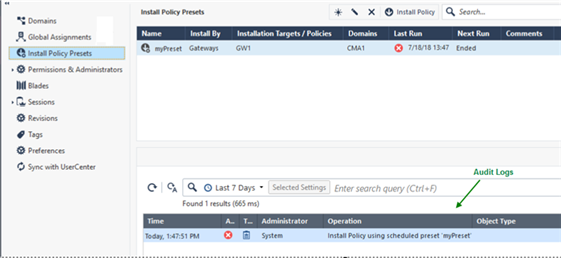
You can see the next policy installation schedule in the Next Run column:

At any time, you can select a Preset and click Install Policy, regardless of the preset schedule.
The audit logs of your Preset activity show at the bottom of the Install Policy Presets page and in the Logs & Events view.
|
|
Note - The policy preset is installed on the Multi-Domain Server with the active global Domain. If a domain has no domain server on the Multi-Domain Server with the active global Domain, then the policy preset is not installed on this Domain. |
Use Case - Installation on multiple Multi-Domain Servers
In this example, the Global policy will not be installed on Domain 2, because Domain 2 has no server in Multi-Domain Server2.
|
Servers Domains |
Multi-Domain Server 1 |
Multi-Domain Server 2 |
|---|---|---|
|
Domain1 |
Domain1_Server (Active) |
Domain1_Server_2 (Standby) |
|
Domain2 |
Domain2_Server (Active) |
No Server |
|
Global |
Standby |
Active |
Use Case - Time Set for a Recurring Installation
In a one time installation, the installation time is according to the SmartConsole client. In a recurring installation, the installation time is according to the Multi-Domain Server. This affects how you set both the hour and the day on your local SmartConsole client.
Example 1:
Your SmartConsole client is in Israel, and your Multi-Domain Server is in New York.
- You want to schedule a recurring installation on Saturday 2 PM Israel time (14:00):
In your SmartConsole client > New Install Policy Preset> Scheduling, select:
Install policy at 14:00
Recurrence > Configure > Days in week > Saturday
- You want to schedule a recurring installation on Saturday 2 PM New York time (14:00):
In your SmartConsole client > New Install Policy Preset > Scheduling, select: Install policy at 21:00
Recurrence > Configure > Days in week > Saturday
Example 2:
Your SmartConsole client is in Israel, and your Multi-Domain Server is in New York.
- You want to schedule a recurring installation on Saturday 6 PM Israel time (18:00):
In your SmartConsole client > New Install Policy Preset > Scheduling, select:
Install policy at 18:00
Recurrence > Configure > Days in week > Saturday
- You want to schedule a recurring installation on Saturday 6 PM New York time (18:00):
In your SmartConsole client > New Install Policy Preset > Scheduling, select: Install policy at 01:00
Recurrence > Configure > Days in week > Sunday
Use Case - Mail Security Servers
You are the administrator for a corporation that has five branches, each branch in a different city. You manage the Security Gateways from a Multi-Domain console. In the Multi-Domain console, each branch is represented by a Domain. Each Domain has a mail security server. When there is a mail-related update, you must update the policy on all mail security servers (no update is required for the other Security Gateways in each Domain). How can you make the policy installation process more efficient?
Create a Preset which includes the mail security server in each Domain. After you create this Preset, each time it is necessary to update the Policy on the mail security servers, you can select this preset for installation. This way, you do not need to search and filter for each mail security server separately.
You can also schedule the policy installation for specific days and hours, for example, in the evening hours, when there are fewer employees at work.