
Wire Mode
Overview of Wire Mode
The Wire Mode allows existing connections to fail over successfully by bypassing firewall enforcement. Traffic within a VPN community is, by definition, private and secure. In many cases, the firewall and the rule Set of traffic parameters and other conditions in a Rule Base (Security Policy) that cause specified actions to be taken for a communication session. on the firewall concerning VPN connections is unnecessary. With the Wire Mode, the firewall can be bypassed for VPN connections by defining internal interfaces and communities as "trusted".
When a packet reaches a Security Gateway Dedicated Check Point server that runs Check Point software to inspect traffic and enforce Security Policies for connected network resources., the Security Gateway asks itself two questions regarding the packet(s):
Is this information coming from a "trusted" source?
Is this information going to a "trusted" destination?
If the answer to both questions is yes, and the VPN Community A named collection of VPN domains, each protected by a VPN gateway. to which both Security Gateways belong is designated as "Wire Mode enabled," stateful inspection is not enforced and the traffic between the trusted interfaces bypasses the firewall. Since no stateful inspection takes place, no packets can be discarded. The VPN connection is no different from any other connection along a dedicated wire.
Wire Mode Scenarios
This section describes use cases were you can use wire mode.
Wire Mode in a MEP Configuration
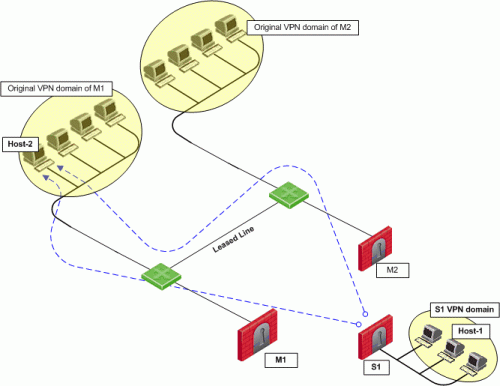
In this scenario:
-
Security Gateway M1 and Security Gateway M2 are both wire mode enabled and have trusted internal interfaces.
-
The community where Security Gateway M1 and Security Gateway M2 reside, is wire mode enabled.
-
Host 1, residing behind Security Gateway S1 is communicating through a VPN tunnel with Host 2 residing behind Security Gateway M1 .
-
MEP is configured for Security Gateway M1 and Security Gateway M2 with Security Gateway M1 being the primary Security Gateway and Security Gateway M2 as the backup.
In this case, if Security Gateway M1 goes down, the connection fails over to Security Gateway M2. A packet leaving Host 2 will be redirected by the router behind Security Gateway M1 to Security Gateway M2 since Security Gateway M2 is designated as the backup Security Gateway. Without wire mode, stateful inspection is enforced at Security Gateway M2 and the connection is dropped. Packets that come into a Security Gateway whose session was initiated through a different Security Gateway, are considered "out-of-state" packets. Since Security Gateway M2's internal interface is "trusted," and wire mode in enabled on the community, no stateful inspection is performed and Security Gateway M2 will successfully continue the connection without losing any information.
Wire Mode with Route-Based VPN
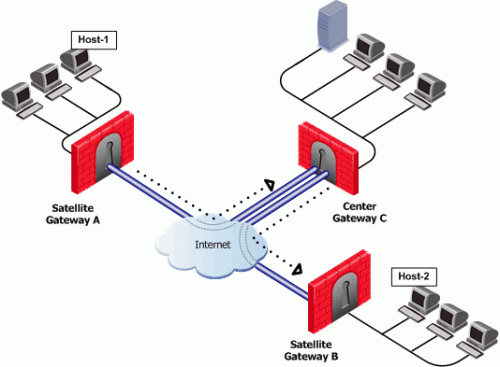
In this scenario:
-
Wire mode is enabled on Center Security Gateway C (without an internal trusted interface specified).
-
The community is wire mode enabled.
-
Host 1 residing behind Satellite Security Gateway A wishes to open a connection through a VPN tunnel with Host 2 behind Satellite Security Gateway B.
In a satellite community, Center Security Gateways are used to route traffic between Satellite Security Gateways within the community.
In this case, traffic from the Satellite Security Gateways is only rerouted by Security Gateway C and cannot pass through Security Gateway C's firewall. Therefore, stateful inspection does not need to take place at Security Gateway C. Since wire mode is enabled on the community and on Security Gateway C, making them trusted, stateful inspection is bypassed. Stateful inspection, however, does take place on Security Gateways A and B.
Wire Mode Between Two VPN Communities
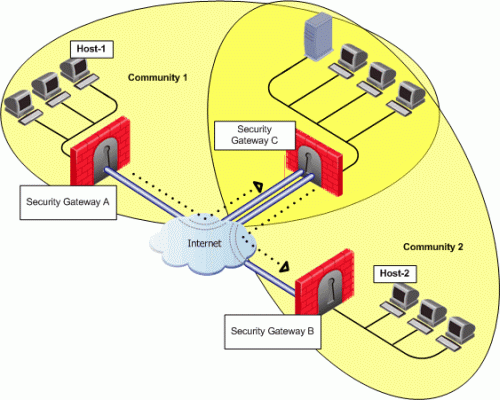
In this scenario:
-
Security Gateway A belongs to Community 1.
-
Security Gateway B belongs to Community 2.
-
Security Gateway C belongs to Communities 1 and 2.
-
Wire mode is enabled on Center Security Gateway C (without an internal trusted interface specified).
-
Wire mode is enabled on both communities.
-
Host 1 residing behind Satellite Security Gateway A wishes to open a connection through a VPN tunnel with Host 2 behind Satellite Security Gateway B.
Wire mode can also be enabled for routing VPN traffic between two Security Gateways which are not members of the same community. Security Gateway C is a member of both communities and therefore recognizes both communities as trusted. When host 1 behind Security Gateway A initiates a connection to host 2 behind Security Gateway B, Security Gateway C is used to route traffic between the two communities. Since the traffic is not actually entering Security Gateway C, there is no need for stateful inspection to take place at that Security Gateway. Stateful inspection, however, does take place on Security Gateways A and B.
Configuring Wire Mode
Wire mode is configured in two places:
-
Community Properties (Meshed or Star)
-
Security Gateway Properties
Enabling Wire Mode in a VPN Community
-
Note - To make sure there are no active sessions, run the "
cpstat mg" command in the Expert mode on the Security Management Server Dedicated Check Point server that runs Check Point software to manage the objects and policies in a Check Point environment within a single management Domain. Synonym: Single-Domain Security Management Server. / in the context of each Domain Management Server Check Point Single-Domain Security Management Server or a Multi-Domain Security Management Server.. -
Connect with Database Tool (GuiDBEdit Tool) to the Security Management Server / applicable Domain Management Server.
-
In the top left pane, go to Table > Managed Objects > communities.
-
In the top right pane, select the applicable VPN community.
-
Press the CTRL+F keys (or go to the Search menu > click Find) > paste support_wire_mode > click Find Next.
-
In the lower pane, right-click on the support_wire_mode > select Edit > select "true" > click OK.
-
Locate and right click on the support_wire_mode_routing field located below > select Edit > select "true" > click OK.
-
Save the changes: go to the File menu > click Save All.
-
Close the Database Tool (GuiDBEdit Tool).
-
Connect with SmartConsole to the Security Management Server / applicable Domain Management Server.
-
Install the Access Control Policy on the applicable Security Gateway / Cluster
Two or more Security Gateways that work together in a redundant configuration - High Availability, or Load Sharing. / VSX Virtual System Extension. Check Point virtual networking solution, hosted on a computer or cluster with virtual abstractions of Check Point Security Gateways and other network devices. These Virtual Devices provide the same functionality as their physical counterparts.Virtual System object.
Enabling Wire Mode on a Specific Security Gateway
-
In SmartConsole, from the left navigation panel, click Gateways & Servers.
-
Open the applicable Security Gateway object.
-
From the left tree, click IPsec VPN > VPN Advanced.
-
In the Wire mode section:
-
Select Support Wire Mode (and Wire mode routing - route uninspected encrypted traffic in VPN routing configurations).
-
Click Add.
-
Select the interfaces to be trusted by the selected Security Gateway.
-
Click OK.
-
Select Log Wire mode traffic to log the Wire Mode activity.
-
-
Click OK.
-
Install the Access Control Policy.