
Databricks
Databricks is a unified data analytics platform for big data and machine learning. It gives collaborative workspaces, data engineering, and AI capabilities across cloud environments.
Prerequisites
Before you start, make sure that you have these prerequisites:
-
Databricks account admin access to the Account Console. The Account Console URL depends on your cloud:
-
AWS:
accounts.cloud.databricks.com -
Azure:
accounts.azuredatabricks.net -
GCP:
accounts.gcp.databricks.com
-
-
A service principal (not a personal user API token). The service principal must have the account-level admin role. The account admin role is required to call the account-level REST APIs.
|
|
Note - The service principal may also need workspace access for the workspaces that SaaS Security collects data from. The SaaS Security integration can provision this workspace access automatically after installation. Verify this behavior against the SaaS Security connector documentation. |

Integrating Databricks
Databricks uses OAuth 2.0 client credentials (machine-to-machine) to integrate with SaaS Security. Three fields are required: the Account ID, the Client ID, and the Client Secret.
To integrate Databricks with SaaS Security, do these steps:
-
Log in to the Databricks Account Console as an account admin. Use the Account Console URL for your cloud (see Prerequisites above).
-
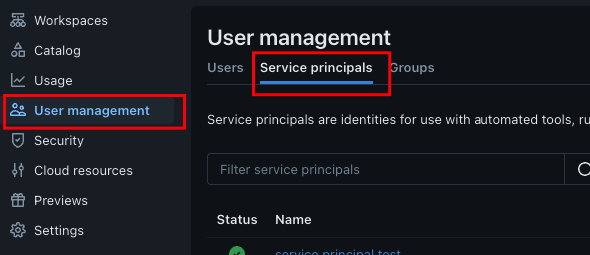
Go to User management > Service principals.
-
Create a new service principal for this integration.
-
Assign the account admin role to the service principal.
-
Open the service principal and go to the Credentials & secrets tab. Generate an OAuth secret. The Client ID is the same as the service principal's application ID. Copy the Client Secret and store it in a secure location. Databricks shows the secret only one time.
-
Get your Account ID from the Account Console.
-
Log in to the SaaS Security Administrator Portal.
-
From the top navigation bar, select Integration Manager.
-
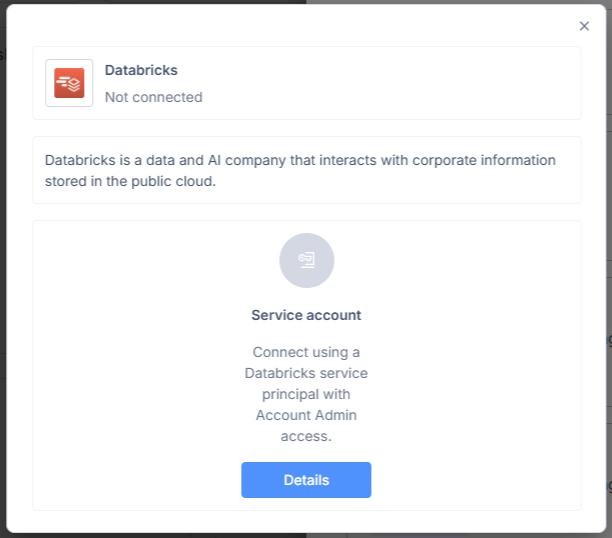
In the Databricks widget, click Connect. The Databricks window opens.
-
Click Details.
-
Enter the Account ID, the Client ID, and the Client Secret. Then click Add service account.
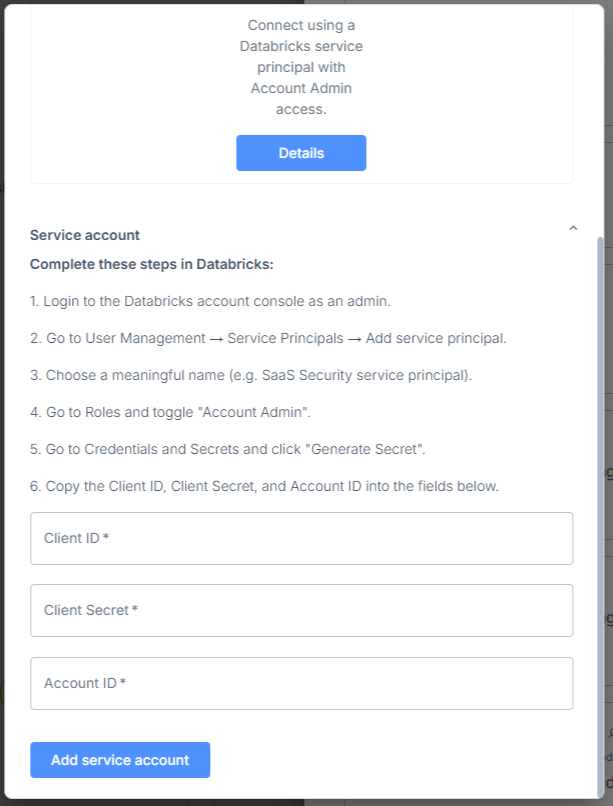
The system validates the OAuth credentials immediately. In the SaaS Security Administrator Portal, the Successfully connected message shows. The system then provisions the workspace access and starts to collect the data from the account and the workspaces.
|
|
Note - A service principal is required. Personal user API tokens are not supported. The service principal must have the account-level admin role before installation. |
|
|
Note - After the token is accepted, the SaaS Security integration creates a SCIM group and provisions workspace admin access across the workspaces. |