
EA Feature: IPv6 in SD-WAN
This section describes an SD-WAN feature in the Early Availability stage.
|
|
Important:
|

Overview
SD-WAN supports IPv6 traffic only for Local Breakout scenarios.
SD-WAN can steer IPv6 traffic to local IPv6 Internet links.
SD-WAN does not support IPv6 for VPN and tunnel selection.
SD-WAN ignores "" rules that contain IPv6 objects (a warning appears).
|
|
Important - SD-WAN features that are related to (such as tunnel-based steering) operate only on IPv4. |
Prerequisite
Enable IPv6 support on the SD-WAN Security Gateway and reboot it.
See the Gaia Administration Guide for your version.
|
|
Important - Without IPv6 support enabled, the Security Gateway does not install IPv6 SD-WAN rules. As a result, it handles IPv6 traffic using the OS routing (not SD-WAN routing). |
SD-WAN Behavior in IPv6
When IPv6 support and SD-WAN are enabled on the Security Gateway:
-
The Security Gateway loads a separate IPv6 Firewall instance.
This IPv6 Firewall instance handles SD-WAN rule matching for IPv6 traffic.
-
The Security Gateway loads a separate SD-WAN steering process (
sdwan_steering6).This process handles all probes over IPv6 and steering decisions for IPv6.
-
The Security Gateway inspects IPv6 traffic independently from IPv4 traffic.
IPv6 Support in SD-WAN Interfaces
An SD-WAN interface can operate in one of these modes:
-
IPv4 single-stack.
-
IPv6 single-stack.
-
Dual-stack (IPv4 and IPv6 on the same interface).
Depending on the configuration, an interface can have:
-
Only an IPv4 next hop.
-
Only an IPv6 next hop.
-
Both IPv4 and IPv6 next hops.
Configuring SD-WAN Next Hop for IPv6
 Procedure in Gaia Portal
-
With a web browser, connect to Gaia Portal.
-
In the navigation tree, click Network Management > Network Interfaces.
-
Select an interface from the list and click Edit.
-
At the top, click the SD-WAN tab.
-
For IPv6 single-stack:
-
Select Next Hop (IPv6).
-
Enter the required next-hop IPv6 address.
-
-
For dual-stack, also:
-
Select Next Hop (IPv4).
-
Enter the required next-hop IPv4 address.
-
-
Click OK.
Example:

Procedure in Gaia Clish
-
Connect to the command line on the Security Gateway.
-
Log in to Gaia Clish.
-
For IPv6 single-stack, configure the required next-hop IPv6 address:
set interface <Name of Interface> sdwan nexthop <IPv6 Address of Next Hop> -
For dual-stack, also configure the required next-hop IPv4 address:
set interface <Name of Interface> sdwan nexthop <IPv4 Address of Next Hop> -
Save the changes:
save config -
Examine the configuration:
show interface <Name of Interface> sdwan
Configuring "Accessible via NAT"
SD-WAN supports configuring NAT accessibility separately for IPv4 and IPv6.
|
|
Note - This configuration applies to future IPv6 support. does not support IPv6 at this time. |
 Procedure in Gaia Portal
-
With a web browser, connect to Gaia Portal.
-
In the navigation tree, click Network Management >Network Interfaces.
-
Select an interface from the list and click Edit.
-
At the top, click the SD-WAN tab.
-
For IPv6 single-stack:
-
Select Accessible via NAT (IPv6).
-
Enter the required IPv6 address.
-
-
For dual-stack, also:
-
Select Accessible via NAT (IPv4).
-
Enter the required IPv4 address.
-
-
Click OK.
Procedure in Gaia Clish
-
Connect to the command line on the Security Gateway.
-
Log in to Gaia Clish.
-
For IPv6 single-stack, configure the required IPv6 address:
set interface <Name of Interface> sdwan nat <IPv6 Address> -
For dual-stack, also configure the required IPv4 address:
set interface <Name of Interface> sdwan nat <IPv4 Address> -
Save the changes:
save config -
Examine the configuration:
show interface <Name of Interface> sdwan
WAN Link Mapping
Explanation
See WAN Link Mapping.
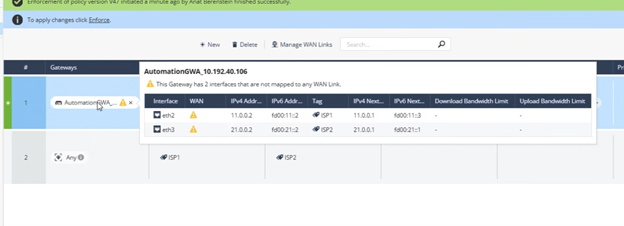
The Network view > WAN Link Mapping shows both IPv4 and IPv6 addresses for each Security Gateway.
Example:
SD-WAN Policy Behavior with IPv6
Explanation
Open Steering Object > click the Criteria tab > scroll down to the Quality Check Methodology section.
The IP version of the probe target must match the IP version used by traffic in the SD-WAN rule.
-
If a rule uses IPv4 objects, the steering object must probe an IPv4 target.
-
If a rule uses IPv6 objects, the steering object must probe an IPv6 target.
-
If a rule includes both IPv4 and IPv6 objects, the steering object must include both IPv4 and IPv6 probe targets.
If the probe target does not match the traffic IP version, the SD-WAN policy fails or is not applied to this traffic.
IPv6 objects in SD-WAN rules:
-
Security Gateway that only have an IPv4 address configured on their SD-WAN interfaces ignore SD-WAN rules with IPv6 objects.
-
Security Gateways that have an IPv6 address configured on their SD-WAN interfaces install and enforce SD-WAN rules with IPv6 objects.
NAT per ISP with IPv6
See SD-WAN NAT for ISP.
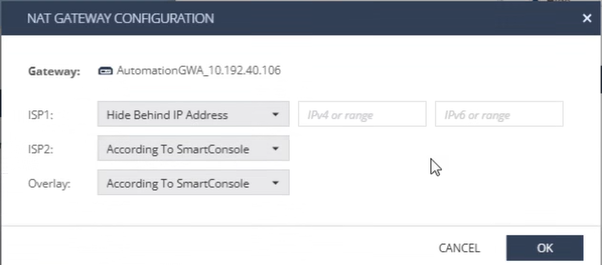
NAT Configuration
The NAT per ISP feature supports NAT addresses for both IPv4 and IPv6.
Example:
Source Object Compatibility
IPv4 NAT only:
-
Source must include: IPv4 objects, IPv4+IPv6 objects, or Dynamic Objects.
-
Behavior:
-
NAT is applied only to IPv4 source traffic.
-
IPv6 source traffic is forwarded without NAT translation.
-
IPv6 NAT only:
-
Source must include: IPv6 objects, IPv4+IPv6 objects, or Dynamic Objects.
-
Behavior:
-
NAT is applied only to IPv6 source traffic.
-
IPv4 source traffic is forwarded without NAT translation.
-
IPv4 and IPv6 NAT:
-
Source must include: IPv4 objects, IPv4+IPv6 objects, or Dynamic Objects.
-
Behavior:
-
IPv4 source traffic is translated using the configured IPv4 NAT address.
-
IPv6 source traffic is translated using the configured IPv6 NAT address.
-
Monitoring and Statistics
Explanation
Live Dashboard
IPv6 SD-WAN statistics are not available in the Monitor view > Dashboard > Live Monitoring tab.
CPView (sk101878)
IPv6 statistics are available in:
-
cpview > Advanced > SD-WAN
-
Separate tabs exist for:
-
IPv4 probes and steering decisions.
-
IPv6 probes and steering decisions.
-
Internal Architecture and Troubleshooting
Firewall Instances and SD-WAN Processes
Firewall and SD-WAN use separate processing paths for IPv4 and IPv6 traffic.
|
IP Version |
Firewall Instance |
SD-WAN Process |
|---|---|---|
|
IPv4 |
FW |
sdwan_steering
|
|
IPv6 |
FW6 |
sdwan_steering6
|
Each IP version uses a dedicated SD-WAN steering process, and each process maintains its own:
-
SD-WAN policy files.
-
SD-WAN probe targets.
-
SD-WAN steering decisions.
-
SD-WAN kernel tables.
-
SD-WAN log files.
Steering and Kernel Tables
The process "sdwan_steering" on Security Gateway:
-
Probes IPv4 targets.
-
Writes steering decisions to the Security Gateway IPv4 kernel tables.
To view entries in these tables, run:
fw tab -t <table_name>
The process "sdwan_steering6" on the Security Gateway:
-
Probes IPv6 targets.
-
Writes steering decisions to the Security Gateway IPv6 kernel tables.
To view entries in these tables, run:
fw6 tab -t <table_name>
Log Files
|
IP Version |
Log File on Security Gateway |
|---|---|
|
IPv4 SD-WAN |
|
|
IPv6 SD-WAN |
|
Policy Installation Behavior
-
SD-WAN rules that contain IPv4 objects and probing targets are installed into this file on the Security Gateway:
$FWDIR/state/local/SDWAN/sdwan_steering_policy.json -
SD-WAN rules that contain IPv6 objects and probing targets are installed into this file on the Security Gateway:
$FWDIR/state/local/SDWAN/sdwan_steering6_policy.json
Each SD-WAN rule includes:
-
Traffic matching objects.
-
Steering settings.
-
Probe targets.
|
|
Important - IPv6 SD-WAN rules are installed only if at least one SD-WAN interface has an IPv6 next hop configured. |
IPv6 Traffic Flow with SD-WAN
-
An IPv6 connection arrives at the Security Gateway.
-
If all these conditions are met:
-
IPv6 support is enabled on the Security Gateway.
-
At least one SD-WAN interface is configured with an IPv6 next hop.
-
A matching SD-WAN rule exists.
-
The FW6 instance evaluates the connection against the SD-WAN rule base.
-
The FW6 instance consults the IPv6 SD-WAN steering kernel tables based on the matched rule.
-
The Security Gateway uses SD-WAN to route the IPv6 traffic through the selected ISP.
Then:
-
-
If IPv6 support is enabled on the Security Gateway and at least one IPv6-enabled SD-WAN interface exists, but no SD-WAN rule matches the traffic:
-
SD-WAN does not steer the traffic
-
The Security Gateway uses OS to route the IPv6 traffic.
-
-
If the Security Gateway does not have an IPv6-enabled SD-WAN interface:
-
The Security Gateway does not evaluate IPv6 SD-WAN rules.
-
The Security Gateway uses OS to route the IPv6 traffic.
-
Limitations
-
The Security Gateway ignores SD-WAN rules with IPv6 objects if there are no IPv6-enabled SD-WAN interface on the Security Gateway.
-
In such a case, the Security Gateway uses OS routing (not SD-WAN routing).
-
The Security Gateway installs SD-WAN rules with IPv6 objects only when at least one SD-WAN interface is configured with an IPv6 next hop.
-
The Security Gateway splits (internally) SD-WAN rules that contain both IPv4 and IPv6 objects and processes these rules by separate Firewall instances and by separate SD-WAN steering processes.
-
If an IPv6 SD-WAN rule requires probing but the steering object does not include an IPv6 probe target, the SD-WAN policy fails on the Security Gateway (even if there is at least one IPv6-enabled SD-WAN interface).
In such a case, the Security Gateway uses OS routing (not SD-WAN routing).
-
SD-WAN does not support IPv6 steering.
-
You must configure IPv6 next hops manually. SD-WAN does not support automatically learned next hops (for example, from DHCP or DHCPv6).