
Microsoft Entra ID
|
|
Important - These configuration steps let you set up the Microsoft Entra ID (formerly Azure AD) Identity Provider with a Non-Gallery Application. |
Prerequisites:
-
Permissions to your company's DNS server.
-
For Microsoft Entra ID with SAML, you must have Microsoft 365 and Microsoft Entra ID Premium P1 licenses or above.
-
For Conditional Access, you must have Microsoft Entra ID Premium P1 or P2. You can use a single Premium P2 license with multiple users. For more information, see Microsoft Entra ID licenses.
|
|
Note - For an integration of more than approximately 150 groups from Microsoft Entra ID, you must use Directory Integration. |
 Preliminary Configuration of a User Group
Step 1: In the Azure portal, create an enterprise application
Preliminary Configuration of a User Group
Step 1: In the Azure portal, create an enterprise application
-
Log in to your Azure portal.
-
In the home directory, click on the hamburger button to show the portal menu.
-
Go to Microsoft Entra ID > Enterprise applications > All applications.

Important - Check Point does not support the preconfigured Check Point Portal application in Microsoft Azure. You must create a new application for Check Point Portal in Microsoft Azure as shown in this procedure.
-
Click New application.
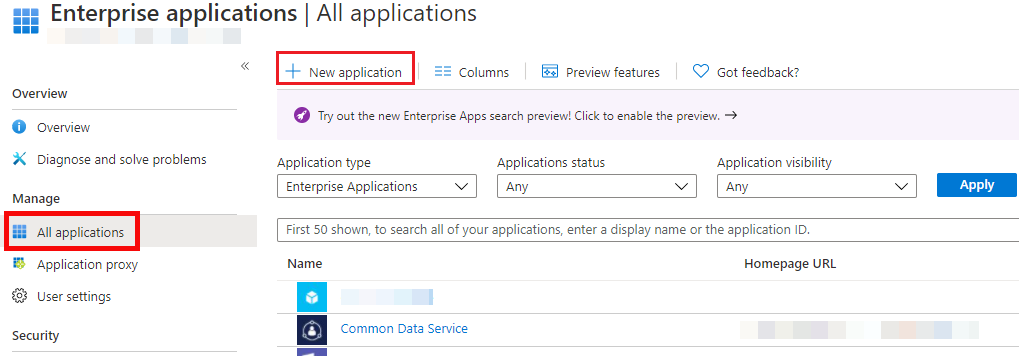
-
Click Create your own application.
-
In the What’s the name of your app field, enter a name for the application (for example, Check Point Portal) and click Integrate any other application you don’t find in the gallery (Non-gallery).
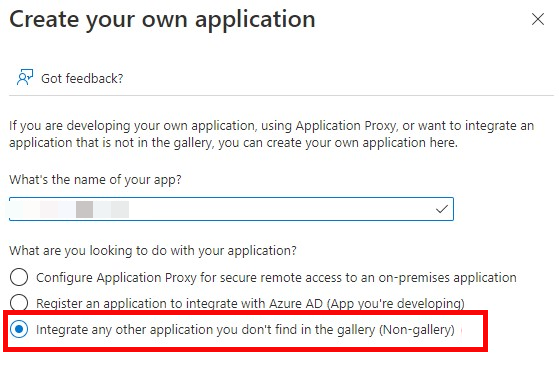
-
Click Create and wait for Azure to add the new application.
Step 2: In the Azure portal, create a group
-
Click on the Azure portal menu.
-
Click Microsoft Entra ID.
-
Click Groups.
-
Click New group.
The New Group window opens.
-
Enter a Group name and Group description.
-
Add members to the group.
-
Click Create and wait for Azure to successfully create the group.
Step 3: In the Azure portal, assign the group to the enterprise application
|
|
Note - Microsoft Entra ID does not grant application access to users who are not direct members of an associated group. For more information, see Microsoft documentation. |
-
Open the enterprise application you created for the Check Point Portal.
-
Click Assign users and groups.
-
Click Add user/group.
-
Click None Selected.
-
Search for the group you created for Check Point Portal users.
-
Click the group and click Select.
-
Click Assign to assign the group to the application.
-
Open the user group.
-
Copy the group's Object Id.
Step 4: In the Check Point Portal, add a user group
-
In the Check Point Portal tenant that administrators should access through Azure SSO, click
 > User Groups.
 -
Click New.
The ADD USER GROUP window opens.
-
Enter a Name for the group.
-
Enter a Description for the group.
-
In the IDP Id field, paste the Object ID of the group from the Azure portal.
-
Assign a role to the group. For more information, see User Groups.
-
Click ADD.
Open the IdP Integration Wizard
-
From the left toolbar, click Getting started.
-
In the Connect a directory section, click Connect (or Add another Directory).
The IdP Integration wizard opens.
-
Enter a name for the Integration Title and select Microsoft Entra ID.
-
Click Next.
Integration Type
In this step of the IdP Integration Wizard, you can configure SSO authentication for Check Point Portal administrators and for users of Check Point Portal services (for example: Harmony Connect). This configuration does not affect Identity and Trust user authentication.
Step 1: Configure SSO for Check Point Portal Administrators
-
Select Enable Administrators to log in to the portal using this IdP.
-
Select one of these options:
-
Login based on domain verification - Check Point Portal Administrators can log in to this Check Point Portal account with SSO from the Identity Provider. Administrators log in through the Check Point Portal login page.
-
Login with a unique URL - Check Point Portal Administrators can log in to multiple Check Point Portal accounts with SSO from the Identity Provider. Administrators log in using the URL that appears at the bottom of the Login with a unique URL section. Copy this URL and keep it in a safe place.
-
Step 2: Configure SSO for Users of Check Point Portal Services
-
In the Service(s) Integration section, select one of these options:
-
No Services - End users of Check Point Portal services cannot authenticate with SSO from the Identity Provider. This is the default configuration.
-
All Services - End users can log in with SSO from the Identity Provider to all Check Point services that support SSO.
-
Specific Service(s) - From the list of services, select service(s) to allow end users to log in with SSO from the Identity Provider. Available services:
-
Connect
-
Quantum Gateways
-
-
-
Click Next (or, if you are editing a configuration, Apply) to complete the Integration Type configuration.
Verify Domain
|
|
Note - If you selected Login with a unique URL for Integration Type, the Verify Domain step is not necessary. |
-
Connect to your DNS server.
-
Copy the DNS Value from the Check Point Portal IdP Integration wizard > Verify Domain step.
-
On your DNS server, enter the Value as a TXT record.
-
In the Check Point Portal > Domain(s) section, enter a public DNS domain server name and click the plus icon.
Check Point makes a DNS query to verify your domain's configuration.
-
Optional - add more DNS domain servers.
-
Click Next.

Note - Wait until the DNS record propagates and becomes resolvable.
Allow Connectivity
In this step, you enter the Identifier (Entity ID) and Reply URL from the Check Point Portal into the Azure portal and create the required Azure attributes and claims.
Configuration
Step 1: Copy tokens from the Check Point Portal to the Azure portal
-
In the Check Point Portal IdP Integration Allow Connectivity page, copy the Identifier (Entity ID) and the Reply URL.
-
In the Azure portal, click Enterprise Applications.
-
Open the Azure application you use for the Check Point Portal.
-
From the left menu, expand Manage and click Single sign-on.
-
On the Select a single sign-on method page, select SAML.
-
In the Basic SAML Configuration section, click Edit and do these steps:
-
In the Identifier (Entity ID) text box, paste the Identifier (Entity ID) you copied from the Check Point Portal.
-
In the Reply URL (Assertion Consumer Service URL) / ACS URL text box, paste the Reply URL you copied from the Check Point Portal
-
-
Optional - Enable IdP-initiated login flow. IdP-initiated flow lets you connect directly to the Check Point Portal from your Azure portal.
-
In the Azure portal, create an app card for the Check Point Portal. See the Microsoft Entra ID documentation for App integrations.
-
Copy the Sign on URL from the Check Point Portal to the Sign on URL field in the Azure portal.
-
Copy the Relay State from the Check Point Portal to the Relay State field in the Azure portal.
-
Click Save.
-
-
If you did not do the previous optional step - In the Azure portal, Basic SAML Configuration window, click Save.
Step 2: Configure Attributes and Claims in the Azure portal
-
In the Azure application you created for the Check Point Portal > Attributes & Claims section, click Edit.
-
Make sure that these claims are in the User Attributes & Claims list. If a claim does not exist, then create it.
Important - Do not change the default configurations of these claims.
-
Claim Name - http://schemas.xmlsoap.org/ws/2005/05/identity/claims/emailaddress
Claim Type - SAML
Value - user.mail
-
Claim Name -http://schemas.xmlsoap.org/ws/2005/05/identity/claims/givenname
Claim Type - SAML
Value - user.givenname
-
Step 3: Add a Group Claim in the Azure portal
-
In the Azure application you created for the Check Point Portal > Attributes & Claims section, click Edit.
-
Click Add a group claim.
The Group Claims window opens.
-
Select Groups assigned to the application.
Important - Nested groups are supported only if you configure Directory Integration with Manual Sync. See Directory Integration.
-
For Source attribute, select Group ID.
-
Click Save.
-
In the Check Point Portal, click Next/Apply.
|
|
Important - Before you can test the connectivity between Microsoft Entra ID and the Check Point Portal, you must complete all of the IdP integration steps in the Check Point Portal. |
Configure Metadata
In this step, you upload the federation metadata XML file.
-
In the Azure portal, navigate to the enterprise application you created.
-
In the left navigation pane, click Single Sign-On.
-
In SAML Signing Certificate, download the Federation Metadata XML file.
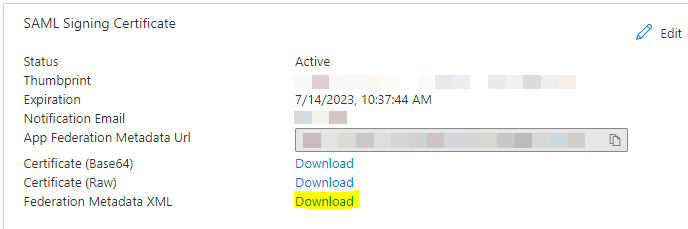
-
In the Check Point Portal > IDP Integration > Configure Metadata page, upload the Federation Metadata XML file.
Note - Check Point uses the service URL and the name of your Certificate to identify your users behind the sites.
-
In the Check Point Portal > IDP Integration > Configure Metadata tab, click Next / Apply.
Check Point validates the metadata of your Identity Provider.
Directory Integration
Directory Integration gets information about users and groups for the services you selected in the Integration Type step > Service(s) Integration section.
|
|
Important - Configuring Directory Integration replaces locally managed groups and role assignments with groups and roles synchronized from the IdP. Existing local groups and their associated role assignments are removed. Hybrid operation is not supported. |
|
|
Important - After you create a Directory Integration, you cannot change it. To create a different Directory Integration, you must create a new Identity Provider (IdP) Integration. |
To use Microsoft Entra ID only for SSO authentication of Check Point Portal users, select the checkbox I want to skip this step and use this IdP for SSO authentication only.
You can configure Directory Integration with Manual API Sync or with System for Cross-Domain Identity Management (SCIM).
|
Directory Integration Method |
How it Works |
Which Users and Groups are Synced |
Identity and Trust Integration with Microsoft Intune and Microsoft Defender |
|---|---|---|---|
|
Manual Sync |
Allows Check Point services to query for any change in Microsoft Entra ID users and groups. The Check Point Portal pulls users and groups from Microsoft Entra ID. |
All users and groups in Microsoft Entra ID. Nested groups in Microsoft Entra ID are supported. |
Identity and Trust can get information from Microsoft Intune and Microsoft Defender on endpoint computers. For instructions, see Microsoft Intune and Microsoft Defender. |
|
SCIM (Automatic Sync) |
Allows Microsoft Entra ID to push any change in the user and group directory to Check Point services. |
Only users and groups in Microsoft Entra ID that are assigned to the SAML application for the Check Point Portal. Nested groups in Microsoft Entra ID are not supported. |
Identity and Trust cannot get information from Microsoft Intune and Microsoft Defender on endpoint computers. |
To use Manual Sync
This video shows you how to configure Manual Sync between the Check Point Portal and Microsoft Entra ID. To finish the integration of Microsoft Entra ID with the Check Point Portal, you must complete the IdP configuration wizard in the Check Point Portal.
Watch the Video
In the Azure Portal, set up users and groups synchronization:
Set up permissions to allow the selection of users and user groups from your Microsoft Entra ID environment in the Check Point Portal Policy.
-
In the Azure portal, click App registrations.
The App registrations screen opens.
-
Click + New registration.
The Register an application screen opens.
-
Create a new App Registration.
The app registrations page for the application opens.
-
Click Manage > API permissions.
The API permissions screen opens.
-
In Configured permissions, click + Add a permission.
The Request API permissions window opens.
-
In Microsoft APIs, click Microsoft Graph and select Application permissions.
-
In the Select permissions section:
-
In the search field, enter Group:
-
Expand Group.
-
Select Group.Read.All.
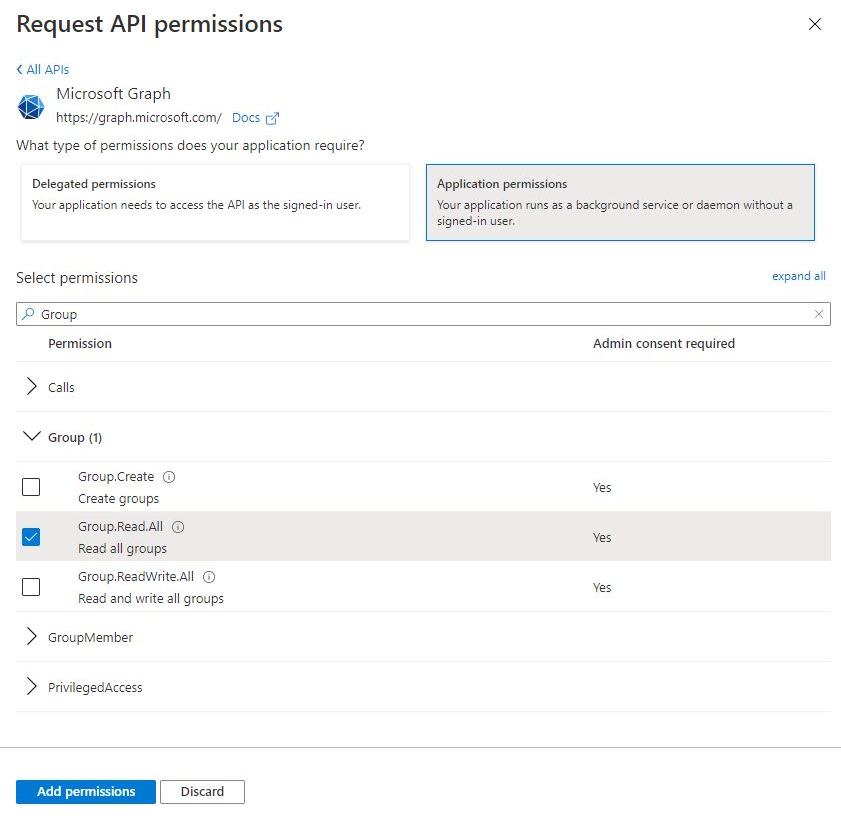
-
-
In the search field, enter User:
-
Expand User.
-
Select User.Read.All.
-
-
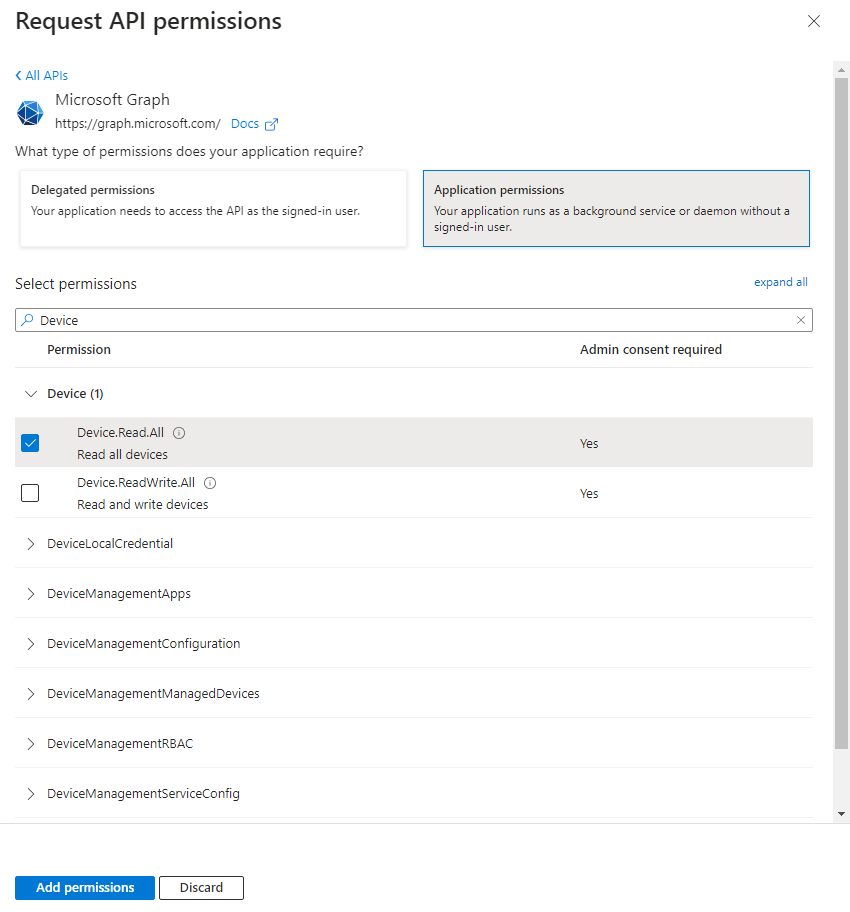
Set up synchronization for device information:
-
In the search field, enter Device.
-
Expand Device.
-
Select Device.Read.All.
-
-
-
Click Add permissions.
-
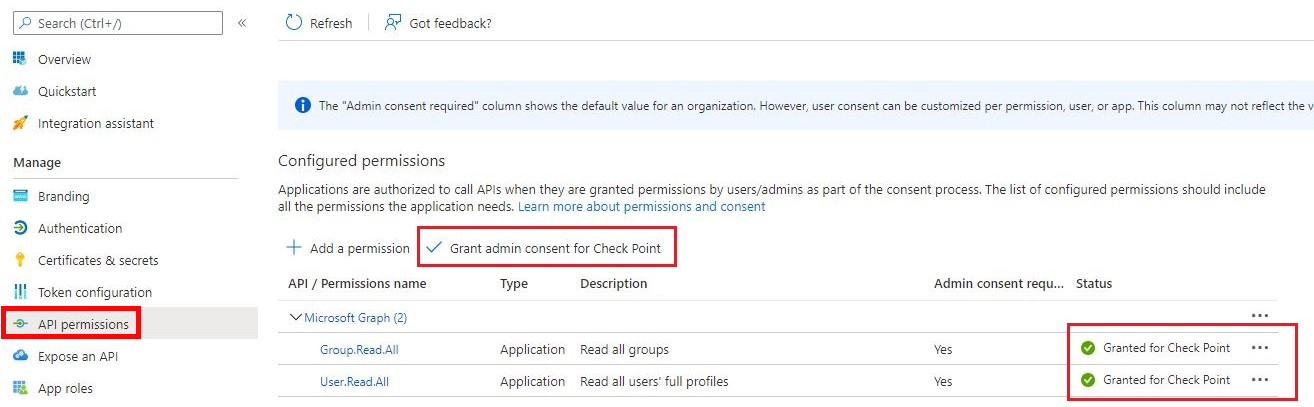
In Configured permissions, click Grant admin consent for <application name> and confirm in the confirmation window.
The Status changes accordingly.
-
Create an authentication secret key:
-
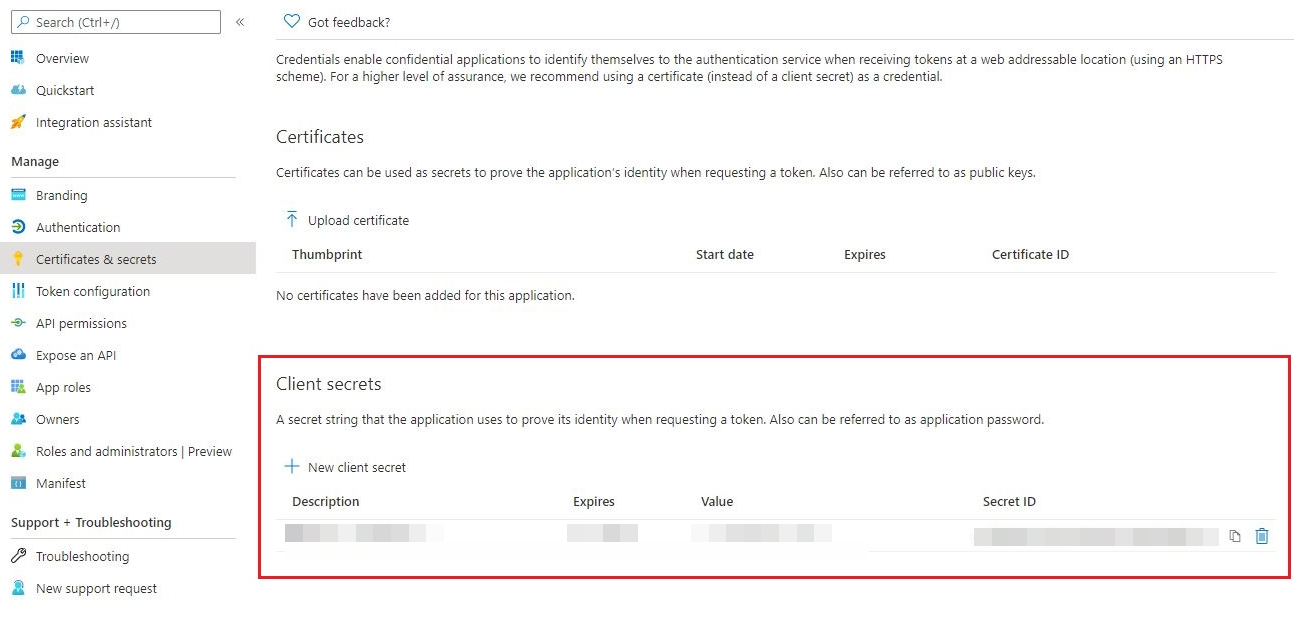
In the Azure portal, open your app and click Certificates & secrets.
-
Click Client secrets > + New client secret.
-
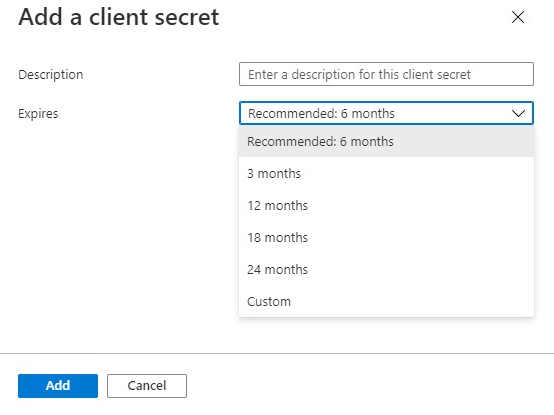
In the Description field, enter a description for the client's secret.
-
Select an expiration date and click Add.
-
From the Value field, copy the value of this new client secret.
Use this value in the next configuration step.
Note - You cannot retrieve this secret value after you close the window.
-
Configure the Check Point Portal IdP:
-
In the Azure Portal, open your app. Click Overview and expand Essentials.
-
Copy the values of the Application (client) ID and Directory (tenant) ID.
-
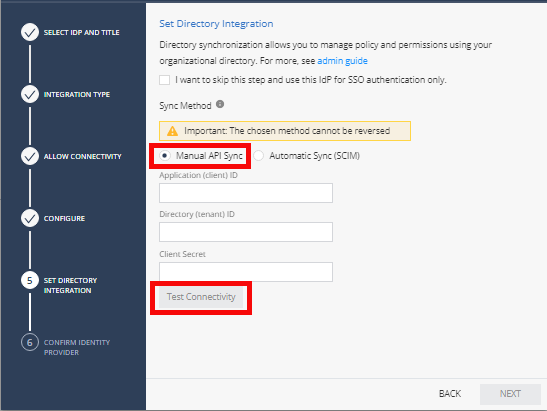
In the Check Point Portal Identity Provider wizard, paste the values of Application (client) ID, Directory (tenant) ID, and Client Secret created in the previous step.
-
To test the users and group synchronization between the Check Point Portal and Identity Provider, click Test Connectivity.
If the test is unsuccessful, repeat the Set Directory Integration step to configure the user and group synchronization parameters.
-
Click Next.
Check Point validates access with the API key.
To use SCIM (Automatic Sync)
Prerequisites:
-
In the Check Point Portal, create a user group with an Admin global role. See Users.
-
You must have Administrator permissions for the IdP.
-
You must have Active Directory and a premium P2 Azure subscription.
This video shows you how to configure SCIM (Automatic) Sync between the Check Point Portal and Microsoft Entra ID.
Watch the Video
Step 1 - Configure the Directory Integration in the Check Point Portal:
-
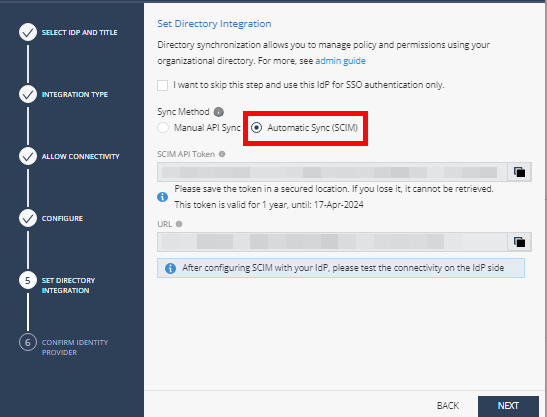
In the Check Point Portal Identity Provider wizard, Set Directory Integration step, select Automatic Sync SCIM.
-
Copy and save the SCIM API Token and URL.
-
Click Next.
The Confirm Identity Provider step opens.
-
Click Submit.
Microsoft Entra ID is now integrated with the Check Point Portal. The Microsoft Entra ID integration appears in the gallery in the Check Point Portal. Finish configuring SCIM (Automatic Sync) in the Azure portal.
Step 2 - Configure the Application Integration in the Azure Portal:
-
In your Microsoft Azure account, navigate to Microsoft Entra ID.
-
From the left toolbar, click Enterprise Applications.
The Enterprise Applications page opens to the Manage > All applications tab.
-
In the table, open the enterprise application you created for the Check Point Portal.
-
From the left menu, click Manage > Provisioning.
The Provisioning page opens to the Overview tab.
-
For Provisioning Mode, select Automatic.
-
In the Admin Credentials section:
-
In the Tenant URL field, enter the URL you copied from the Check Point Portal's Set Directory Integration step.
-
In the Secret Token field, enter the SCIM API Token you copied from the Check Point Portal's Set Directory Integration step.
-
Click Test Connection.
-
-
Click Save.
-
In the Mappings section, click Provision Microsoft Entra ID Directory Users.
-
On the Attribute Mapping page that opens:
-
In the Target Object Actions section, make sure these checkboxes are selected: Create, Update, Delete.
-
In the Attribute Mappings table, find the row with the
externalIdvalue in the customappsso Attribute column and click Edit.The Edit Attribute page opens.
-
In the Source attribute field, select
objectIdand click OK to close the Edit Attribute page. -
In the Attribute Mapping page, select Show advanced options.
-
Click the Edit attribute list for customappsso option.
-
On the Edit attribute list page, scroll down to add a new attribute with these values:
-
Name:
urn:ietf:params:scim:schemas:extension:InfinityIdentityExtension:2.0:User:onPremSid -
Type:
String
-
-
Click Save to close the attribute list editing.
-
In the Attribute Mapping window, click Add New Mapping.
-
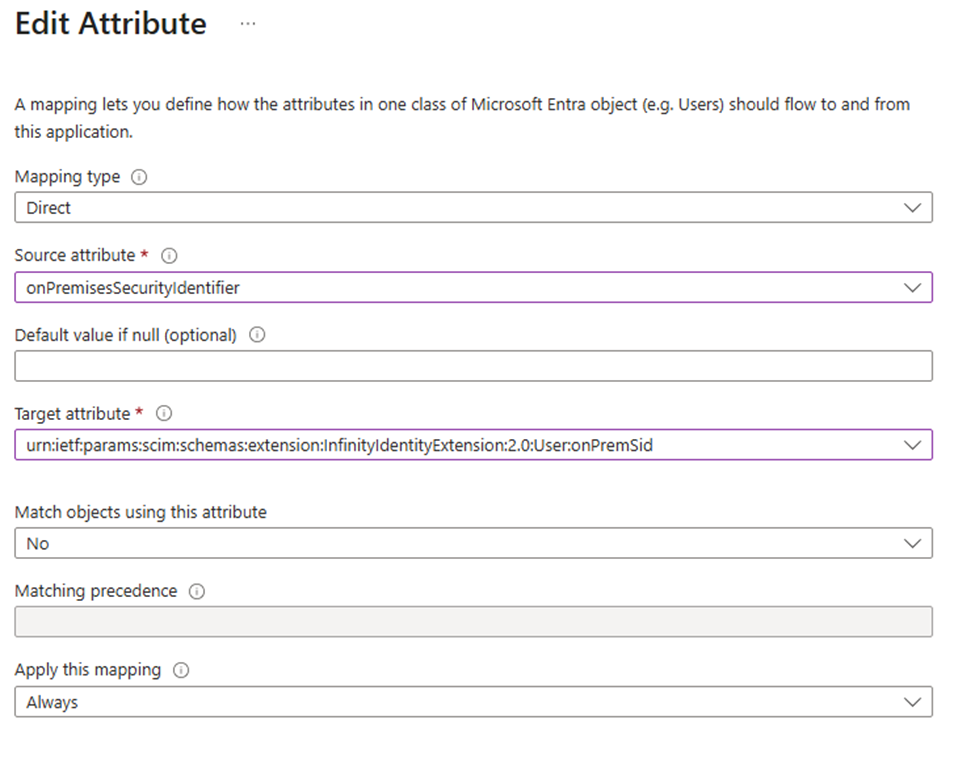
In the Edit Attribute window, configure the mapping as shown in the image below and then click OK:
-
Source attribute:
onPremisesSecurityIdentifier -
Target attribute:
urn:ietf:params:scim:schemas:extension:InfinityIdentityExtension:2.0:User:onPremSid
-
-
Click Save and confirm.
-
-
From the top navigation toolbar, click [NAME OF APPLICATION]| Provisioning.
-
From the left menu, go to Manage > Users and groups.
-
Add users and groups.
-
From the left menu, click Overview.
-
Click Start provisioning.
It can take up to a few hours for Azure to finish sending directory information to the Check Point Portal.
Confirm Identity Provider Integration
Review the details of the SSO configuration and click Submit.
|
|
Note - If you selected to use SCIM, then this step is not necessary. |
|
|
Important - Create a user group with the applicable roles and assign it to the related IdP group name or ID. This depends on the applicable identity provider before you log out. For more information, see User Groups. |