
Prerequisites
These are the prerequisites to install the Mobile Security Protect app on a mobile device:
-
-
Access to enterprise email from your mobile device or computer.
-
Endpoint Management (UEM
 Unified Endpoint Management. An architecture and approach that controls different types of devices such as computers, smartphones and IoT devices from a centralized command point.) Agent (optional).
 -
For iOS 17.3 and higher, make sure to turn off Stolen Device Protection on the device before you begin the installation. Otherwise, Unable to Install Profile error appears.
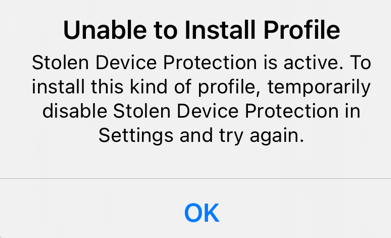
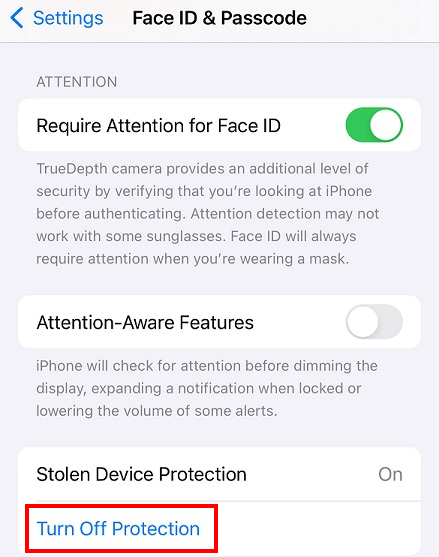
To turn off Stolen Device Protection on the device:
-
Go to Settings and do one of these:
-
On a device with Face ID, tap Face ID & Passcode and enter your passcode.
-
On a device with Touch ID, tap Touch ID & Passcode and enter your passcode.
-
-
Go to the Stolen Device Protection section and tap Turn Off Protection.
-
|
|
Note - Mobile Security Protect app is also supported on iPads but it cannot scan or share verdicts for applications exclusive to iPads. |

Permissions for iOS Devices
To ensure that the Mobile Security solution (formerly Harmony Mobile) works as expected on your device, you must provide these permissions when you install the app. If your organization uses UEM, then the permissions can be granted automatically by the UEM.
|
Permission |
Description |
|---|---|
|
Location Permission |
Allows an application to access the device location. Mobile Security uses this permission to enrich threat event reports with the location. |
|
Notification Permission |
Allows an application to display notifications on the device. Mobile Security uses this permission to:
|
|
VPN User Consent |
Allows an application to intersect the mobile device network traffic. Mobile Security uses this permission to bring up a local VPN to inspect the data traffic and mitigate any detected network threat. |
|
Camera |
Allows an application to use the camera. Mobile Security uses this permission to scan QR code in the on-boarding process. |
|
SMS Filtering |
Allows Mobile Security to scan SMS messages for malicious URLs. To enable SMS filtering on the end-user device, see Preventing SMS Phishing in the Mobile Security Protect for iOS User Guide. |