
Prerequisites - BlackBerry UEM Cloud

Creating an OAuth2 Client for Mobile Security
For the interaction with Mobile Security at the API, you must create a dedicated OAuth2 Client in your BlackBerry UEM.
|
|
Important - Creating an OAuth2 Client is mandatory for BlackBerry UEM Cloud integration. It is optional for the On-Premises integration. |

-
Log in to your BlackBerry UEM account.
-
Go to Services > UEM and expand your BlackBerry Cloud account. Note down the tenant ID.

-
Go to Applications.
-
Click Add Application.

-
Enter the application details:
-
Enter a name for the application.
-
In the Entitlement ID field, enter a unique reverse DNS name. For example, com.checkpoint.portal.
-
From the Type list, select Solutions.
-
In Capabilities, select BlackBerry Platform APIs.
-
Click Add Application.

The system creates a new application.
-
-
Go to the Application tab and select the application you created.
-
Click the BlackBerry Platform APIs tab.
-
Select the Template tab and click Add Template.

-
Enter the template details:
-
In the Redirect URLs field, enter https://localhost:9443/cb
-
Select Type as Web.
-
Select Grant Type as client_credentials
-
Select Response Types as None.
-
Select Token Endpoint Auth Method as client_secret_basic
-
Select Application Scope as Organization.
-
In API Scopes, select Mobile Device Management.
-
-
Click Register.
-
Go to the Client tab.
-
Click Add Client.

-
In the Client Name field, enter a name for the client.
-
In the Redirect URLs field, enter the Redirect URL entered in the template.
-
In the Tenants field, select the tenant ID of your BlackBerry Cloud instance (see step 2).
-
Click Register.

The system creates a Client ID and Client Secret.
-
Copy and save the Client ID and Client Secret values for future use.

Configuring BlackBerry Enterprise Identity Settings
-
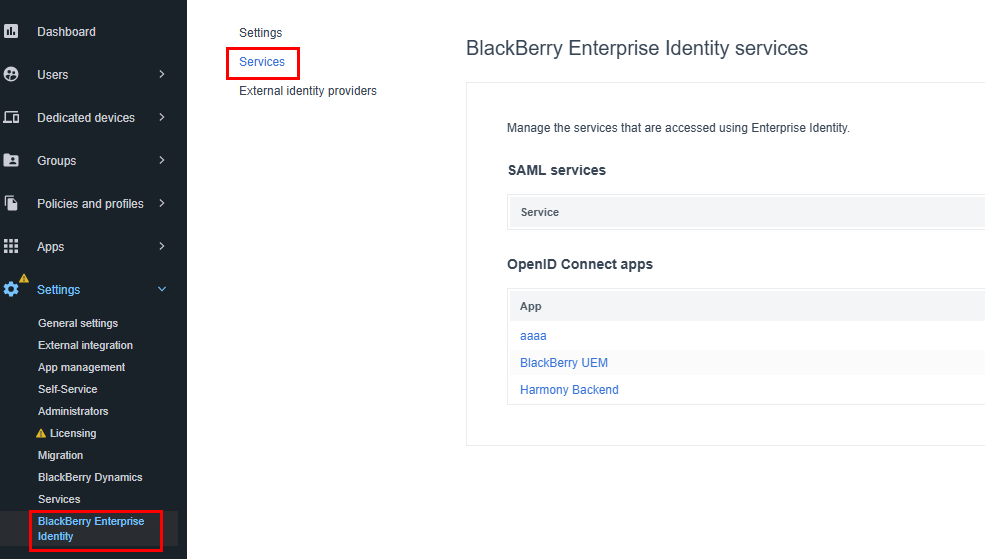
Go to Settings > BlackBerry Enterprise Identity.
-
Click Services.
-
Under OpenID Connect apps, click +.

-
Select the API client you created.

-
Click Save.
