
OS CVE Assessment
The OS CVE Assessment tab shows the vulnerability status of the devices in the dashboard.
|
|
Note - The CVE |


View by CVEs
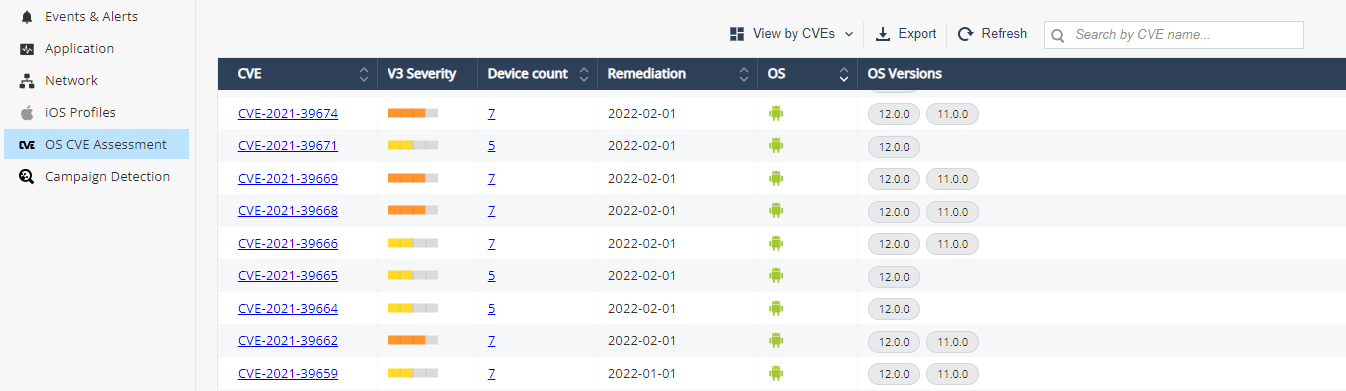
| Item | Description |
|---|---|
|
CVE |
OS CVE name. Click on the name will direct to NVD for full description |
|
V3 Severity |
The Common Vulnerability Scoring System (CVSS
|
|
Device Count |
Number of devices that are exposed to the displayed CVE. Click on the number will direct you to the devices tab |
|
Remediation |
The release date of the security patch to the CVE |
|
OS |
Operating System (Android/iOS) |
|
OS Version |
List of OS Versions that contain the CVE |
To export the CVEs information from the table to CSV file, click Export. It creates a comma separated values file that can be opened in spreadsheet applications such as Microsoft Excel. Use a filter to select the required information for the file.
If the number of CVEs exceeds 10,000, processing the data may take time. So the export is performed offline and an email is sent to the registered address with the link to download the CSV file. The link is valid for 7 days.
View by OS Versions

| Item | Description |
|---|---|
|
OS |
Operating System (Android/iOS) |
|
Version |
OS Version |
|
Device Count |
Number of devices with the OS version |
|
CVE Count |
Number of CVEs that the OS version contains |
|
CVEs |
The first 10 CVEs the OS version contains |
-
You can filter by OS, OS version and CVE name in the table:
-
Click Filter
 above the table.
 -
On the Filters pane on the right side of the window, adjust information you want to view.
-
-
You can also export
 the information from the table to CSV file, which creates a comma separated values file that can be opened in spreadsheet applications such as Microsoft Excel. Use filter to select the required information for the file.
If the number of CVEs exceeds 10,000, processing the data may take time. So the export is performed offline and an email is sent to the registered address with the link to download the CSV file. The link is valid for 7 days.
-
You can set policy according to the OS CVE under Policy > Device > OS Vulnerabilities.
View by Devices

| Item | Description |
|---|---|
|
ID |
Device ID. To view the device details, click the ID link. |
|
Device Risk |
Risk level of the device |
|
Device Model |
Model of the device. For example, iPhone 13 Pro, Samsung SM-G998B |
|
OS |
Device Operating System
|
|
OS Version |
Device OS version |
|
Installed Patch |
The security patch version installed on the Android device. |
|
Latest Patch |
The latest security patch version available for the Android device OS version. |
|
Upgradeable |
Indicates whether the Android device can be upgraded to the latest security patch version:
|
|
Highest V3 Severity |
Highest CVSS score of the device. The Common Vulnerability Scoring System (CVSS) is a free and open industry standard to assess the severity of computer system security vulnerabilities. The scores displayed are as per CVSS version 3.x:
|
|
CVEs |
The CVEs detected on the device |
-
To filter the table, click
. You can filter by:-
OS
-
Device Risk
-
Highest CVSS greater than - Shows the devices with Highest V3 Severity greater than the selected value.
-
Not Connected Since - Shows the devices not connected with the Mobile Security server since the selected date.
-
-
To export the table to a CSV file, click Export.
If the number of devices exceeds 10,000, processing the data may take time. So the export is performed offline and an email is sent to the registered address with the link to download the CSV file. The link is valid for 7 days.