
Identity Agent for a User Endpoint Computer - Support for IPv6 SLAAC
Introduction and Use Case
A modern endpoint often holds several IPv6 addresses at the same time on one interface. With Stateless Address Autoconfiguration (SLAAC), the endpoint builds its own addresses from a prefix that the router advertises. With Privacy Extensions, the endpoint also builds temporary addresses that rotate at set intervals.
The Identity Agent Check Point dedicated client agent installed on Windows-based user endpoint computers. This Identity Agent acquires and reports identities to the Check Point Firewall with Identity Awareness enabled. The administrator configures the Identity Agents (not the end users). There are two types of Identity Agents - Full and Light. You can download the Full and Light Identity Agent package from the Captive Portal - 'https://<Gateway_IP_Address>/connect' or from Support Center. on the endpoint computer detects these addresses. The Identity Agent reports the complete list of the current IPv6 addresses to the Policy Decision Point (PDP Check Point Firewall with Identity Awareness enabled that acts as Policy Decision Point: acquires identities from identity sources; shares identities with other gateways.) Gateway, and it keeps the list current as addresses change. The Identity Agent updates the same identity session, so no re-authentication occurs and the user performs no action.
The Identity Agent, PDP Gateway, and Policy Enforcement Point (PEP Check Point Firewall with Identity Awareness enabled that acts as Policy Enforcement Point: receives identities via identity sharing; redirects users to Captive Portal.) Gateway detect SLAAC automatically. No additional Identity Agent configuration is necessary.
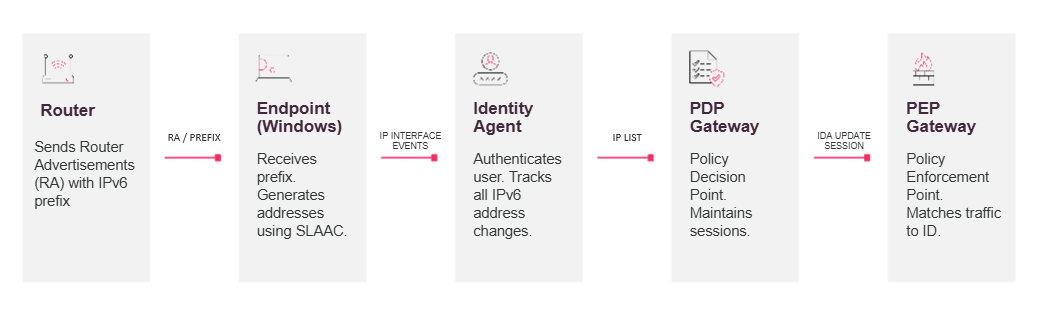
Workflow of Identity Awareness with IPv6 SLAAC
-
The user authenticates one time through the Identity Agent.
-
The Identity Agent tracks all current IPv6 addresses of the endpoint and reports them to the PDP Gateway.
-
When SLAAC rotates a temporary address, the Identity Agent detects the change and updates the address list in the same session on the PDP Gateway. No re-authentication occurs.
-
The PDP Gateway shares the identity-to-IP Address associations with the PEP Gateway. The PEP Gateway matches traffic from any current address to the user identity.
Prerequisites for Identity Awareness with IPv6 SLAAC
-
Custom version of Identity Agent for a Windows endpoint compute. To get the custom Identity Agent, contact Check Point Support.
-
IPv6 is configured on the endpoint computer, and the router advertises the SLAAC prefix.
-
Policy Decision Point (PDP) Gateway is Check Point Firewall
Dedicated Check Point server that runs Check Point software to inspect traffic and enforce Security Policies for connected network resources. Formerly: Security Gateway. version R82.20 or higher with IPv6 configured. For IPv6 configuration instructions, see the "System Configuration" chapter of the R82.20 Gaia Check Point security operating system that combines the strengths of both SecurePlatform and IPSO operating systems. Administration Guide.Policy Enforcement Point (PEP) Gateway is Check Point Firewall version R82.20 or higher with IPv6 configured. For IPv6 configuration instructions, see the "System Configuration" chapter of the R82.20 Gaia Administration Guide.
-
Management Server
Check Point Single-Domain Security Management Server or a Multi-Domain Security Management Server. version R82.20 or higher. -
If the Policy Enforcement Point (PEP) Gateway is remote (not the same physical appliance as the Policy Decision Point (PDP) Gateway, then you must use Scaled Identity Sharing from the PDP to the PEP. For more information, see the "Scaled Identity Sharing" chapter of the R82.20 Identity Awareness
Software Blade on a Check Point Firewall that enforces network access and audits data based on network location, the identity of the user, and the identity of the computer. Acronym: IDA. Administration Guide.
Verifying that an Identity Awareness Gateway Receives IPv6 Addresses from Identity Agent for an Endpoint Computer
To view the current addresses on the Windows endpoint
On the CLI of the Windows endpoint computer:
|
|
The output includes the temporary and deprecated IPv6 addresses.
To view the identity session and the additional IPv6 address list on a Policy Decision Point (PDP) Gateway:
On the CLI of the Policy Decision Point (PDP) Gateway:
|
pdp monitor all |
For more information about pdp monitor, see the "pdp-monitor" section of the R82.20 CLI Reference.
To view the identity session and the additional IPv6 address list on a Policy Enforcement Point (PEP) Gateway:
On the CLI of a Policy Enforcement Point (PEP) Gateway:
|
|
The command output on the PDP and on the PEP includes the Additional IPv6 list for the session. This confirms that several current IPv6 addresses are associated with the same user session.
For more information about this command, see the "pep-show" section of the R82.20 CLI Reference.
To view the identity session and the additional IPv6 address list in SmartConsole Logs:
In SmartConsole Check Point GUI application used to manage a Check Point environment - configure Security Policies, configure devices, monitor products and events, install updates, and so on. logs, an IP Changed log appears for each address that the endpoint adds or removes as the temporary addresses rotate.
Example of IP Changed logs in SmartConsole
