
Activating Office 365 Mail
To protect Office 365 Mail, Avanan uses
As a prerequisite to activate Office 365, make sure you have these:
-
You are a user with Privileged Role Administrator role or higher permissions, or you have the credentials of such a user.
-
You have the minimum supported SaaS license. See Minimum License Requirements to Activate SaaS Applications.
-
If some mailboxes are on an on-premises Exchange server, see Appendix H: Activating Office 365 Mail in Hybrid Environments.
-
When onboarding, Avanan assumes the Exchange Administrator role. To ensure successful onboarding, do not change the default permissions assigned to the Exchange Administrator role.

Note - If you modify the default permissions of Exchange RBAC role groups or the Microsoft Entra ID role permissions assigned to the Exchange Administrator role, the system does not support onboarding, and it may fail.
- If another
To activate Office 365 Mail:
-
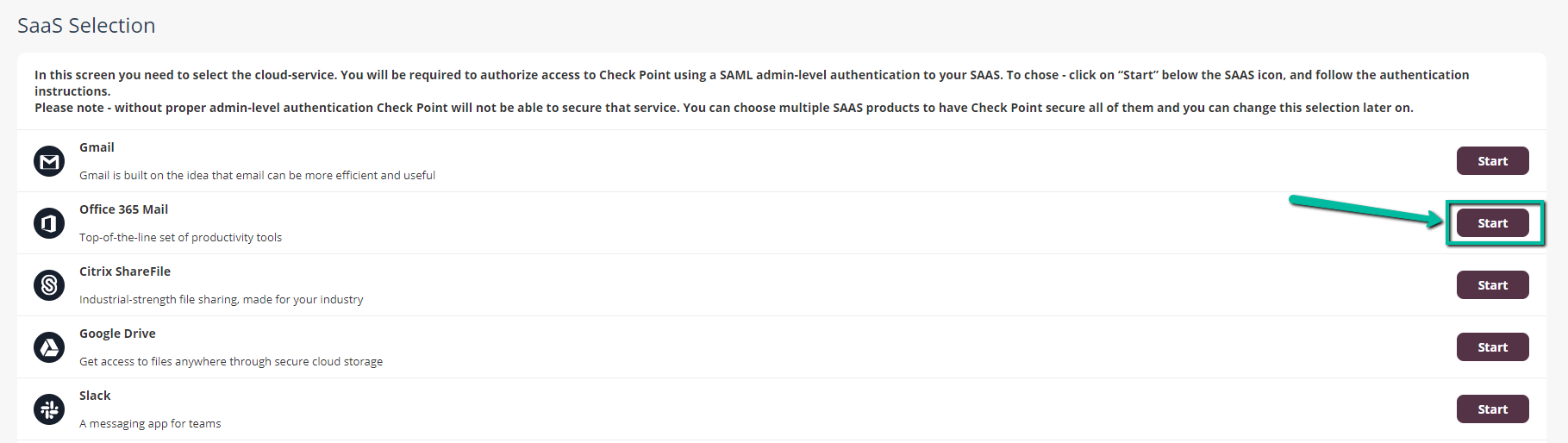
From the Getting Started Wizard click Start for Office 365 Mail.
or
Navigate to Security Settings > SaaS Applications and click Start for Office 365 Mail.
-
Select the mode of operation for Office 365.
-
Automatic mode
Avanan performs the necessary configurations to your Microsoft 365 environment and operates in Monitor only mode. For more information, see Automatic Mode Onboarding - Microsoft 365 Footprint.
-
Manual mode
You must manually perform the necessary configurations in the Office 365 Admin Exchange Center before you bind the application to your Office 365 email account and every time you add or edit the security policy associated with Office 365 emails. For more information, see Appendix A: Avanan Manual Integration with Office 365.
Note -
-
-
Enable the I Accept Terms Of Service checkbox.
-
If you need to limit the license consumption and protection to a specific group of users or to connect multiple Avanan tenants to the same Microsoft 365 account:
-
Enable the Restrict inspection to a specific group (Groups Filter) checkbox and click OK.
-
In the Office 365 Authorization window that appears, sign in with a user with Privileged Role Administrator role or higher permissions.
In the authorization screen, click Accept to grant permissions for
To view the permitted IP addresses to access this application, see Appendix I: Permitted IP Addresses to access the Avanan Azure Application.
-
In the Office 365 Mail - Group Selection pop-up, select Specific group.
-
Enter the group name you need to protect with Avanan.
Notes:
-
The group name must have an associated email address.
-
Avanan supports these groups for group filtering:
-
Assigned Membership:
-
Microsoft 365 Group
-
Mail-enabled Security Group
-
Distribution List
-
-
Dynamic Membership:
-
Microsoft 365 Group
-
-
-
-
If you need to connect multiple Avanan tenants to the same Microsoft 365 account, enable the Multiple portals will be connected to this Office 365 account checkbox.

Caution - Before you enable the checkbox, see Connecting Multiple Portals to the Same Microsoft 365 Account.
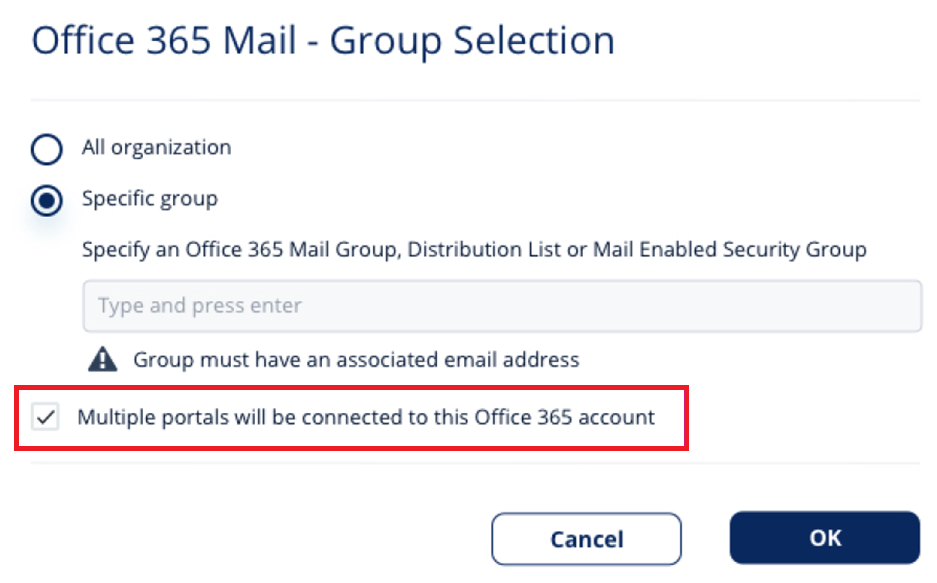
- Click OK.
-
Now, the Office 365 Mail SaaS is enabled and monitoring begins immediately.
|
|
Note - To scan auto-forwarded messages through Microsoft 365, contact Avanan Support. |
|
|
Note - By default, Monitor only mode is assigned for all the SaaS applications you connect to. This allows you to immediately see the value that Avanan brings as it recognizes security incidents that occurred before on your SaaS platform. To configure email protection, see Threat Detection Policy. |