Google Gmail
Overview
Google offers a lot of APIs for Gmail and Google Drive. Avanan initiates the security by fetching all emails, attachments, files, and folders metadata in a bootstrap process. The bootstrap ensures the customer’s dedicated virtual appliance has the same cloud state.
How it Works
Gmail offers file sharing and file collaboration tools that allow employees and outside collaborators to share files. Avanan adds additional layers of security, privacy, and compliance not offered by Google.
-
Malware detection with Anti-Virus and Advanced Persistent Threat detection
-
Data Leakage Prevention
-
Revocable Encryption (for files leaving the environment)
-
File sanitization
Required Permissions
The cloud state used for Gmail by Avanan is composed of the following entities:
-
Users
-
Emails
-
Attachments
-
Labels used in emails
Once the cloud state is saved, Avanan starts monitoring the changes for each user. To track each change for each user in the cloud, Avanan uses the following channels:
-
Subscribe each user to Google Push Notifications for new messages (https://developers.google.com/gmail/api/guides/push)
-
Fallback to polling each user history of changes, each minute if Push Notifications fails (https://developers.google.com/gmail/api/guides/sync)
Avanan uses the following resources for Gmail from the APIs:
-
Messages
-
Labels
-
History of changes
-
Attachments
Avanan require the following permissions from Gmail.
|
Permissions Required by Gmail |
|---|
|
View and manage Emails |
|
View users on your domain |
|
Insert mail into your mailbox |
|
Manage mailbox labels |
|
View, modify and delete your email |
|
View your emails messages and settings |
|
Manage your basic mail settings |
|
View and manage Pub/Sub topics and subscriptions |
|
View your email address |
|
View your basic profile info |
|
|
Note - Avanan requires delete permission to quarantine emails. |

Activating Gmail
For details about the procedure to activate Gmail, see Activating Gmail.
Deactivating Gmail
-
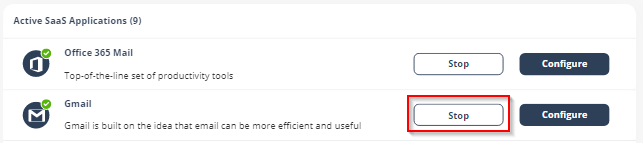
Navigate to Security Settings > SaaS Applications.
-
Click Stop for Gmail.
-
In the confirmation pop-up, click Stop.
Upon deactivation,
To complete the deactivation process:
-
If you receive Google Workspace protection was successfully uninstalled message, remove the
For the procedure to remove the Marketplace app, see Uninstall a Google Workspace Marketplace app.
-
If you receive
-
Delete
-
Inbound gateway
-
SMTP relay service
-
Hosts
-
Groups
-
Service Admin User
-
-
Remove the
For the procedure to remove the Marketplace app, see Uninstall a Google Workspace Marketplace app.
-
After a certain period of time your tenant-related data will be deleted. If you want the data to be deleted immediately, contact Avanan Support.
Gmail Security Settings
Quarantine Settings
For details about quarantine, see Managing Quarantine.
Notification Templates and Senders
The content for notifications sent to internal and external end users are controlled through the Gmail configuration page.
To configure the notification templates:
-
Navigate to Security Settings > SaaS Applications.
-
Click Configure for Gmail.
-
Scroll-down to the end and expand Advanced.
-
Select the template and make the required changes.
Note - Some notifications can be customized from the policy. For more details, see Configuring a Threat Detection Policy Rule and Data Loss Prevention (DLP) Policy and Click-Time Protection Policy.
Available configurable templates
-
Quarantine notification `From` name
-
Quarantine notification `From`
-
Quarantine notification subject
-
Password Protected Quarantine notification subject
-
Encrypted Attachment Warning Banner
-
Phishing quarantine notification body
-
Password Protected Quarantine notification body
-
Require password to release encrypted file notification body
-
Quarantine notification body
-
Quarantined notification (admin restore request):
-
Restore request subject
-
Restore request body
-
Decline message subject
-
Decline message body
-
Threat extracted message format
-
Threat extracted attachment name template
-
Phishing quarantine notification subject
-
Phishing quarantine notification body (admin restore request)
-
Phishing decline message subject
-
Phishing decline message body
-
Spam quarantine notification body
-
Spam quarantine notification subject
-
DLP quarantined notification body (admin restore request) - Outbound
-
DLP quarantined notification body (admin restore request) - Outbound
-
DLP quarantined notification body (user can restore) - Outbound
-
DLP restoration notification body - Outbound
-
DLP restore by manager notification body - Outbound
-
Restore notification subject
-
DLP restore declined by manager notification body
-
DLP request restore by manager notification body
-
Graymail - Added header key
-
Outbound DLP - Added header key
-
Graymail - Added header value
-
Outbound DLP - Added header value
-
Replace "[Promotional]" with:
-
Report Phishing approve subject
-
Report Phishing approve body
-
Report Phishing simulation subject
-
Report Phishing decline subject
-
Report Phishing simulation body
-
Report Phishing decline body
-
Outgoing phishing quarantine notification body
-
Report Phishing Clean Decline Admin Subject
-
Report Phishing Clean Decline Admin Body
-
Report Phishing Clean Decline User Subject
-
Report Phishing Clean Decline User Body
-
Report Phishing Clean Review Admin Subject
-
Report Phishing Clean Review Admin Body
-
Report Phishing Clean Review User Subject
-
Report Phishing Clean Review User Body
-
Report Phishing Clean Review Approve User Subject
-
Report Phishing Clean Review Approve User Body
-
Report Phishing Clean Review Decline User Subject
-
Report Phishing Clean Review Decline User Body
-
Report Phishing Inconclusive Decline Admin Subject
-
Report Phishing Inconclusive Decline Admin Body
-
Report Phishing Inconclusive Decline User Subject
-
Report Phishing Inconclusive Decline User Body
-
Report Phishing Inconclusive Review Admin Subject
-
Report Phishing Inconclusive Review Admin Body
-
Report Phishing Inconclusive Review User Subject
-
Report Phishing Inconclusive Review User Body
-
Report Phishing Inconclusive Review Approve User Subject
-
Report Phishing Inconclusive Review Approve User Body
-
Report Phishing Inconclusive Review Decline User Subject
-
Report Phishing Inconclusive Review Decline User Body
-
Report Phishing Inconclusive Approve Admin Subject
-
Report Phishing Inconclusive Approve Admin Body
-
Report Phishing Inconclusive Approve User Subject
-
Report Phishing Inconclusive Approve User Body
-
Report Phishing Phishing Approve Admin Subject
-
Report Phishing Phishing Approve Admin Body
-
Report Phishing Phishing Approve User Subject
-
Report Phishing Phishing Approve User Body
-
Report Phishing Phishing Review Admin Subject
-
Report Phishing Phishing Review Admin Body
-
Report Phishing Phishing Review User Subject
-
Report Phishing Phishing Review User Body
-
Report Phishing Phishing Review Approve User Subject
-
Report Phishing Phishing Review Approve Admin Body
-
Report Phishing Phishing Review Decline User Subject
-
Restore Request - Inconclusive - Declined by Avanan - Admin Notification - Subject
-
Restore Request - Phishing - Approved by Admin - End User Notification - Subject
-
Restore Request - Clean - Approved by Admin - End User Notification - Body
-
Restore Request - Inconclusive - Pending Review - End User Notification - Subject
-
Restore Request - Phishing - Declined by Admin - End User Notification - Body
-
Restore Request - Inconclusive - Approved by Avanan - Admin Notification - Body
-
Restore Request - Inconclusive - Pending Review - End User Notification - Body
-
Restore Request - Clean - Approved by Admin - End User Notification - Subject
-
Restore Request - Inconclusive - Approved by Admin - End User Notification - Body
-
Restore Request - Inconclusive - Approved by Avanan - Admin Notification - Subject
-
Restore Request - Clean - Pending Review - End User Notification - Subject
-
Restore Request - Clean - Declined by Admin - End User Notification - Subject
-
Restore Request - Inconclusive - Pending Review - Admin Notification - Subject
-
Restore Request - Inconclusive - Declined by Avanan - End User Notification - Body
-
Restore Request - Inconclusive - Pending Review - Admin Notification - Body
-
Restore Request - Phishing - Declined by Avanan - End User Notification - Body
-
Restore Request - Clean - Approved by Avanan - End User Notification - Subject
-
Restore Request - Inconclusive - Declined by Avanan - End User Notification - Subject
-
Restore Request - Clean - Pending Review - Admin Notification - Subject
-
Restore Request - Inconclusive - Declined by Admin - End User Notification - Subject
-
Restore Request - Clean - Approved by Avanan - Admin Notification - Subject
-
Restore Request - Inconclusive - Approved by Avanan - End User Notification - Body
-
Restore Request - Clean - Approved by Avanan - Admin Notification - Body
-
Restore Request - Phishing - Pending Review - End User Notification - Body
-
Restore Request - Clean - Pending Review - End User Notification - Body
-
Restore Request - Phishing - Pending Review - Admin Notification - Body
-
Restore Request - Phishing - Declined by Avanan - Admin Notification - Subject
-
Restore Request - Clean - Approved by Avanan - End User Notification - Body
-
Restore Request - Inconclusive - Declined by Avanan - Admin Notification - Body
-
Restore Request - Inconclusive - Declined by Admin - End User Notification - Body
-
Restore Request - Phishing - Approved by Admin - End User Notification - Body
-
Restore Request - Inconclusive - Approved by Avanan - End User Notification - Subject
-
Restore Request - Clean - Declined by Admin - End User Notification - Body
-
Restore Request - Inconclusive - Approved by Admin - End User Notification - Subject
-
Restore Request - Phishing - Pending Review - End User Notification - Subject
-
Restore Request - Phishing - Declined by Avanan - End User Notification - Subject
-
Restore Request - Phishing - Declined by Avanan - Admin Notification - Body
-
Restore Request - Phishing - Declined by Admin - End User Notification - Subject
-
Restore Request - Phishing - Pending Review - Admin Notification - Subject
-
Report Phishing Phishing Review Decline User Body
-
Restore Request - Clean - Pending Review - Admin Notification - Body
-
Restore quarantined emails with API instead of SMTP
Viewing Gmail Security Events
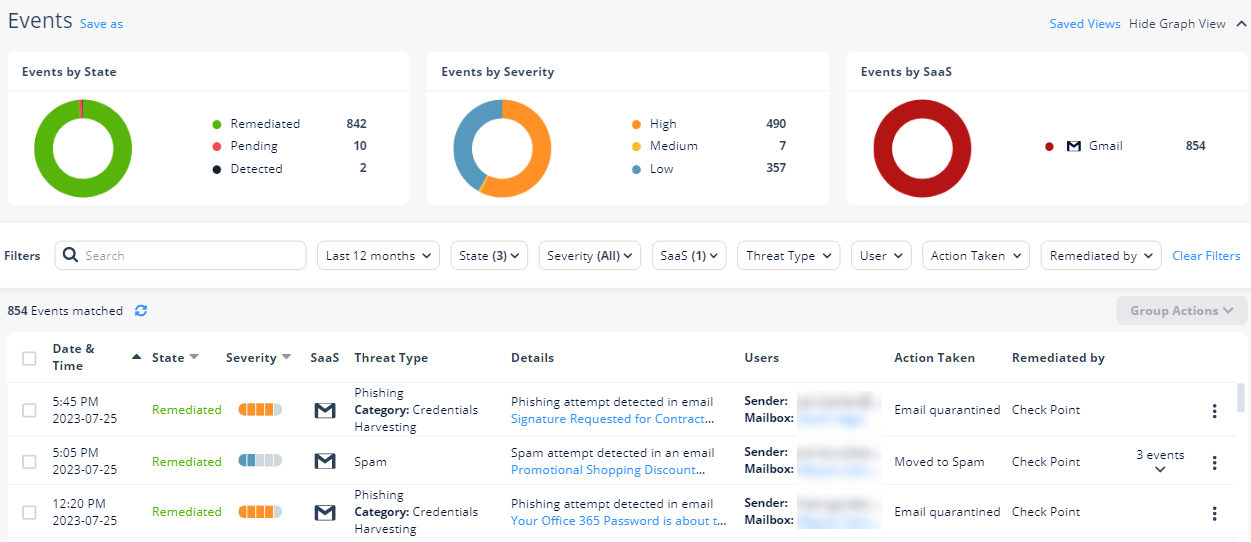
Avanan records the Gmail detections as security events. The event type depends on the type of policy that created the event. You can handle the security events in different ways, whether they are detected/prevented automatically or discovered by the administrators after not being prevented.
The Events screen shows a detailed view of all the security events.