
MLS200
General Requirements for Racks
Check Point appliances are designed for a standard 19-inch (48.26 cm) rack. For more information, see the specification EIA-310-D.The telescopic rails are designed for racks with these specifications:
|
Minimum Depth |
Maximum Depth |
|---|---|
|
22 inches (55.9 cm) |
32 inches (81.3 cm) |
|
24 inches (61 cm) |
36 inches (91.4 cm) |
Front and rear rack doors must have equally distributed holes on at least 65% of the surface area to give sufficient airflow. Make sure that the racks have sufficient clearance to service the Check Point appliances that are mounted on telescopic rails.
The telescopic rails support racks with either round holes or square holes.
|
Rack Side |
Clearance Requirement |
|---|---|
|
Front |
36 in (91.4 cm) plus additional clearance, if necessary, for the mechanical lift used to move the appliance and rails equipment. |
|
Rear |
16 in (40.6 cm) from the rear of the rack or appliance without the rear cabinet door. 22 in (55.9 cm) from the rear of the rack or appliance with the rear cabinet door. |
These are the physical specifications of the appliance:
Telescopic Rails Hardware
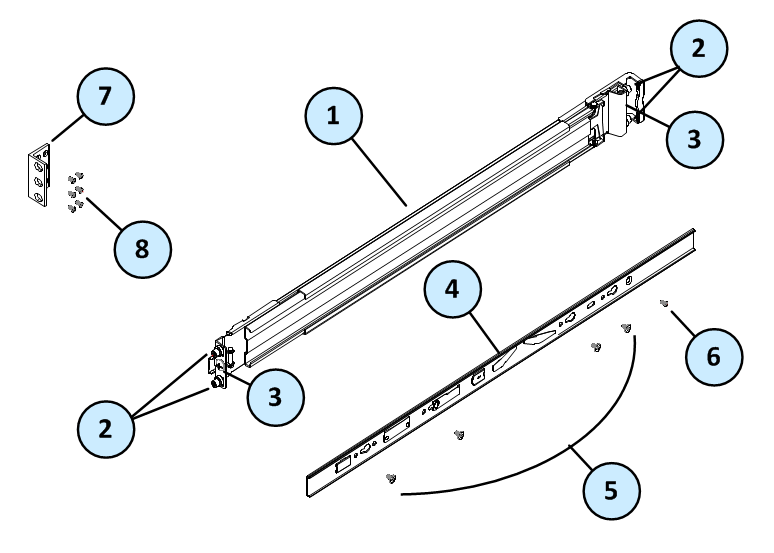
Rack Mounting Tools
We recommend that you use a Phillips PH2 screwdriver with a magnetic head to hold and retrieve screws. A powered screwdriver is also useful.
Installation Overview
Telescopic rails installation includes these procedures:
-
Attaching the inner rails to the appliance
-
Attaching the ear mounts to the appliance
-
Attaching round-hole rack screws (if you are using round-hole racks)
-
Attaching the outer rack rails to the rack
-
Installing the appliance in the rack
Step 1 - Attaching the Inner Appliance Rails
The outer rack rail section and the inner appliance rail section come as one unit when you open the box.
Before you can attach each appliance rail to the side of the appliance, you must remove the inner appliance rails from the outer rack rails.
To remove the inner appliance rail from the telescopic rail unit:
-
Extend the inner appliance rail from the outer rail until the rails locks in place.
-
Press the inner rail release latch, as shown, and pull the inner appliance rail straight out.
-
Do steps 1 and 2 again for the other telescopic rack rail unit.

|
Item |
Description |
|---|---|
|
1 |
Inner rack rail |
|
2 |
Release latch |
|
3 |
Outer appliance rail |
To install the inner appliance rails to the appliance:
-
Place the appliance rail on the side of the appliance and make sure:
-
The release latch is facing away from the appliance
-
The arrow on the release latch points to the front of the appliance
-
The appliance rail extends past the back panel of the appliance
-
-
Install the appliance rails to the side of the appliance with the provided screws.

Note - Do not overtighten the screws. Check Point recommends that you leave the rail mounting screws loose until the server is completely installed. This eases installation by preventing binding of the server in the rack.
-
Do steps 1 and 2 again to install the appliance rail on the other side of the appliance.
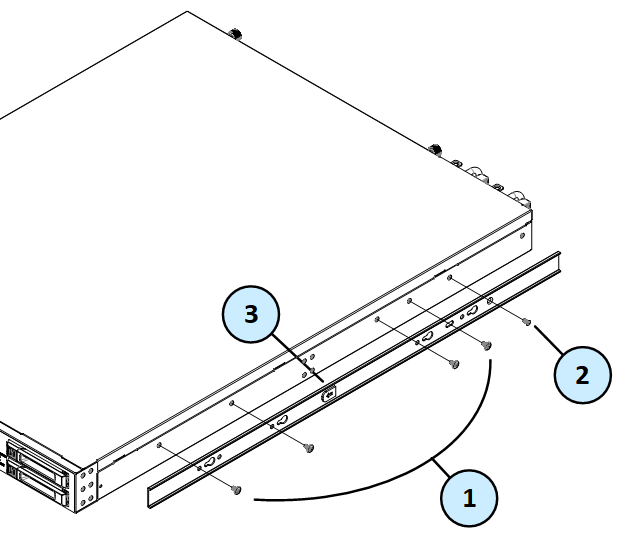
|
Item |
Description |
|---|---|
|
1 |
Appliance rail screws - Four for each inner rail |
|
2 |
Appliance rail screws - One for each inner rail |
|
3 |
Release latch |
Step 2 - Attaching the Ear Mount Brackets
Attach the ear mounts to the left and right side of the front of the appliance to lock the appliance into the rack.
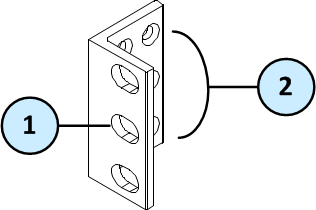
To attach the ear mount brackets to the appliance:
-
Place the ear mount bracket on the side of the appliance near the front panel.
-
Attach the ear mount bracket to the appliance using the six ear mount bracket screws.
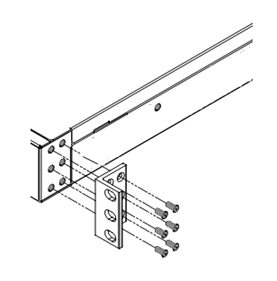
-
Do steps 1 - 2 again for the other side of the appliance.
Step 3 - Preparing Round-Hole Rack Rails
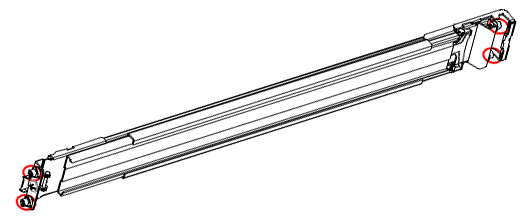
If you use round-hole racks, you must replace the eight square-hole rack screws that come attached to the outer rack rails with the eight supplied round-hole rack screws.
Do this procedure before you attach the outer rack rails to the rack.
To attach the round-hole rack screws:
-
Use a screwdriver to remove the square-hole rack screws from the front and back of the outer rack rail.
-
Replace with four of the supplied round-hole rack screws.
-
Do steps 1 - 2 again for the other outer rack rail.
Step 4 - Attaching the Outer Rack Rails
Attach the outer rack rails to the rack. Make sure that you have the two rack rails ready.
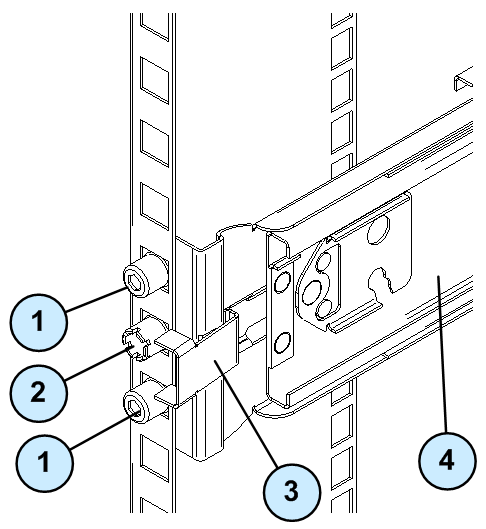
|
Item |
Description |
|---|---|
|
1 |
Rack rail screws (attached to the end of the rack rail) |
|
2 |
Screw hole with rack mounting screw |
|
3 |
Securing clip |
|
4 |
Rack rail |
To attach the outer rails to the rack:
-
If your rack has round holes, make sure to complete Step 3 - Preparing Round-Hole Rack Rails.
-
Align the front end of the outer rail with the hole number.
Make sure that the securing clip faces the inner part of the rack.
-
Gently pull forward and connect the outer rail to the rack by inserting the rack rail screws into the rack holes.
-
Do steps 1 - 3 again to attach the rear end of the outer rail to the rack.
The rear securing clips are marked with the letters
R(for the right rack rail) andL(for the left rack rail).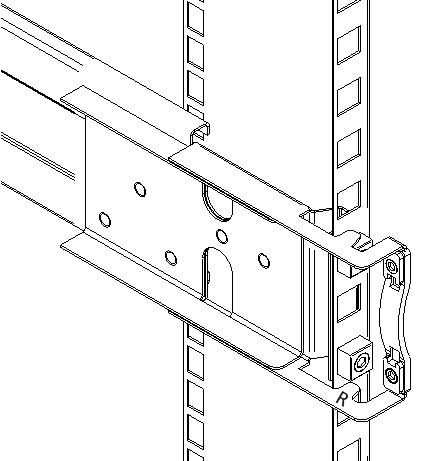
-
Use a rack mounting screw to secure the rear end of the outer rail to the rack.
-
Do steps 1 - 5 again for the other outer rail.
Step 5 - Installing the Appliance in the Rack
Install the appliance in the telescopic rails in the rack.
|
|
Important - To prevent injury or damage, at least two people are required to install the appliance in a rack. |

|
|
Important - Do not attempt to lift, drag, or otherwise move the appliance using the handles on the power supply units. |
To install the appliance in the rack:
-
Align the inner rack rails to be level with the rack rails.
-
Move the appliance into the rack as far as it can go.
-
On the appliance rails:
-
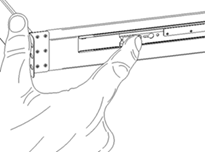
Press and pull gently on the blue release strips on both sides of the appliance.
-
While continuously holding the blue release strips, push the appliance into the rack.
-
Tighten all of the rail mounting screws.
-
For each ear mount, use a rack mount screw to secure it to the rack and make sure that the appliance cannot move. This disables the telescopic rails.
Use the rack post mounting hole that is between the rack rail screws (see item 2 in the figure).
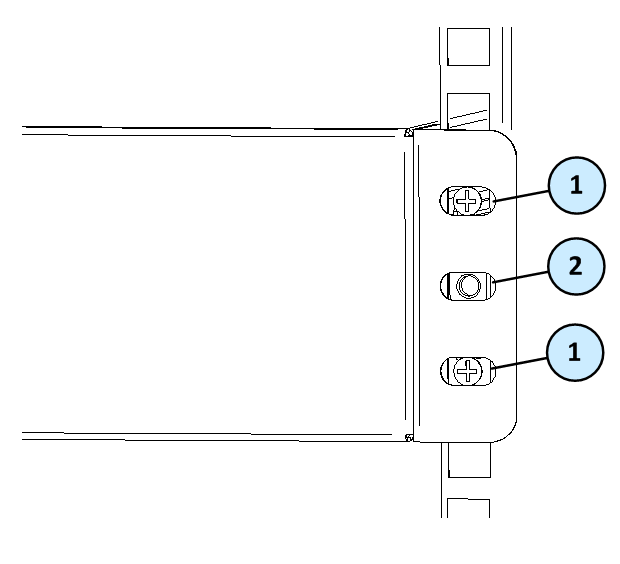
Legend Item
Description
1
Rack rail screws attached to the outer rack rail
2
Rack post mounting hole for rack mount screw
Removing the Appliance
|
|
Important - We recommend that at least two people work together to remove the appliance from a rack to prevent injury, or damage to the appliance. |
|
|
Important - Do not attempt to lift, drag, or otherwise move the appliance using the handles on the power supply units. |
Unlock the telescopic rails to remove the appliance from the rack.
To remove the appliance from the rack:
-
Remove the rack mounting screws in the ear mounts to enable the telescopic rails.
-
Move the appliance away from the rack as far as possible.
-
On the inner rack rail, press and pull on the white release levers on both sides of the appliance.
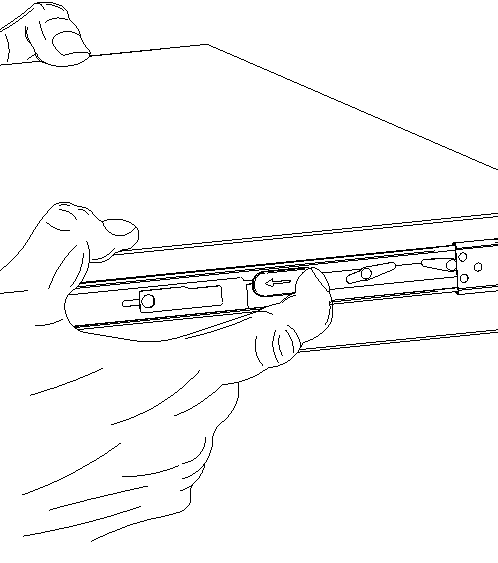
-
While holding the appliance, move the appliance away from the rack rail.
Appliance Air Vents
Make sure that the appliance air vents have sufficient airflow from front to rear when the appliance is mounted in a rack.
|
|
Important - If the appliance vents are blocked, the appliance can become too hot and it can be damaged. |
The appliance and rack rails have been tested in extreme conditions and do not block air flow to the appliance.
These appliances are specifically designed to install with these rails.
The air flow in MLS200 appliances:
