
Mounting the Appliance
-
Remove the Spark Firewall 2580 Appliance from the shipping carton and place it on a tabletop.
For other mounting options, see below.
-
Optional - Remove the transparent protective sticker from the front panel of the appliance.
-
Identify the network interface marked as LAN1. This interface is preconfigured with the IP address
192.168.1.1.
To mount the appliance:
-
Place the wall-mount sticker on the wall and drill two holes for the screws.

-
Insert the 2 screw anchors in the wall.
-
Attach the 2 screws in the accessory kit (M4*6 mm) to the wall.
-
Mount the appliance and verify the 2 screws are fastened well to the appliance.
Bottom of the appliance
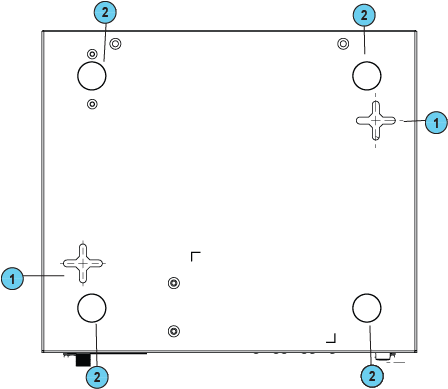
|
Key |
Item |
Description |
|---|---|---|
|
1 |
Holes on the bottom of the appliance |
Attach screws here |
|
2 |
Rubber feet |
Attached to the bottom of the appliance |