
SGM400 Security Gateway Module
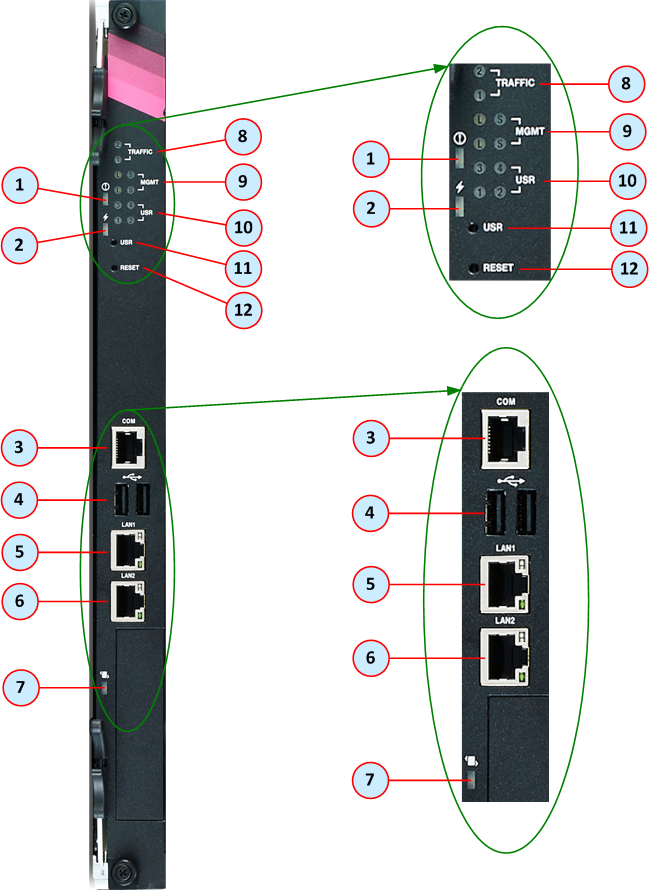
|
Item |
Name |
Description |
|---|---|---|
|
1 |
|
LED that shows the Out of Service status. |
|
2 |
|
LED that shows the Power status. |
|
3 |
COM |
1 x RJ45 port for direct access through console. |
|
4 |
|
2 x USB v2.0 ports. Use these ports to connect a bootable USB drive to install a Check Point software ISO image. |
|
5 |
LAN1 |
For Check Point internal use only (output of the |
|
6 |
LAN2 |
For Check Point internal use only (output of the |
|
7 |
|
LED that shows the Hot-swap status of the SGM. |
|
8 |
TRAFFIC |
LEDs that show status of the SGM Data and Sync traffic in SSM #1 / SSM #2. |
|
9 |
MGMT |
LEDs that show status of link and activity on the management ports on SSM #1 / SSM #2. |
|
10 |
USR |
LEDs that show the installation status on the SGM. |
|
11 |
USR |
This button is not used. |
|
12 |
RESET |
Reset (reboot) button for the SGM. |


