
QLS250, QLS450, QLS650, and QLS800
QLS250, QLS450, QLS650, and QLS800 Appliances have a redundant power supply unit (PSU) and support DC PSUs.
If necessary, you can replace a PSU. Note that all PSUs on an appliance must be of the same type (DC).
If necessary, you can replace a PSU. Note that all PSUs on an appliance must be of the same type (DC).
|
|
Warning:
|

|
|
Warning - All work related to the |
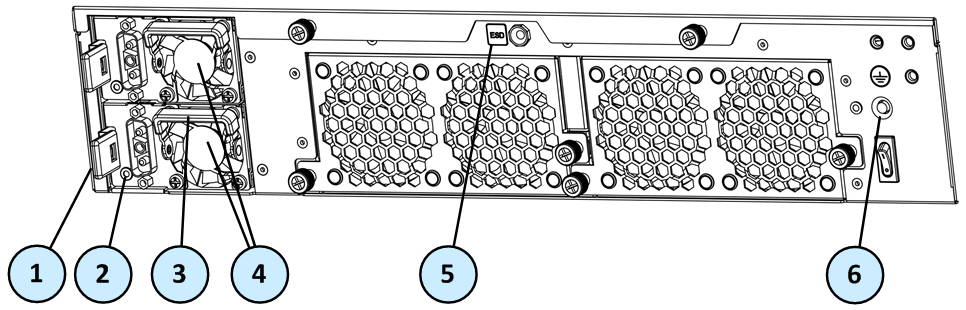
QLS250 Appliance Rear Panel
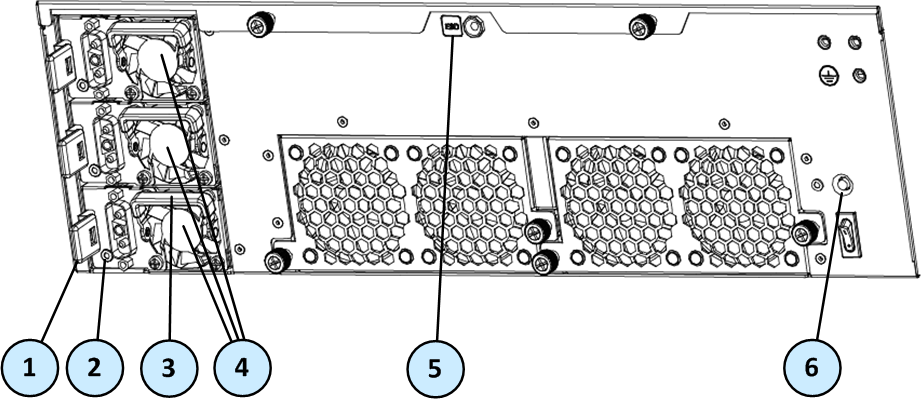
QLS450, QLS650, and QLS800 Rear Panel
|
Item |
Description |
|---|---|
|
1 |
Release lever |
|
2 |
LED indicator for each power supply unit
|
|
3 |
Extractor handle |
|
4 |
QLS250 - Two DC PSUs |
|
5 |
ESD grounding point |
|
6 |
Alarm off button for power supply units |
Removing a DC Power Supply Unit
Before you remove a power supply unit, we recommend that you make sure that:
-
In QLS250 - A second DC power supply is installed and connected to a working power source
-
In QLS450, QLS650, and QLS800 - Two other DC power supplies are installed and connected to a working power source
Or
-
The appliance is shut down.
To remove a DC power supply unit:
-
Loosen the two DC power cord retaining screws from the DC PSU.
-
Remove the DC power cord from the DC PSU.
-
If the alarm sounds, press the Alarm Off button to the right of the DC PSU.
-
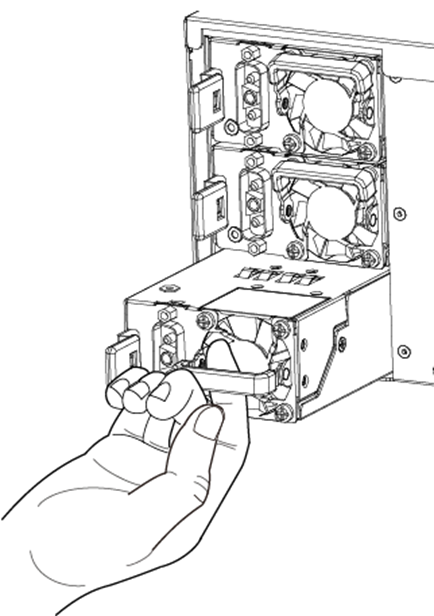
Press and hold down the PSU release lever.

-
While holding the release PSU lever, pull the extraction handle to remove the DC PSU.
|
|
Note - Remove the power supply unit only with the extraction handle to prevent any possible damage. |

Installing a Replacement DC Power Supply Unit
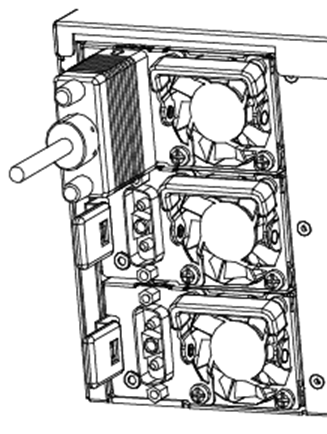
To install a replacement DC power supply unit:
-
Insert the DC PSU into the power supply slot.
-
Push in the DC PSU until the release lever clicks.
-
Insert the DC power cord into the power supply socket.

-
Tighten the two DC power cord retaining screws onto the DC PSU.
-
Make sure that the power LED on the DC PSU is illuminated.
PSU Configuration and Monitoring
See the Quantum LightSpeed Appliances Getting Started Guide for PSU configuration and monitoring options for your appliance model.